[ key takeways ]
Growth changes everything. The tools that once helped your business move fast can suddenly start slowing you down. This is where custom software development for scaleups comes in.
It means building software that fits your business as it grows, your workflows, your users, and your goals.
Scaleups need this because off-the-shelf tools often cannot handle increasing complexity, data, and demand. Without the right systems, growth can turn messy and inefficient.
Understanding custom software is important because it directly affects how smoothly you scale and compete. The right solution can save time, reduce costs, and improve performance.
Let’s explore how it works and why it matters for your growth.
Custom software development for scaleups means building software that is designed specifically for a growing business. Instead of using general tools, companies create systems that match their exact needs, workflows, and growth plans.
This becomes important because scaleups grow fast and standard tools often cannot keep up.
A scaleup company is a business that has moved beyond the startup stage and is now growing quickly in users, revenue, and operations.
These companies are often backed by venture capital, which helps them expand faster, hire talent, and enter new markets. Many of them operate as SaaS platforms, which serve a large number of users online.
Scaleups are often described as high-growth companies or venture-backed startups because their main focus is rapid expansion.
As they grow, operations become more complex, with larger teams, more customers, and heavier data usage. These are also known as scaling startups, where efficiency and system stability become critical.
The key difference between custom software and off-the-shelf tools is flexibility. Off-the-shelf software is ready-made and designed for general use. It is quick to start but limited in customization. As a result, businesses often need to adjust their processes to fit the tool.
On the other hand, enterprise software built as custom or bespoke software is designed around the company’s specific needs. This supports better flexibility, smoother integration with other systems, and stronger scalability.
This is where the build vs buy software decision becomes important. While SaaS tools work well for early stages, scaleups often shift toward custom solutions when they need better control, deeper integration, and long-term growth support.
Scalable custom software is designed to grow with a business without slowing down or breaking under pressure. Here are the major features of scalable custom software.
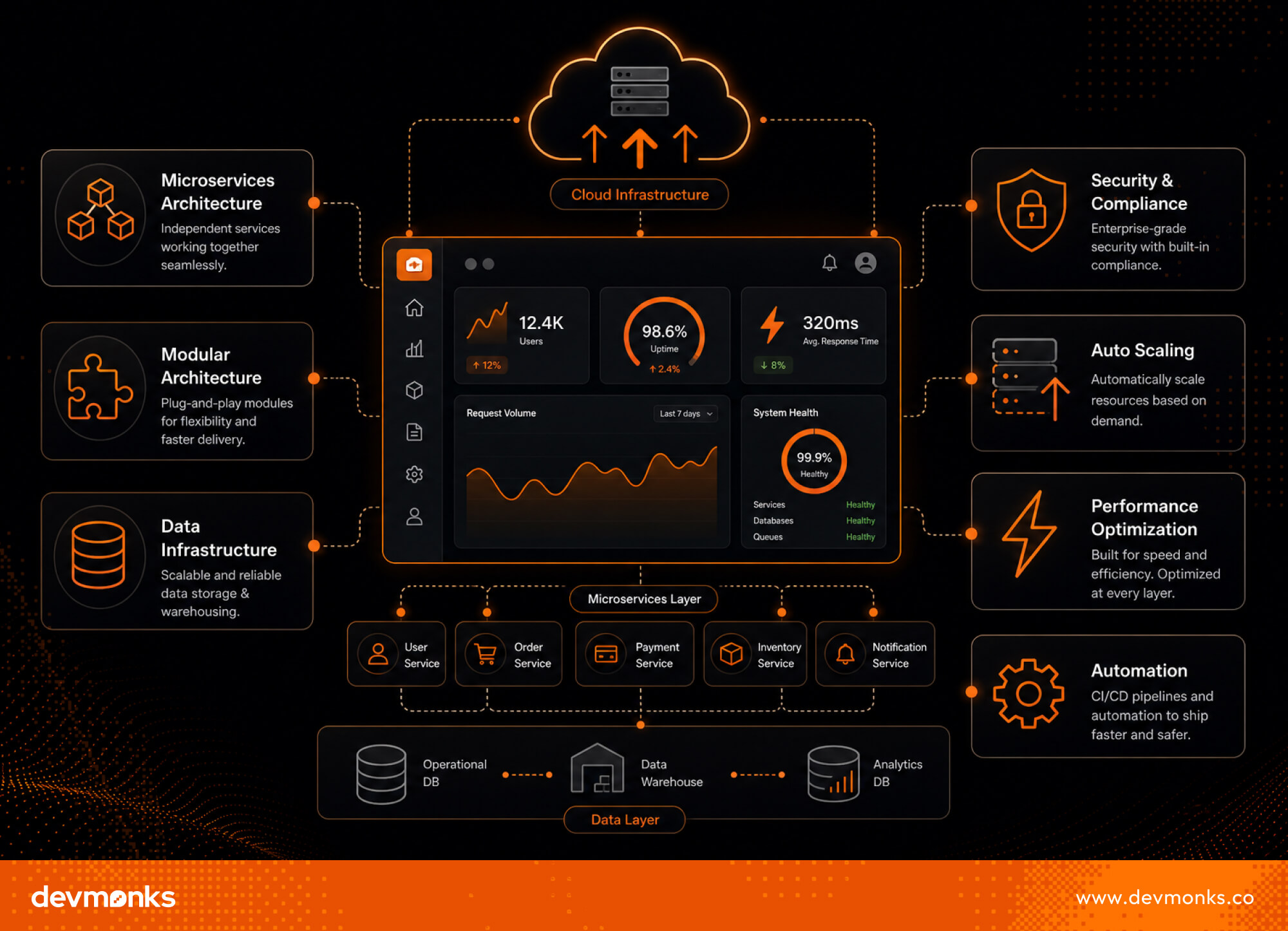
Scalable systems often use a microservices architecture, where each function of the software works as a separate module. This makes updates easier and allows individual parts to scale independently without affecting the whole system.
These systems also run on Cloud infrastructure, which supports horizontal scaling by adding more servers when demand increases. In distributed systems, multiple services work together across different servers, which improves speed and reliability.
As companies grow, protecting data becomes more important. Strong security systems help prevent breaches and ensure safe access to sensitive information.
Compliance standards like GDPR and SOC 2 ensure that companies follow global rules for privacy and security. These are essential when scaleups expand into international markets or handle large user data.
A data warehouse helps store large amounts of structured data in one place for easy access and reporting. It supports smooth data management across departments.
Big data analytics turns this data into insights, which helps businesses make data-driven decisions that improve strategy and performance.
Flexible systems use a modular design, where parts can be updated independently. Loose coupling reduces dependency between components, which makes the system easier to maintain.
Statelessness improves scalability by allowing each request to run independently.
Cloud systems offer auto scaling, which adjusts resources based on demand. Containerization and orchestration help run applications efficiently across environments, which improves deployment speed and reliability.
Load balancing, database sharding, and caching strategies ensure fast system performance even with high traffic.
Meanwhile, CI/CD pipelines and asynchronous processing automate development and background tasks, which keep systems fast and efficient.
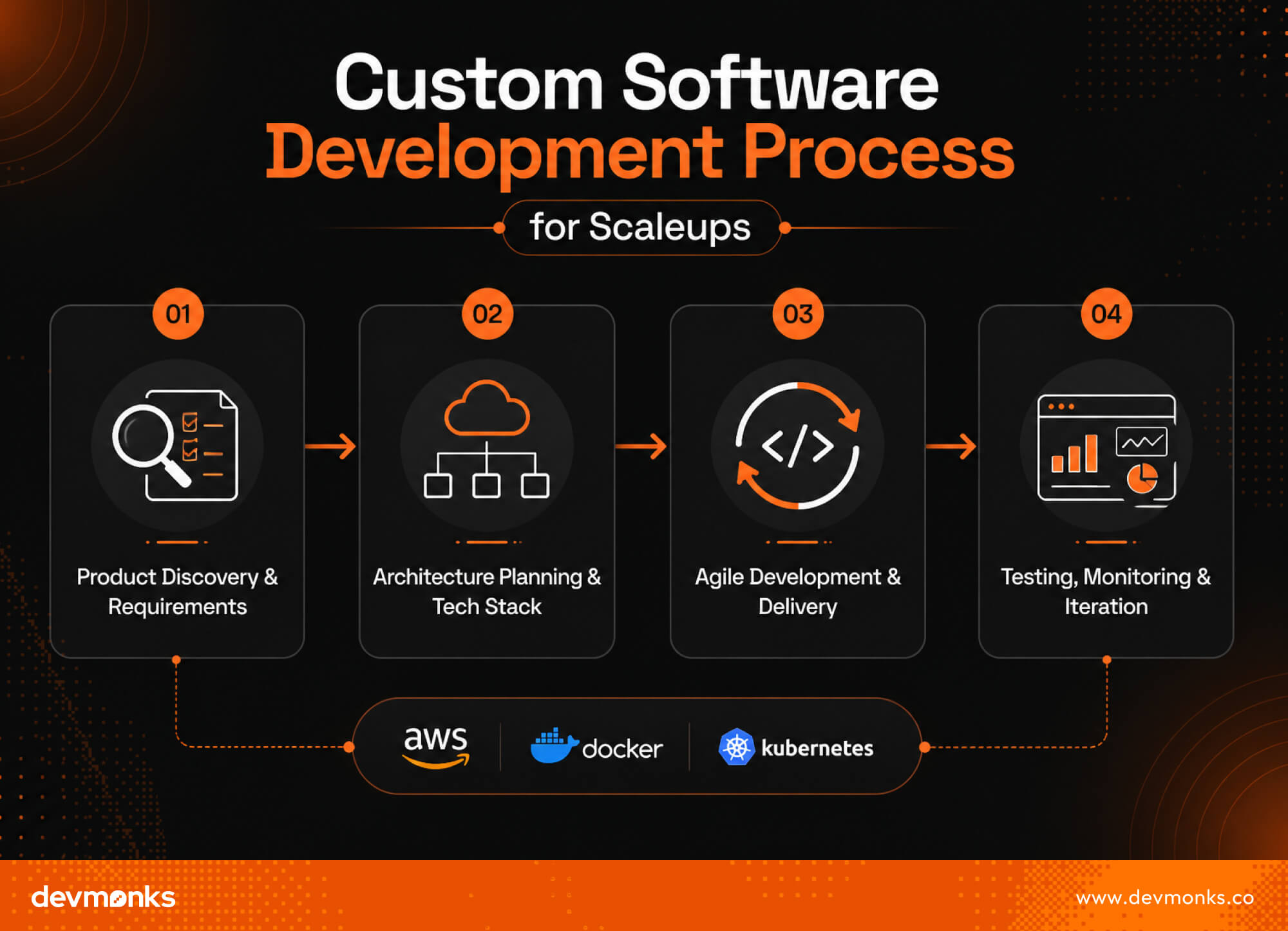
Building custom software for scaleups follows a structured process. This ensures the system is not only functional but also scalable, stable, and ready for long-term growth.
Each stage that plays a key role in turning business needs into a reliable digital product is given below.
The process starts with understanding what the business truly needs. Teams run discovery sessions to define goals, user problems, and growth expectations. This phase helps shape a clear product roadmap, which guides the entire development journey.
A key outcome here is defining the MVP (Minimum Viable Product). This is the simplest version of the product that still delivers value. It helps scaleups test ideas quickly while keeping scalability requirements in mind from the beginning.
Once requirements are clear, teams design the system architecture. This includes deciding how the software will be structured and which technologies will be used. The goal is to ensure the system can grow without performance issues.
Popular tools and platforms like AWS, Kubernetes, and Docker are often chosen for scalability and reliability. This stage defines the overall technology stack, which includes frameworks, programming languages, and cloud setup that best fit the product needs.
Development usually follows Agile methodology, where work is divided into small, manageable cycles called sprints. This allows teams to build features step by step and adapt quickly to changes.
With DevOps practices and continuous deployment, new updates are tested and released frequently. CI/CD pipelines automate this process, which makes development faster, more reliable, and less error-prone.
Before and after release, the system goes through continuous testing. Automated testing ensures that new changes do not break existing features and that the software remains stable.
After deployment, monitoring systems track performance, errors, and user behavior in real time. This feedback helps teams improve the product through continuous iteration, which ensures the system stays scalable and efficient as it grows.
Choosing the right development partner is critical for scaleups because the quality of your software directly impacts your growth. The right team should understand not just coding, but also how fast-growing businesses operate.
Here are the ways to choose the right custom software development partner.
Look for a partner with proven experience in building products for high-growth companies. Their portfolio should show work with scaleups or venture-backed startups, where scalability and speed were important.
This ensures they understand real-world growth challenges, not just basic development.
Strong engineering leadership is essential. The partner should be skilled in system design, scalable architecture, and modern tools. They must know how to build systems that handle long-term growth, not just short-term delivery.
Good communication and teamwork matter as much as technical skills. A strong partner follows Agile methodology and works closely with your team to adapt quickly.
For example, agencies like Dev Monks focus on collaborative development, scalable architecture, and Agile delivery, which makes them a strong fit for scaleups that want both speed and stability in their product growth.
Modern scaleups rely on powerful technologies to build software that can handle rapid growth, high traffic, and complex operations. The right tech stack ensures performance, flexibility, and long-term scalability.
Most scalable systems are built on cloud platforms that provide flexible computing power and storage. Leading providers include AWS, Google Cloud, and Microsoft Azure.
These platforms support automatic scaling, high availability, and global deployment, which makes them ideal for fast-growing businesses.
The backend is the core of any system. Popular choices include Node.js for fast, event-driven applications, Python for flexibility and data-heavy systems, Java for enterprise-level stability, and Go for high-performance microservices.
These technologies help manage complex operations efficiently.
For user interfaces, scaleups often use React, Vue, and Next.js. These frameworks help build fast, responsive, and interactive web applications, ensuring smooth user experiences even as traffic grows.
Custom software development brings many benefits, but scaleups also face several challenges while building and scaling their systems.
Fast development can lead to technical debt, where quick fixes create long-term complexity. Over time, this makes the system harder to maintain and slows down new feature development.
As user numbers increase, systems must scale databases, APIs, and infrastructure. Without proper planning, performance issues like slow response times and downtime can occur.
Scaleups often struggle to balance internal teams and outsourced developers. While in-house teams offer control, external partners can provide speed and expertise.
Projects often expand beyond the original plan, which makes it difficult to prioritize features and stay focused on the product roadmap.
Poor architectural decisions can create bottlenecks that limit growth and system performance.
Limited time and budget can restrict technology choices, which makes it harder to build fully optimized, scalable systems.
The cost of custom software development for scaleups can range from $30,000 to $1M+, depending on several key factors. A larger development scope increases the overall development cost, especially when more features and integrations are required.
The size of the team also affects the software budget, as more developers, designers, and engineers mean higher expenses.
In addition, infrastructure costs like cloud services and tools, along with ongoing maintenance and updates, add to long-term spending. Proper planning helps scaleups balance quality and budget effectively.
Here are some of the emerging future trends in custom software for scaleups.
Generic software often works well in the early stages of a business because it is quick and easy to use. However, as scaleups grow, these tools start to limit flexibility. They are built for mass use, not specific workflows, so businesses face missing features, weak integration, and extra manual work. Over time, this creates inefficiencies. Teams must rely on multiple disconnected tools, which slows down operations and reduces productivity.
Scaleups choose custom software because it is built around their exact business needs. Instead of adjusting their processes to fit a tool, they build a system that supports their workflow, goals, and growth plans. This improves efficiency, flexibility, and integration across teams. Custom software also scales with the business. New features, departments, and users can be added without disrupting the system.
Custom software helps startups automate repetitive tasks such as data entry, reporting, customer onboarding, and order processing. This reduces manual work and allows teams to focus on higher-value activities like strategy and growth. It also connects different business functions into one system. Instead of switching between tools, data flows automatically across departments. This improves accuracy, reduces errors, and speeds up decision-making, which helps startups operate more efficiently as they scale.
Build custom software when off-the-shelf solutions limit your growth, workflows are too complex, or integration needs are unique. It’s ideal when scalability, data control, or competitive advantage matters, and when long-term efficiency outweighs upfront development costs and time investment for your business.
Scaling a business is not just about growing faster, it is about growing smarter. Custom software gives scaleups the structure and flexibility they need to manage complexity, improve efficiency, and deliver better customer experiences.
Instead of relying on tools that limit growth, businesses should focus on building systems that align with their long-term goals. The right custom solution can streamline operations, support innovation, and create a strong foundation for future expansion.
If you are planning to scale, now is the time to evaluate your current systems. Investing in the right software today can make growth smoother, faster, and more sustainable tomorrow.
We combine AI-driven workflows with product-first engineering to provide MVP development services for startups and enterprises. Our approach balances speed, reliability, and usability while keeping teams involved. We deliver production-ready, scalable solutions, not just prototypes or demos.

The best free AI for Python coding depends on your goals. ChatGPT excels at code generation and learning, Claude is outstanding for debugging, Gemini handles large codebases well, while GitHub Copilot and Windsurf shine inside VS Code with powerful autocomplete features.
No single AI is perfect for every task. An AI that works well for Django development may not be the best for competitive programming or data science.
Knowing which tool is best for writing code, fixing bugs, or learning Python can save time and improve productivity. Read on to compare the top free Python AI tools and find the right one for your workflow.
The best free AI for Python coding depends on your needs, but ChatGPT Free offers the best overall balance for most users. It combines code generation, explanations, debugging help, and learning support in a simple interface.
Whether you are writing your first Python script or building a larger project, it works as a reliable AI coding assistant. Learning web development takes a lot of time, especially if you're starting with Python. But if you have ChatGPT, it's way easier.

ChatGPT Free is the top choice for most developers. It supports code generation, explains concepts clearly, and helps fix errors. Its ease of use makes it suitable for both beginners and experienced programmers.
For beginners, ChatGPT Free and Google Gemini Free are excellent Python AI tools. They explain code in simple language, answer follow-up questions, and help users learn Python step by step. Their conversational style makes coding less intimidating.
When it comes to debugging, Claude Free stands out. Its strong reasoning abilities allow it to analyze complex code and identify the root cause of errors. Instead of only suggesting fixes, it often explains why the problem occurred.
If you work in VS Code, Windsurf (Codeium), and GitHub Copilot are excellent options. They provide autocomplete, smart code completion, and in-editor AI assistance, which helps developers write Python code faster without leaving their IDE.
While AI tools can help developers write code faster, businesses often require expert implementation and custom solutions.
Agencies like Dev Monks use AI-assisted development practices to build high-quality websites and applications tailored to specific business needs.
If you are searching for the best free AI for coding Python, you have plenty of great options today. Some tools work as chat assistants, while others integrate directly into your code editor.
The right choice depends on whether you need code completion, debugging, or full project support. Here is a detailed look at the top free AI coding tools for Python developers.
ChatGPT Free is one of the most popular AI tools for Python coding. It helps users write scripts, explain concepts, generate functions, and debug errors.
Beginners especially enjoy its conversational style because they can ask follow-up questions and receive detailed explanations.
The tool is excellent for learning Python syntax, understanding algorithms, and fixing common bugs. It can also generate code snippets quickly and explain why a certain approach works.
However, the free version has usage limits and may not always provide editor-based autocomplete or code completion features. You usually need to copy and paste code into the chat interface.
Claude Free stands out for its strong reasoning abilities. It performs especially well when analyzing complex Python code and identifying logical errors.
Many developers use it for debugging because it explains problems clearly and suggests practical fixes.
This AI coding tool is useful for reviewing large code blocks and improving code quality. It often provides thoughtful responses that help developers understand the root cause of bugs rather than simply offering quick fixes.
The free version may have message limits depending on usage.
Google Gemini Free is another powerful option for Python developers. It offers generous free usage and supports long conversations, which makes it useful for larger coding projects.
One of its biggest strengths is handling long context windows. This helps developers to work with larger files and maintain continuity across multiple coding tasks.
Gemini can assist with code generation, debugging, and explanations while integrating with Google's ecosystem.
Windsurf, powered by Codeium, is a strong free AI coding tool designed for developers who prefer working directly inside their editor. It provides fast autocomplete and code completion features that speed up Python development.
The tool supports popular editors such as VS Code, which makes it convenient for daily coding. Developers can generate functions, receive suggestions, and improve productivity without constantly switching tabs.
GitHub Copilot Free gives developers access to AI-powered coding assistance within the GitHub ecosystem. It offers a free quota that allows users to experience AI-driven code completion and autocomplete features.
For Python developers already using GitHub repositories, Copilot integrates smoothly into their workflow. It can generate repetitive code, suggest functions, and help reduce development time. However, advanced usage may require a paid subscription.
Cursor is an AI-powered code editor built specifically for developers. Unlike chat-based tools, Cursor brings AI directly into the coding environment.
This editor-based workflow helps users write, edit, and debug Python code without leaving the workspace.
Cursor supports intelligent code completion, project understanding, and quick debugging. Developers who prefer an integrated coding experience often find Cursor highly efficient.
Replit AI is ideal for users who want browser-based coding without installing software. It combines an online IDE with AI assistance, which makes Python development accessible from almost any device.
The AI features help with code generation, debugging, and explanations directly inside the browser. This makes Replit especially useful for students, beginners, and developers who need a portable coding environment.
Choosing the best AI for coding Python for free can be difficult because each tool shines in different areas. Some focus on debugging, while others excel at code completion or editor integration.
The table below compares the most important features to help you pick the right AI coding assistant for your needs.
Not all Python AI tools are built for the same job. Some are better at code generation, while others excel at Python debugging or code explanation. Choosing the right AI can save time and improve your coding experience.
For writing Python scripts, ChatGPT Free and Google Gemini Free are excellent choices. They can generate code quickly, explain syntax, and suggest better ways to solve problems.
Whether you need a simple calculator or a web scraper, these tools can help.
If your code keeps throwing errors, Claude Free is one of the best options. Its strong reasoning skills make it excellent for Python debugging and code refactoring. It often identifies not only the bug but also why it happened.
Developers working with Django can benefit from ChatGPT and GitHub Copilot. These tools understand common Django patterns, such as models, views, and templates. They can generate boilerplate code and speed up development.
For data science tasks, ChatGPT and Gemini perform very well. They can help with libraries like NumPy, Pandas, and Matplotlib. From cleaning datasets to creating charts, these AI assistants simplify complex tasks.
Beginners often prefer ChatGPT Free because of its teaching style. It provides step-by-step explanations, answers questions, and breaks down difficult concepts into easy language.
For logic-heavy problems and algorithms, Claude Free and Gemini Free are strong choices. They can explain time complexity, suggest efficient solutions, and help developers improve their problem-solving skills.
Yes, AI can generate entire Python projects, but it is not fully autonomous. Modern AI tools can create project structures, write code, and even generate documentation.
They are especially useful for building small to medium-sized applications quickly. For enterprise web development, it's better to take human assistance.
AI can create Python applications using frameworks like Flask, Django, and FastAPI. For example, it can generate REST APIs, web applications, data analysis scripts, and automation tools.
AI can also write database models, create routes, and suggest test cases. This greatly speeds up development and reduces repetitive work.
Even though AI is powerful, human review remains essential. Developers should always check the generated code for accuracy, performance, and maintainability.
AI may not fully understand business requirements or edge cases. Human oversight ensures that the application works as intended and follows best practices.
This is where experienced developers and reliable agencies come in. Agencies like Dev Monks combine AI-assisted development with expert review to ensure applications are secure, scalable, and aligned with business goals.
Human oversight ensures that the final product works as intended and follows industry best practices.
AI-generated code is not perfect. Common mistakes include:
AI is an excellent coding assistant, but it should be treated as a helper rather than a replacement for developers. The best results come from combining AI-generated code with careful human review.

AI can save hours of work, but the quality of its output depends on how you use it. With the right approach, AI can become a powerful Python coding assistant rather than just a code generator.
Good prompts lead to better results. This is known as prompt engineering. Instead of saying, "Write Python code," be specific. For example, ask: "Write a Python script that reads a CSV file and calculates average sales."
Clear instructions help AI generate more accurate code.
When asking AI to fix bugs, include the error message and relevant code. Context matters. For example:
"I'm getting KeyError: 'name' in this Pandas code. How can I fix it?"
Sharing details helps the AI identify the issue faster and provide better debugging suggestions.
AI is not only for writing code. You can ask it to explain functions, algorithms, or syntax in simple terms. This makes learning Python easier and helps developers understand why the code works.
Many AI tools work directly inside VS Code through extensions. Tools like GitHub Copilot and Windsurf provide autocomplete, code completion, and debugging support within the editor.
This creates a smoother workflow and lets developers code faster without switching between apps.
Choosing the best AI for Python depends on what you value most. Some tools excel at coding accuracy, while others are better for debugging or editor integration. Here's how they compare.
ChatGPT and Claude are known for producing accurate Python code and clear explanations. Gemini performs well on larger codebases due to its long context window.
GitHub Copilot is highly effective for generating code inside an IDE, but may occasionally suggest outdated patterns.
When it comes to debugging, Claude often stands out because of its strong reasoning skills. It explains why an error occurs instead of simply providing a fix.
ChatGPT also performs very well for debugging and code explanations. Gemini is useful when working with long scripts or multiple files.
All four tools offer free access, but with limitations. ChatGPT Free and Claude Free have message limits.
Gemini Free generally provides generous usage and larger context windows. GitHub Copilot Free includes a monthly quota for code suggestions.
For IDE support, GitHub Copilot is the clear winner. It integrates seamlessly with editors like VS Code and works directly in your coding environment. ChatGPT, Claude, and Gemini are primarily chat-based, though extensions are available.
Choose ChatGPT if you want the best all-around AI assistant. Pick Claude for debugging Python errors. Use Gemini for large projects and long conversations. Select GitHub Copilot if you prefer AI built directly into your editor.
Free AI coding assistants can boost productivity, but understanding their limitations helps you use them more effectively.
Several AI tools offer free plans for Python coding, including ChatGPT Free, Claude Free, Gemini Free, and Windsurf (Codeium). While many have usage limits, Windsurf provides generous free code completion features, which makes it one of the best free AI coding tools.
Many AI coding assistants integrate directly with VS Code. Popular options include GitHub Copilot, Windsurf (Codeium), and Cursor. These tools provide autocomplete, code completion, debugging assistance, and AI-powered suggestions without requiring developers to leave the editor.
Yes, AI can generate Django applications by creating models, views, templates, and API endpoints. Tools like ChatGPT and GitHub Copilot can build project structures and write boilerplate code, though developers should always review the output for accuracy and security.
Chat-based tools like ChatGPT, Claude, and Gemini are ideal for learning and debugging. Meanwhile, editor-based tools such as Cursor, Windsurf, and GitHub Copilot provide seamless AI assistance directly inside coding environments.
Your best choice depends on whether you prioritize debugging, autocomplete, or an integrated development workflow.

When comparing Bootstrap vs Flexbox, many developers assume they are direct competitors. In reality, they serve different purposes.
Bootstrap is a CSS framework that provides a responsive grid system, prebuilt components, and utility classes, while Flexbox is a CSS layout model used to arrange elements efficiently. Bootstrap is a framework, whereas Flexbox is a layout tool.
Understanding this difference is important for choosing the right approach to responsive web design and building maintainable websites.
In this guide, we'll compare their features, strengths, limitations, and use cases to help you decide when to use each one.
Bootstrap is a popular front-end framework used to build responsive and mobile-friendly websites. It provides prebuilt components, CSS classes, and a responsive grid system that help developers create layouts faster.
Instead of coding every element from scratch, developers can use Bootstrap's ready-made tools to streamline development.

Bootstrap includes a flexible grid system for organizing content into rows and columns. It also offers UI components such as Navbars, buttons, forms, and Card components.
Utility classes make it easy to control spacing, colors, alignment, and other styling needs. Responsive breakpoints ensure layouts adapt smoothly across different screen sizes.
Bootstrap speeds up development with reusable components and predefined styles. It helps maintain design consistency and offers a large ecosystem of themes, templates, plugins, and community resources.
Bootstrap speeds up development with reusable components and predefined styles.
This is one reason why development agencies such as Dev Monks often use Bootstrap when building responsive websites and web applications under tight timelines.
Websites built with Bootstrap can sometimes have a similar appearance because of its default styling.
The framework also adds extra CSS code, which can increase file size. While customization is possible, creating a completely unique design may require additional effort and style overrides.
Flexbox, short for Flexible Box Layout, is a CSS layout module designed for one-dimensional layouts. It helps developers arrange elements in a row or a column without relying on complex positioning methods.
Flexbox is built directly into CSS, which makes it a simple and powerful tool for creating flexible layouts.

Flexbox works through a Flex container that holds one or more Flex items. The layout is controlled along two directions, the Main axis and the Cross axis.
The main axis defines the primary direction in which items are placed, while the cross axis runs perpendicular to it. This structure makes it easier to align, distribute, and reorder elements.
Developers activate Flexbox using display:flex. Properties like justify-content control item placement along the main axis, while align-items manages alignment on the cross axis.
Other useful properties include flex-direction for changing layout direction and flex-wrap for controlling item wrapping.
Flexbox offers greater layout control, cleaner code, and native CSS support without external frameworks.
Flexbox has a steeper learning curve for beginners and does not include prebuilt components or UI elements.
Both Bootstrap and Flexbox help developers build modern website layouts, but they serve different purposes.
Bootstrap is a complete CSS framework with ready-made UI components, while Flexbox is a CSS layout model focused on arranging elements efficiently. The table below highlights the main differences.
Bootstrap is a full CSS framework that includes styling, layouts, and UI components. Flexbox is a layout model built into CSS and is mainly used to control the positioning and alignment of elements.
Bootstrap is generally easier for beginners because many features are ready to use. Flexbox requires developers to understand concepts such as alignment, direction, and spacing before using it effectively.
Flexbox offers greater control over layouts and element positioning. Bootstrap can be customized, but developers often need to override existing styles to achieve unique designs.
Bootstrap includes a responsive grid system and predefined breakpoints. Flexbox can also create responsive layouts, but developers must define the behavior themselves using CSS rules and media queries.
Bootstrap adds extra CSS files and features that may not always be needed. Flexbox is part of native CSS, which makes it lighter and reduces unnecessary overhead.
Bootstrap comes with ready-made UI components such as Navbars, buttons, modals, forms, and cards. Flexbox does not provide components. It only offers layout tools that developers can use to build custom interfaces from scratch.

Many developers compare Bootstrap and Flexbox, but Bootstrap actually relies heavily on Flexbox behind the scenes. Since Bootstrap 4, much of its layout system has been built using Flexbox.
This means the Bootstrap grid vs Flexbox debate is not always a direct comparison, as the framework uses the layout model to power many of its features.
Bootstrap includes several flex utilities that make working with layouts easier. For example, d-flex turns an element into a flex container.
The justify-content-center class centers items along the main axis, while align-items-center aligns them along the cross axis. These Bootstrap flex utilities allow developers to create flexible layouts without writing custom CSS.
Bootstrap and Flexbox are best viewed as complementary tools rather than competitors. Flexbox provides the layout foundation, while Bootstrap builds on top of it with a grid system, responsive features, and ready-made components.
In many projects, developers use both together to create responsive and visually consistent websites more efficiently.
Although Bootstrap's grid system is built using Flexbox, the two are often used differently when creating a responsive layout. Understanding their layout approach helps developers choose the right tool for each situation.
Flexbox is designed for one-dimensional layouts. It controls elements in a single direction, either a row or a column. Bootstrap's grid system, on the other hand, organizes content into rows and columns, creating a more structured layout.
This makes it easier to manage multiple sections across a page.
A grid-based approach works best for complex page structures where content must align across both rows and columns.
Examples include dashboards, admin panels, landing pages, and multi-section website layouts. For these cases, a grid system provides better organization and consistency.
Flexbox is ideal for smaller interface elements that require precise alignment. It works especially well for navigation bars, card layouts, menus, toolbars, and groups of buttons.
When you need to control spacing, alignment, or item order within a single row or column, Flexbox is usually the better choice than CSS Grid or a full grid system.
Both Bootstrap and Flexbox can create the same responsive layout. The main difference is how the layout is structured and managed.
Bootstrap uses rows and columns to organize content.
<div class="container">
<div class="row">
<div class="col-md-6">Column 1</div>
<div class="col-md-6">Column 2</div>
</div>
</div>
In this example, the row creates a horizontal section, while the col-md-6 classes split the space into two equal columns. Bootstrap handles responsiveness automatically through its grid system.
Flexbox uses a flex container to control item placement.
<div class="flex-container">
<div>Column 1</div>
<div>Column 2</div>
</div>
.flex-container {
display: flex;
}
.flex-container div {
flex: 1;
}
Here, the flex container places both items in a row and gives them equal width. Alignment and spacing can be adjusted using Flexbox properties.
Bootstrap requires less custom CSS and speeds up development. Flexbox offers more control but often needs additional styling.
For simple responsive layouts, Bootstrap is usually faster. For highly customized CSS layout techniques, Flexbox provides greater flexibility and maintainability.
Both Bootstrap and Flexbox support responsive design, but they approach it differently. Bootstrap provides built-in responsive tools, while Flexbox relies on custom CSS and media queries to adapt layouts across devices.
Modern websites are usually built using a mobile-first approach. Bootstrap follows this philosophy by including predefined breakpoints for different screen sizes.
Similar mobile-first principles are also found in popular mobile app development tools used to create cross-platform applications.
Flexbox also supports mobile-first design, but developers must create their own media queries to control layout changes.
Bootstrap makes responsive design easier with utility classes and grid breakpoints. Classes such as col-md and col-lg adjust column widths based on screen size.
The d-none utility can hide elements on specific devices. These features reduce the need for custom CSS and speed up development.
Flexbox provides complete control over responsive layouts. Developers can combine Flexbox properties with media queries to change direction, spacing, alignment, and item order at different screen sizes.
While this requires more code, it allows highly customized responsive design solutions that match specific project needs.
Performance is an important factor when choosing between Bootstrap and Flexbox. While both can create efficient layouts, they differ in file size, overhead, and long-term maintainability.
Bootstrap includes a large collection of components, utilities, and responsive features. As a result, it adds more CSS code to a project, even if many features are not used.
Flexbox is built into CSS, so it does not require loading an additional framework.
Flexbox relies on native browser CSS capabilities, which makes it lightweight and efficient. Bootstrap layouts also perform well, but the extra framework code can increase page size and resource usage.
For small projects, pure CSS often provides a leaner solution.
Flexbox can lead to cleaner and more organized code because developers write only the styles they need.
Bootstrap simplifies development but may introduce unused classes and framework dependencies over time. For highly customized projects, Flexbox often offers a more maintainable architecture.
Bootstrap is a great choice when speed and consistency are more important than deep customization. Its ready-made components and responsive features help teams launch projects faster.
Bootstrap is ideal for rapid prototyping because developers can quickly build layouts and interface elements without writing large amounts of custom CSS.
Small teams often benefit from Bootstrap's standardized structure. It helps maintain a consistent design and reduces the time spent creating common UI elements.
When building an MVP (Minimum Viable Product), speed is critical. Bootstrap allows teams to focus on functionality while using prebuilt components for the interface.
Bootstrap works particularly well for admin dashboards. Its grid system, forms, tables, cards, and navigation components make it easy to create organized and responsive dashboard layouts with minimal effort.
Flexbox is a strong choice when you need complete control over layouts and want to create a unique user interface. It is especially useful for projects that prioritize flexibility and clean CSS.
Flexbox works well for custom UI design because it gives developers precise control over alignment, spacing, and element positioning without relying on framework defaults.
For lightweight websites, Flexbox helps reduce unnecessary code. Since it is built into CSS, there is no need to load a separate framework.
Flexbox is commonly used in component architecture, where individual interface elements need flexible and reusable layouts. It makes it easier to manage the structure of independent components.
Many modern design systems use Flexbox to create consistent and adaptable layouts. Its flexibility helps developers build scalable interfaces that remain easy to maintain as projects grow.
Yes, you can use Bootstrap and Flexbox together, and many developers do. In fact, modern versions of Bootstrap are built on Flexbox, so the two technologies work naturally alongside each other.
A common approach is to use the Bootstrap grid system for the overall page structure and add custom Flexbox rules for more precise alignment within specific sections.
For example, you can create a page layout with Bootstrap rows and columns while using Flexbox to center content inside a card.
You can also combine Bootstrap components with Flexbox alignment utilities to build responsive and highly customized interfaces with minimal effort.
Bootstrap, Flexbox, and CSS Grid are all useful for building modern layouts, but they serve different purposes. Understanding their roles helps developers choose the right tool for each project.
Bootstrap is a complete front-end framework. It includes a responsive grid system, utility classes, and ready-made components such as buttons, forms, and navigation bars. It is designed to speed up development.
Flexbox is a CSS layout model built for one-dimensional layouts. It works best when arranging items in a single row or column and provides excellent control over alignment and spacing.
CSS Grid is a layout system designed for two-dimensional layouts. Unlike Flexbox, it manages both rows and columns at the same time, which makes it ideal for complex page structures.
Beginners should start with Flexbox because it teaches core layout concepts. Next, learn CSS Grid for advanced layouts.
After that, Bootstrap becomes easier to understand since its Bootstrap grid system and many responsive features are built on these CSS layout techniques.
Flutter does not use Flexbox directly. Instead, it uses its own layout system with widgets such as Row and Column, which work similarly to Flexbox. These widgets allow developers to control alignment, spacing, and element positioning in a flexible way.
Bootstrap is generally easier for beginners because it provides prebuilt components and ready-made styles. Tailwind offers more customization but requires learning many utility classes. If you want a faster setup, Bootstrap is usually the simpler option.
Neither is universally better. Bootstrap is ideal for quick development and framework-independent projects. MUI is designed specifically for React and follows Material Design principles. Choose Bootstrap for versatility and MUI when building modern React applications.
Bootstrap and Flexbox are not competing technologies. Bootstrap is a complete framework, while Flexbox is a CSS layout model that Bootstrap itself uses.
Choose Bootstrap for faster development and Flexbox for greater layout control. Understanding both will help you build responsive, maintainable, and modern web applications more effectively.

The best coding language for games depends on the type of game, target platform, and development engine you choose. Different languages serve different purposes, from high-performance AAA titles to mobile, indie, and browser-based games.
Understanding this before you begin is important because your choice affects development speed, available features, learning difficulty, and long-term career opportunities.
Many beginners spend months learning a language that does not fit their goals, which forces them to relearn new tools later.
This article will discuss the best programming languages for various game development paths, which will help you choose the right one with confidence.
The best coding language for games depends on the type of game, platform, and game engine you choose. There is no single answer that fits every project. Different game programming languages work better in different situations.
For high-performance 3D games, many developers use Unreal Engine with C++. For mobile and indie games, Unity with C# is very popular.
So, the best coding language for games depends on your goals, your platform, and the engine you select. Most developers learn one language first and then expand later based on project needs. Engine choice often matters more than the language itself.

Programming languages are the core tools in game development. They control how a game works, looks, and reacts. Developers use them to build gameplay, graphics, AI, networking, and performance systems.
Game logic controls how a game behaves. It includes player movement, scoring, rules, and interactions. Languages like C++ and C# are often used to build smooth and responsive mechanics.
Graphics rendering turns code into visual output. It helps create characters, environments, and animations. Game engines like Unity handle many rendering tasks using programming support.
AI controls non-player characters and enemy behavior. It makes games feel smart and dynamic. Developers use AI systems to create decision-making and pathfinding logic.
Networking allows players to connect and play together. It manages data like player positions and actions in real time.
The Physics Engine handles gravity, collisions, and movement. Performance optimization ensures the game runs smoothly without lag.
Game development also often involves working with experienced teams or studios to speed up production.
For example, Dev Monks is a development agency that works on building and supporting game projects. Such agencies help developers turn ideas into playable products with better structure and quality.

Game development uses many programming languages, and each one plays a different role. There is no single “perfect” language. The best choice depends on the game type, platform, and engine support.
C++ is widely used in AAA games. It gives high performance and full memory control. This makes it ideal for large and complex games. Many major studios use it with Unreal Engine. It helps developers build detailed graphics and fast gameplay.
C# is simple and easy to learn. It is the main language for Unity. Many indie and mobile games use it because development is faster and more flexible. It is great for beginners.
Python is simple and very beginner-friendly. It is often used to test game ideas quickly. Developers use it for scripting, small games, and learning programming concepts. It is not usually used for high-performance commercial games, but it is great for starting out.
Java is widely used for Android game development. It is stable, portable, and works well on many devices. Many older mobile games are built with Java, and it still has strong support.
JavaScript is used for web-based games that run in browsers. It works well with HTML5 and allows quick deployment. These games are usually simple but very accessible to users.
Swift is used for Apple game development. It is fast, safe, and optimized for iPhones and iPads. It works well with Apple’s game frameworks.
Kotlin is a modern language for Android. It is cleaner and more efficient than Java. Developers prefer it for new Android game apps because it reduces code complexity.
Rust is becoming popular for performance-focused game systems. It offers both speed and memory safety. While still new in game development, it is gaining attention for engine-level programming and advanced game tools.
Different games need different tools. The best coding language depends on the platform and the type of game you want to build. Choosing the right one makes development easier and faster.
Mobile games are built for Android and iOS. The most common languages are C# with Unity and Java or Kotlin for Android. Swift is used for iOS. These languages are ideal for smooth mobile performance.
PC games often use C++ and C#. Many developers rely on Unreal Engine and Unity for building powerful PC games with high graphics and complex systems.
Console games are built for platforms like PlayStation and Xbox. These games mostly use C++ because consoles need high performance and optimized code for smooth gameplay.
Browser games use JavaScript along with HTML5. They run directly in web browsers, so no installation is needed. This makes them easy to access and share.
Indie developers often choose C# with Unity. It is simple, fast, and beginner-friendly. Python is also used for prototypes and small creative projects.
AAA games use C++ because they need maximum performance, realism, and control. These games are large, detailed, and require advanced optimization.

Game engines play a big role in choosing a programming language. A game engine is the main tool that helps developers build games faster.
It controls graphics, physics, and gameplay systems. Each engine supports specific languages, so your choice of engine often decides your coding path.
Unity uses C# as its main language. It is popular for mobile, indie, and 3D games. C# is easy to learn and works well with Unity’s tools, which makes development smooth and fast.
Unreal Engine uses C++. It is known for high-performance and realistic graphics. This combination is widely used in AAA games and large studios where power and precision matter.
Godot mainly uses GDScript, a simple scripting language designed for the engine. It is lightweight and easy for beginners. Developers also use C# or C++ in advanced cases.
GameMaker uses GameMaker Language (GML). It is simple and beginner-friendly. It is widely used for 2D games and quick game development.
CryEngine also uses C++. It focuses on high-end graphics and realistic environments. It is used for visually advanced and performance-heavy games.
Game engines shape how games are built. Choosing the right engine automatically guides you toward the best programming language for your project.
C++ and C# are two of the most popular languages in professional game development. Both are powerful, but they serve different needs. Understanding their strengths can help you choose the right language for your career and projects.
C++ offers higher performance and greater control over system resources. It allows direct memory management, which is important for large and demanding games.
This is why many AAA studios use C++ for performance-critical projects.
C# is slightly slower than C++, but the difference is often small for most games. It provides excellent performance while reducing development complexity.
C# is generally easier to learn. Its syntax is cleaner, and it handles many technical tasks automatically. Beginners can become productive more quickly with C#.
C++ has a steeper learning curve. Developers need to understand concepts like memory management, pointers, and optimization. However, mastering C++ provides deeper knowledge of how games work behind the scenes.
Both languages offer strong career opportunities. C++ is highly valued in AAA game studios, engine development, and performance-focused projects.
C# is widely used in indie studios, mobile game companies, and Unity-based development teams.
C# is the primary language for Unity, which makes it a top choice for mobile, indie, and cross-platform games.
C++ is the main language for Unreal Engine and many custom game engines used by large studios.
C# allows faster development because it requires less code and has simpler debugging tools. Developers can build and test features quickly.
C++ development usually takes more time, but it provides greater flexibility and control. For projects where performance is a top priority, the extra effort is often worthwhile.
If you are new to game development, start with a simple language. The goal is to learn logic, not struggle with complex syntax. These languages are great for beginner game programming.
Python is one of the easiest languages to learn. It has simple syntax and is great for understanding basic game logic. Beginners often use it for small games and prototypes.
C# is also beginner-friendly and widely used in real game projects. It works well with Unity and helps you build both 2D and 3D games.
JavaScript is perfect for browser-based games. It runs directly in web browsers, making it easy to test and share your games quickly.
GDScript is used in the Godot engine. It is simple, clean, and designed specifically for game development, which makes it very beginner-friendly.
These languages help you start building games quickly while learning core development skills step by step.
However, if you are building a game for a product or software purpose and are not focused on learning development yourself, it is better to work with a reliable game development agency.
Agencies like Dev Monks can help you turn your idea into a fully functional game with professional quality.
Professional game studios choose programming languages based on performance, development speed, and platform requirements.
While many languages are used across the industry, a few dominate modern game development.
AAA studios often rely on C++ for large-scale game development. Companies such as Epic Games, Ubisoft, and Nintendo use C++ extensively because it delivers high performance and deep system control.
These features are essential for creating advanced graphics and complex game worlds.
Indie studios frequently choose C# with Unity. It is easier to learn, speeds up development, and allows smaller teams to launch games more efficiently. This combination has become a standard choice for many independent developers.
Mobile game companies often use C#, Kotlin, Java, and Swift. These languages support Android and iOS development while helping teams create responsive and optimized mobile experiences.
The industry continues to evolve. C++ remains the leading choice for AAA games, while C# dominates many indie and mobile projects. At the same time, Rust is gaining attention for its strong performance and memory safety.
As game development tools improve, developers are adopting languages that balance speed, efficiency, and ease of use.
The best game programming language is not always the most popular one. You should choose a language based on your goals, skills, and project requirements.
Some languages are easier to learn than others. C# and Python are beginner-friendly, while C++ requires more time and practice.
Games with advanced graphics and complex systems need high-performance languages. C++ is often preferred for these projects because it offers greater control and speed.
A strong community can make learning easier. Popular languages usually have more tutorials, forums, and learning resources available.
Your game engine may determine which language you should learn. For example, Unity mainly uses C#, while Unreal Engine is closely linked with C++.
Different languages open different career paths. C++ is common in AAA studios, while C# is widely used in indie and mobile game development.
If you want to release games on multiple platforms, choose a language that works well across PC, mobile, and consoles. This can save development time and effort.
The future of game programming is driven by new technologies and changing development needs. Studios are looking for languages that offer speed, flexibility, and efficiency.
Rust is gaining popularity in game development. It provides strong performance and better memory safety. Many developers see it as a promising option for future game engines and tools.
AI is transforming game creation. Developers use AI to generate content, automate testing, and speed up coding tasks. This helps teams develop games faster and more efficiently.
More studios are building games for multiple platforms. Developers need languages and engines that support PC, mobile, and console releases with less effort.
Cloud gaming is changing how games are delivered and played. As games run on remote servers, developers need scalable and optimized code to ensure smooth performance.
As the industry evolves, programming languages that balance performance, security, and ease of development will become even more important.
The best coding language for game development depends on your goal, experience level, and the type of games you want to build. Instead of chasing trends, it is better to choose a path that matches your target career.
If you are new, start with C#. It is simple, readable, and widely used in real projects. It also helps you learn core game development concepts faster without heavy complexity.
Indie developers often stick with C#. It works very well for small teams and fast production. It allows you to build 2D and 3D games quickly and publish them on multiple platforms.
For mobile games, C# with Unity is a strong choice. It supports both Android and iOS development. Kotlin is also useful for Android-focused games, especially if you want native performance.
If your goal is high-end studio work, learn C++. It is the standard in AAA development and is used for building complex, high-performance game systems.
Multiplayer games need strong performance and network control. C++ is widely used because it handles low-level optimization well. Rust is also growing as a modern, safer alternative.
The best approach is to start with one language, build real projects, and then expand based on your career direction.
Pro Tip: When developing games, ensuring compatibility with mobile platforms is very important since a large portion of games are played on Android and iOS devices.
Learning mobile development tips and tricks helps you optimize performance, improve user experience, and build games that run smoothly across different devices.
C++ is the primary language used in GTA 5. It allows Rockstar Games to build a massive open world with advanced physics, AI, and rendering systems. C++ gives full performance control needed for AAA game development.
C++ is better for full game development because it offers high speed and control. Python is easier to learn and useful for prototypes, but it is not suitable for high-performance or large-scale commercial games.
The most widely used languages are C++ and C#. C++ is common in AAA studios, while C# is popular in Unity-based indie and mobile game development across multiple platforms.