How to Start Mobile Application Development? For Beginners!
.png)

.svg)
[ key takeways ]
- Mobile app development follows a structured step-by-step learning process.
- Choosing a clear goal helps beginners stay focused and motivated.
- Platform selection determines tools, languages, and overall development approach.
- Learning programming languages is essential for building functional mobile applications.
- Consistent practice and projects improve skills and accelerate learning progress.
.svg)
Mobile application development is the process of creating software apps that run on smartphones and tablets. It involves planning, designing, coding, testing, and launching apps that people use every day.
Learning it step by step is important because many beginners start without understanding the full process and end up feeling confused, stuck, or overwhelmed.
Without the right direction, they may waste time on random tools or build apps that do not work properly or solve real problems. Knowing the complete workflow helps you stay focused and learn faster.
In this article, you will learn how to start mobile app development from scratch in a simple, beginner-friendly way. Keep reading!
What is Mobile Application Development?
Mobile app development is the process of creating software applications that run on smartphones and tablets. A Mobile application is designed to work on platforms like Android or iOS. It is a part of Software development, but focuses only on mobile devices.
Beginners are often interested in learning this because mobile apps are used everywhere today. From social media to banking, apps make daily tasks easier.
Understanding the mobile development lifecycle helps you see how an idea turns into a real app. Learning app creation basics is the first step to building mobile apps and starting your journey in mobile app development.
Choose Your Goal Before Starting

Start with a clear reason. Ask yourself why you want to learn mobile app development. Your answer will shape your learning path and keep you motivated when things get hard.
Some people start because they want to learn to code. They enjoy building things and solving problems. If this is your goal, focus on understanding the basics of app development step by step. Take your time and practice often.
Others want to build a startup. They have an idea for an app and want to turn it into a real product. In this case, you should learn both coding and how apps work in the real world. Think about users, design, and how your app will grow.
Freelancing is another common goal. Many beginners learn mobile development to earn money by building apps for clients. If this is your plan, focus on practical skills and real projects. Build a small portfolio to show your work.
If your goal is to get a mobile application built and you do not want to take the hassle of learning everything from scratch, you can consider working with a development team like Dev Monks.
We handle application development and can help turn your idea into a working app while you focus on your business or concept.
No matter your reason, having clear app development goals makes it easier to decide how to start app development and move forward with confidence.
Choose a Platform: Android, iOS, or Cross-Platform
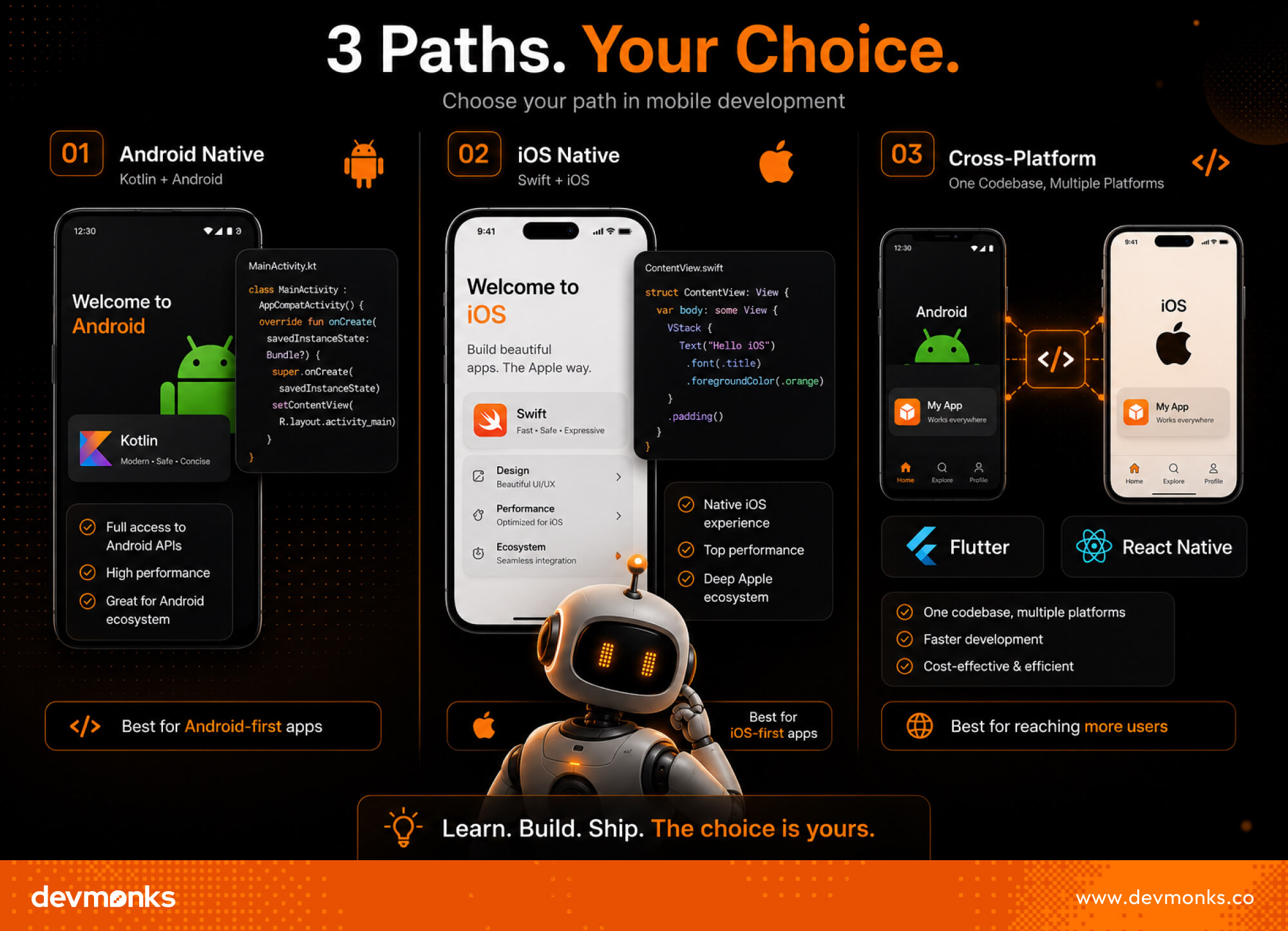
Before you start building, choose where your app will run. This decision affects your tools, language, and learning path. Each option has its own benefits, so pick one based on your goal and resources.
Android App Development
Android is the most widely used mobile platform. It gives you access to a large user base. Beginners often start here because it is more flexible.
You can build apps using Kotlin, which is simple and modern. If your goal is Android app building, this is a great place to begin. Android development also has many free tools and learning resources.
iOS App Development
iOS is used on Apple devices like iPhones and iPads. It offers a smooth and secure user experience.
To build apps, you will need to learn Swift. iOS app building is ideal if you want to target premium users. However, you need a Mac device to get started with iOS development.
Cross-Platform Development
Cross-platform apps let you build one app and run it on both Android and iOS. Tools like Flutter and React Native make this possible.
This approach saves time and effort. It is a good choice for beginners who want faster results. Cross-platform development is popular for startups and small teams.
Learn the Essential Programming Languages
You need to start by learning the core coding skills needed to build apps. Programming languages are the foundation of mobile app programming. The language you choose depends on the platform you picked earlier.
For Android, Kotlin is the most recommended option. It is simple, modern, and easy to learn for beginners. It helps you write clean code and build apps faster. If you are focusing on Android, learning Kotlin will cover most of your needs.
For iOS, Swift is the main language. It is designed by Apple and works smoothly with iPhone and iPad apps. Swift is also beginner-friendly and focuses on safety and performance. If your goal is coding for mobile apps on Apple devices, this is the right choice.
For cross-platform development, JavaScript is widely used. It works with frameworks like React Native to build apps for both Android and iOS. This option is useful if you want to create apps quickly without having to learn multiple languages.
No matter which path you choose, focus on understanding mobile app programming basics. Practice regularly and build small projects to improve your skills.
Understand the Mobile App Development Process
To build a successful app, you need to follow a clear process. This process is often called the Software Development Life Cycle. It breaks app development into simple steps so beginners can follow along easily.
Step 1: Idea Validation
Start with an idea, but make sure it solves a real problem. Think about who will use your app and why. This step helps you avoid building something no one needs.
Step 2: UI/UX Design
Next, plan how your app will look and feel. UI/UX design focuses on user experience. Create simple wireframes to map screens and define user flow before coding.
Step 3: Development
This is where you start coding. Turn your design into a working app by building features step by step. Focus on small tasks so the process feels manageable.
Step 4: Testing
After building, test your app carefully. Fix bugs and check performance. Make sure everything works smoothly on different devices.
Step 5: Launch & Maintenance
Finally, publish your app on app stores. After launch, keep improving it. Add updates, fix issues, and listen to user feedback to grow your app over time.
Set Up Your Development Environment
Before you start coding, you need the right tools. A proper setup makes learning easier and faster. These tools help you write, test, and manage your app smoothly.
First, install an IDE (Integrated Development Environment). For Android, use Android Studio. It provides everything you need for building and testing apps.
For iOS, use Xcode. It is Apple’s official tool for creating iPhone and iPad apps. Both IDEs come with built-in features that simplify the setup of development tools.
Next, learn version control. Git helps you track changes in your code. It also allows you to go back to earlier versions if something breaks. This is very useful when you are learning or working on bigger projects.
You can also use platforms like GitHub to store your code online and share it with others. This helps build a portfolio and collaborate with other developers.
Setting up the right app development tools at the beginning will save you time and help you stay organized as you build your skills.
Build Your First Mobile App (Step-by-Step)
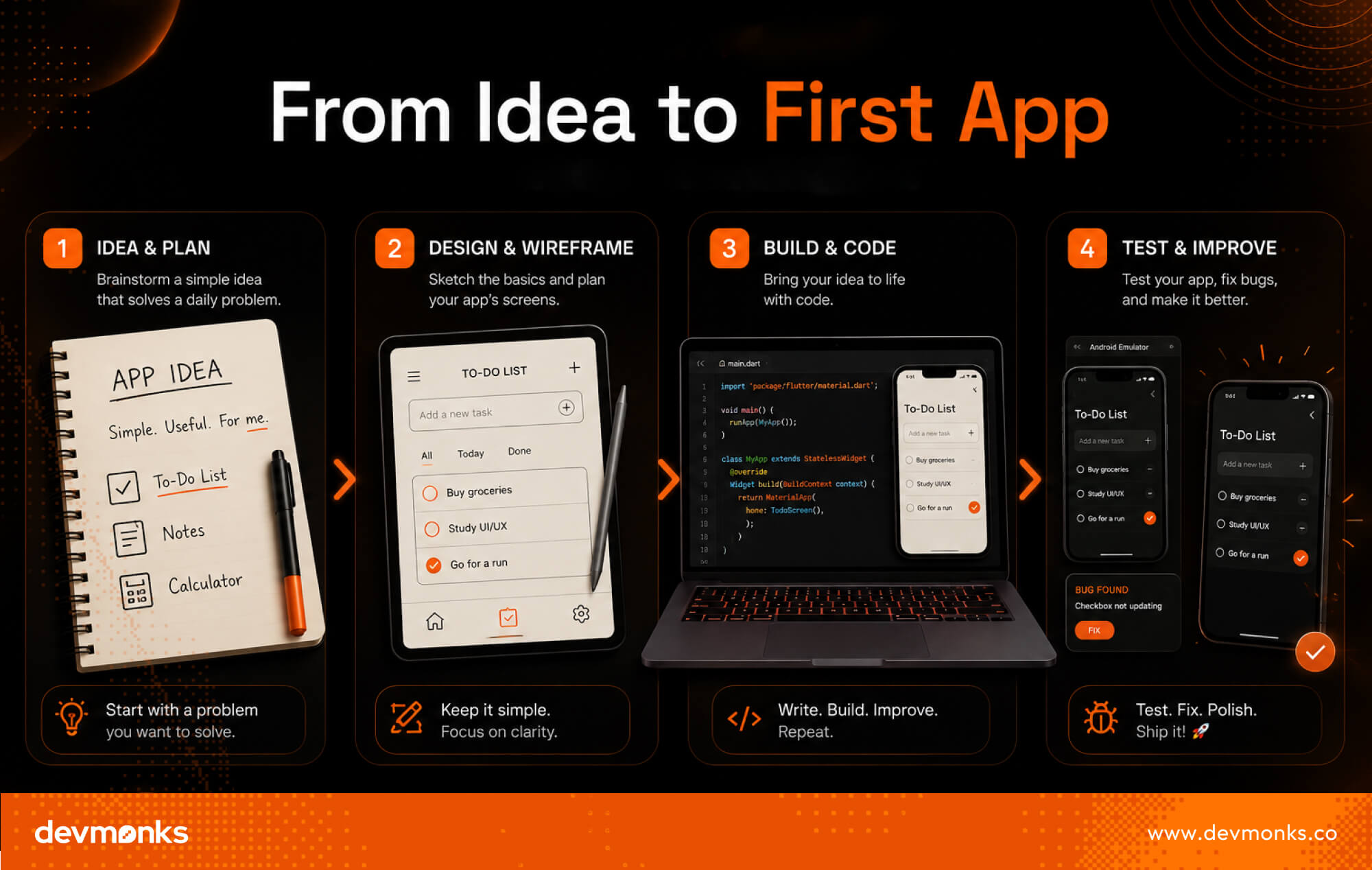
Start small. Your first mobile app does not need to be complex. A simple project will help you understand how everything works together. This beginner app project will guide you through the basic steps.
Step 1: Choose a Simple App Idea
Pick an idea that is easy to build. For example, a to-do list, a notes app, or a simple calculator. Focus on one main feature. This helps you stay focused and complete your first mobile app faster.
Step 2: Design Basic UI
Plan how your app will look. Sketch a few screens on paper or use simple design tools. Decide where buttons, text, and menus will go. Keep the layout clean and easy to use. Good design makes your app easier to understand.
Step 3: Write Core Functionality
Now start coding. Build the main feature of your app step by step. For example, if it is a to-do app, allow users to add and delete tasks. Do not try to add too many features at once. Focus on making one feature work well.
Step 4: Test on Emulator/Device
Test your app regularly. Use an emulator or a real device to see how it works. Check for errors and fix bugs. Make sure the app runs smoothly and responds well to user actions.
Once your app is working, you will have a complete first project. This builds confidence and prepares you for more advanced app development steps.
Use No-Code or Low-Code Tools (Beginner Shortcut)
If coding feels difficult at the start, you can still build apps using No-code platforms. These tools let you create apps with simple drag-and-drop features. You do not need deep programming knowledge to get started.
Platforms like Glide and Adalo are popular choices. They allow you to design layouts, add features, and publish apps quickly. This is a great way to understand how apps work and build apps without coding.
No-code app builders are ideal for beginners, startups, or small projects. They help you launch faster and test your ideas before investing time in full development.
Common Challenges Beginners Face
Starting mobile app development is exciting, but it also comes with a few challenges. Knowing them early helps you stay prepared and motivated. Here are some common beginner struggles:
- Learning curve: Understanding mobile app basics and coding takes time. It can feel slow at the beginning.
- Debugging issues: Errors in code are normal. Finding and fixing them is a key part of the process.
- UI complexity: Designing a clean and user-friendly interface is not always easy for beginners.
- Performance issues: Apps may run slowly or crash if not optimized properly.
- App Store approval: Publishing apps requires meeting guidelines, which can be strict for new developers.
These app development challenges are part of the journey. With practice and patience, you will overcome them and improve your skills.
Tips to Learn Mobile App Development Faster
Learning mobile app development becomes easier when you follow a clear plan. Focus on simple, practical steps instead of trying everything at once.
- Select a focused path: Choose Android, iOS, or cross-platform and stick to it.
- Build projects: Practice by creating small apps like a calculator or a to-do list.
- Follow tutorials: Learn step-by-step from beginner-friendly guides.
- Join communities: Connect with other learners to ask questions and share knowledge.
- Learn essential tech stack: Focus only on the core tools and languages first.
- Emphasize debugging: Fixing errors helps you understand code deeply.
These steps will help you learn app development fast and stay consistent.
Career Opportunities in Mobile App Development
Mobile app development offers many exciting career paths for beginners. As you grow your skills, you can choose different directions based on your interests.
- Mobile developer: A Mobile developer builds and maintains mobile apps for companies. This is one of the most common app developer career options.
- Freelancer: You can work independently and create apps for different clients. This gives flexibility and income opportunities.
- App entrepreneur: If you have your own idea, you can build and launch your own app startup. This path can be highly rewarding if your app becomes successful.
These mobile developer jobs are in high demand worldwide. With the right skills, you can build a strong and flexible career in this field.
Future Trends in Mobile App Development
Mobile app development is changing quickly, and new technologies are shaping the future of mobile apps. Developers need to stay updated to build better and smarter applications.
- AI-powered apps: Artificial Intelligence is making apps smarter by adding features like chatbots, recommendations, and automation.
- 5G apps: Faster internet from 5G will improve app speed and enable real-time features like gaming and video streaming.
- AR/VR: Augmented Reality is changing how users interact with apps through virtual experiences and interactive visuals.
These mobile app trends will make apps more intelligent, fast, and engaging. Learning these technologies early can give beginners a strong advantage in the future.
Conclusion
Mobile app development is a step-by-step journey that anyone can learn with practice and patience.
Start by understanding the basics, choose your platform, and focus on small projects first. Build consistently and learn from mistakes.
Every skilled developer began as a beginner. Take your first step today and keep improving to grow your future in mobile app development.
.png)
.svg)
Frequently Asked Questions
How can I discuss an AI MVP with Dev Monks?

Book a strategy call with your use case, existing systems, and project priorities. The team can help define an initial scope and the dependencies that need to be addressed.
Does using AI replace engineering review?
Dev Monks uses AI-assisted workflows with human-guided decisions. Product requirements, engineering choices, and testing remain part of the development process.
What AI development services does Dev Monks offer?
Dev Monks offers agentic AI solutions, custom language-model solutions, workflow automation, and RAG development. Its broader services include SaaS engineering, MVP development, backend integrations, and web and mobile applications.
Is Dev Monks an official OpenAI Select Partner?
Yes. Dev Monks is now an official OpenAI Select Partner within the OpenAI Partner Network.
How long does it usually take to complete a project?
We combine AI-driven workflows with product-first engineering to provide MVP development services for startups and enterprises. Our approach balances speed, reliability, and usability while keeping teams involved. We deliver production-ready, scalable solutions, not just prototypes or demos.
What makes Dev Monks different from other development companies?
We combine AI-driven workflows with product-first engineering to provide MVP development services for startups and enterprises. Our approach balances speed, reliability, and usability while keeping teams involved. We deliver production-ready, scalable solutions, not just prototypes or demos.
How Involved Will My Team be During Development?
We combine AI-driven workflows with product-first engineering to provide MVP development services for startups and enterprises. Our approach balances speed, reliability, and usability while keeping teams involved. We deliver production-ready, scalable solutions, not just prototypes or demos.
How involved will my team be during development?
We combine AI-driven workflows with product-first engineering to provide MVP development services for startups and enterprises. Our approach balances speed, reliability, and usability while keeping teams involved. We deliver production-ready, scalable solutions, not just prototypes or demos.
Do you develop both web and mobile applications?
We combine AI-driven workflows with product-first engineering to provide MVP development services for startups and enterprises. Our approach balances speed, reliability, and usability while keeping teams involved. We deliver production-ready, scalable solutions, not just prototypes or demos.
How can Dev Monks help my startup launch faster
We combine AI-driven workflows with product-first engineering to provide MVP development services for startups and enterprises. Our approach balances speed, reliability, and usability while keeping teams involved. We deliver production-ready, scalable solutions, not just prototypes or demos.

%20vs%20new%20Date().jpg)