Date.parse() vs new Date(): Syntax, Uses & Differences
.png)

.svg)
[ key takeways ]
- Date.parse() converts date strings into timestamps measured in milliseconds since 1970.
- new Date() creates a JavaScript Date object with built-in formatting methods.
- Use Date.parse() for comparisons, sorting, calculations, and processing API timestamps efficiently.
- Use new Date() for formatting, date arithmetic, displaying dates, and timezone conversions.
- Prefer ISO 8601 date strings for consistent JavaScript parsing across browsers.
.svg)
Date.parse() and new Date() both handle dates in JavaScript, but they return different results. Date.parse() converts a date string into a timestamp in milliseconds, while new Date() creates a Date object that you can format, modify, and manipulate.
Choosing the right one depends on what you want to do with the date.
Knowing the difference can make working with dates feel much smoother and help avoid a few common surprises along the way.
In the sections ahead, you'll see how each method behaves, where it works best, and how to choose the right approach for everyday JavaScript projects.
Understanding Dates in JavaScript
Working with JavaScript dates is a common part of web development. You may need to display the current date, calculate time differences, or convert a text string into a valid date.
JavaScript handles all of these tasks through the JavaScript Date object. This built-in Date object lets you create, store, format, and manipulate dates and times.
Understanding these JavaScript fundamentals is important because date handling is a core part of modern application development, from scheduling features to user authentication.
However, creating a date and parsing a date are not always the same process. Knowing how the JavaScript Date object works helps you avoid invalid dates, unexpected results, and timezone-related bugs when working with dates in real-world applications.
What Is Date.parse()?
Date.parse() is a built-in JavaScript method that converts a date string into a Unix timestamp. Instead of creating a Date object, it returns the number of milliseconds since January 1, 1970 (UTC), known as the Unix Timestamp.
This is useful when you need to compare dates, sort records, or perform date calculations.
Syntax and Return Value
The syntax is simple:
Date.parse(dateString);
It accepts one parameter:
- dateString – A string representing a date.
Return value:
- A timestamp in milliseconds if the string is valid.
- NaN if JavaScript cannot parse the date string.
Example:
const timestamp = Date.parse("2026-07-02");
console.log(timestamp);
Date.parse() Examples
ISO 8601 date (recommended)
console.log(Date.parse("2026-07-02"));
Returns a valid timestamp because the string follows the ISO 8601 format.
RFC date
console.log(Date.parse("Fri, 02 Jul 2026 15:30:00 GMT"));
Most modern browsers can parse this format correctly.
Invalid date
console.log(Date.parse("July 35, 2026"));
Output:
NaN
Since the date does not exist, JavaScript returns NaN.
Limitations of Date.parse()
Although Date.parse() is convenient, it has a few drawbacks. First, browser parsing can be inconsistent for non-standard formats, which means the same string may produce different results across browsers.
Second, locale-dependent formats like "02/07/2026" are ambiguous because some regions read them as February 7, while others interpret them as July 2.
Finally, invalid date parsing does not throw an error. Instead, the method simply returns NaN, so you should always validate the result before using it.
For the most reliable behavior, use ISO 8601 date strings whenever possible. They are consistently supported across modern browsers and help avoid unexpected parsing issues.
What Is new Date()?
new Date() is the JavaScript Date Constructor used to create a Date object. Unlike Date.parse(), which returns a timestamp, new Date() returns a complete date object that you can format, compare, or modify.
It accepts different types of input, which makes it a flexible way to create dates for various situations.
Different Ways to Use new Date()
You can create a date object in several ways:
Current date and time
Calling new Date() without any arguments creates a Date object with the current date and time.
const now = new Date();
From a timestamp
Pass a Unix timestamp in milliseconds to create a specific date.
const date = new Date(1782950400000);
From a date string
You can also create a date object from a valid date string.
const date = new Date("2026-07-02");
From individual components
Provide the year, month, day, and optional time values.
const date = new Date(2026, 6, 2);
Note: Months are zero-based, so 6 represents July.
new Date() Examples
Here are a few common examples:
new Date(); // Current date and time
new Date("2026-07-02"); // From a date string
new Date(1782950400000); // From a timestamp
new Date(2026, 6, 2, 10, 30); // July 2, 2026, 10:30 AM
Each example returns a Date object, not a number.
Advantages of Using new Date()
The biggest advantage of new Date() is that it returns a Date Object instead of just a timestamp.
Once you have the object, you can use built-in methods like getFullYear(), getMonth(), getDate(), and setHours() to read or modify date values.
Because it creates a complete JavaScript Date object, new Date() is the better choice when you need to format dates, perform calculations, or work with date and time throughout your application.
Writing reliable date-handling logic is an important part of building stable web applications.
Accurate date handling becomes even more important in modern headless web development, where frontend applications and backend services exchange date values through APIs.
Experienced development agencies, such as Dev Monks, follow JavaScript best practices to ensure dates, time zones, and user data are handled consistently across browsers.
Date.parse() vs new Date() (Complete Comparison)
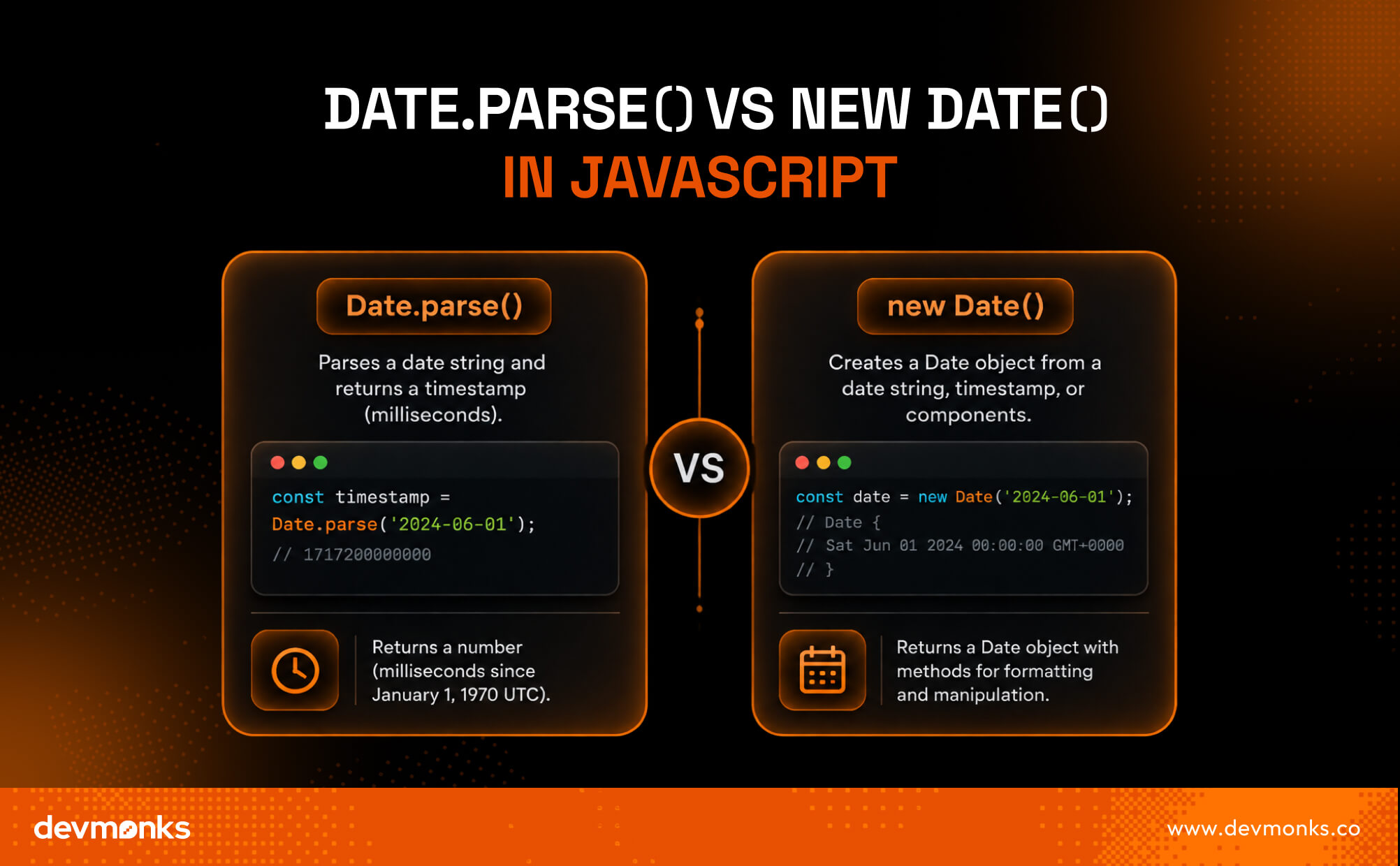
Both Date.parse() and new Date() work with dates in JavaScript, but they serve different purposes. Understanding the difference between Date.parse and new Date helps you choose the right method for each situation.
Date.parse() is designed to parse a date string and return a timestamp. On the other hand, new Date() creates a complete date object that you can format, compare, or modify.
Although both can accept a date string, their return value is different, which makes each method useful in different scenarios.
Key Differences
The table below highlights the main differences between Date.parse() vs new Date.
Return Value Comparison
The biggest difference is what each method returns.
Date.parse()
Returns a Unix Timestamp, which is the number of milliseconds since January 1, 1970 (UTC).
const result = Date.parse("2026-07-02");
console.log(result); // 1782950400000
This is useful when comparing dates or performing time calculations.
new Date()
Returns a Date Object.
const result = new Date("2026-07-02");
console.log(result);
The object includes built-in methods such as getDate(), getMonth(), and toISOString(), making it much easier to work with dates.
Feature Comparison Table
In most applications, new Date() is the better choice because it creates a reusable object with many built-in methods.
Use Date.parse() when you only need a timestamp for comparisons or calculations. If you're working with date strings, stick to the ISO 8601 format to avoid browser compatibility issues.
When Should You Use Date.parse()?
Use Date.parse() when you only need a Unix Timestamp instead of a Date object. Since it returns a timestamp in milliseconds, it is a simple and efficient choice for comparing dates or performing time-based calculations.
Common use cases include:
- Date comparisons: Convert two date strings into timestamps to quickly determine which date is earlier or later.
- Sorting dates: Parse multiple date strings into timestamps before sorting them in ascending or descending order.
- Time calculations: Find the difference between two dates by subtracting their timestamps. The result is returned in milliseconds.
- API timestamps: Many APIs send dates as strings. Date.parse() lets you convert those values into timestamps for easier processing and calculations.
If you only need to compare, sort, or calculate dates, Date.parse() is a good choice. However, if you plan to format the date or use built-in date methods, new Date() is the better option.
When Should You Use new Date()?
Use new Date() when you need a complete Date Object instead of just a timestamp. It creates a date object with built-in methods that make it easy to format, update, and manipulate dates in JavaScript.
Common use cases include:
- Formatting dates: Display dates in different formats using methods like toLocaleDateString() or toISOString().
- Date arithmetic: Add or subtract days, months, or years using built-in methods such as setDate() and setMonth().
- Displaying dates: Show the current date and time or present user-friendly dates in your application's interface.
- Timezone conversions: Convert dates between local time and UTC using methods like toUTCString() and getTimezoneOffset().
Whenever you need to create a date object, format dates, perform date arithmetic, or use JavaScript's built-in date methods, new Date() is the preferred option. It provides much more flexibility than Date.parse() for everyday date handling.
Common Mistakes Developers Make
Working with dates in JavaScript can be tricky, especially when handling different formats and time zones. Avoid these common mistakes to write more reliable code.
- Assuming every date string parses correctly: Not all date strings are supported. Use the ISO 8601 format for the most consistent parsing across browsers.
- Ignoring time zones: The same date string can produce different results depending on the user's timezone. Always consider whether your application should use local time or UTC.
- Mixing timestamps and Date objects: A timestamp is just a number, while a Date object includes built-in methods. Make sure you know which type your code expects.
- Forgetting invalid date checks: Always validate the result. Date.parse() returns NaN for invalid input, while new Date() creates an Invalid Date object.
- Relying on non-standard date formats: Formats like "07/02/2026" can be interpreted differently across browsers. Use ISO 8601 whenever possible to avoid unexpected parsing errors.
Best Practices for Parsing Dates in JavaScript
Following a few simple practices can help you avoid bugs and make your date-handling code more reliable.
- Prefer ISO 8601 strings: This is the most widely supported date format and provides consistent parsing across modern browsers.
- Validate parsed dates: Always check the result after parsing. If Date.parse() returns NaN or new Date() creates an invalid date, handle the error before using the value.
- Avoid locale-specific formats: Date strings like "07/02/2026" can be interpreted differently depending on the browser or region. Use ISO 8601 instead.
- Use timestamps consistently: When comparing dates or calculating time differences, convert them to timestamps to keep your logic simple and accurate.
- Consider modern date libraries when needed: For complex tasks like recurring dates, timezone handling, or advanced formatting, libraries such as date-fns or Luxon can simplify development.
Following these JavaScript date best practices will help you write cleaner code, improve compatibility, and avoid common timezone issues by using UTC consistently where appropriate.
If you're building a production-ready application, working with an experienced agency like Dev Monks can help ensure your JavaScript code remains reliable, scalable, and easy to maintain.
Browser Compatibility and Parsing Behavior
Although JavaScript follows the ECMAScript specification, browser compatibility can still vary when parsing non-standard date strings.
Modern browsers generally handle ECMAScript Date methods consistently for ISO 8601 dates, but other formats may produce different results or fail completely. For example, a date string that works in one Browser may return NaN or an unexpected date in another.
To ensure consistent behavior across browsers, always use standard ISO 8601 date strings, validate parsed values, and avoid relying on locale-specific or ambiguous formats. These practices improve compatibility and reduce unexpected parsing errors.
FAQs
What Is new Date().toISOString()?
new Date().toISOString() returns the date and time as a standardized ISO 8601 string in UTC. It is commonly used when storing dates in databases, sending data to APIs, or ensuring a consistent date format across different systems.
Does new Date() Use Date.parse() Internally?
When you pass a date string to new Date(), JavaScript parses the string using the same parsing rules as Date.parse(). However, new Date() returns a Date object, while Date.parse() returns a timestamp in milliseconds.
Can new Date() Parse Date Strings Directly?
Yes. new Date() can parse valid date strings directly and create a Date object from them. For the most reliable results across browsers, use ISO 8601 date strings instead of locale-specific or non-standard formats.
Final Verdict
Date.parse() and new Date() are both useful, but they solve different problems. Choose Date.parse() when you only need a timestamp for comparisons or calculations.
Use new Date() when you need a Date object for formatting, manipulation, or timezone handling. For the most reliable results, always use ISO 8601 date strings and validate your input before processing dates.
.png)
.svg)
Frequently Asked Questions
How can I discuss an AI MVP with Dev Monks?

Book a strategy call with your use case, existing systems, and project priorities. The team can help define an initial scope and the dependencies that need to be addressed.
Does using AI replace engineering review?
Dev Monks uses AI-assisted workflows with human-guided decisions. Product requirements, engineering choices, and testing remain part of the development process.
What AI development services does Dev Monks offer?
Dev Monks offers agentic AI solutions, custom language-model solutions, workflow automation, and RAG development. Its broader services include SaaS engineering, MVP development, backend integrations, and web and mobile applications.
Is Dev Monks an official OpenAI Select Partner?
Yes. Dev Monks is now an official OpenAI Select Partner within the OpenAI Partner Network.
How long does it usually take to complete a project?
We combine AI-driven workflows with product-first engineering to provide MVP development services for startups and enterprises. Our approach balances speed, reliability, and usability while keeping teams involved. We deliver production-ready, scalable solutions, not just prototypes or demos.
What makes Dev Monks different from other development companies?
We combine AI-driven workflows with product-first engineering to provide MVP development services for startups and enterprises. Our approach balances speed, reliability, and usability while keeping teams involved. We deliver production-ready, scalable solutions, not just prototypes or demos.
How Involved Will My Team be During Development?
We combine AI-driven workflows with product-first engineering to provide MVP development services for startups and enterprises. Our approach balances speed, reliability, and usability while keeping teams involved. We deliver production-ready, scalable solutions, not just prototypes or demos.
How involved will my team be during development?
We combine AI-driven workflows with product-first engineering to provide MVP development services for startups and enterprises. Our approach balances speed, reliability, and usability while keeping teams involved. We deliver production-ready, scalable solutions, not just prototypes or demos.
Do you develop both web and mobile applications?
We combine AI-driven workflows with product-first engineering to provide MVP development services for startups and enterprises. Our approach balances speed, reliability, and usability while keeping teams involved. We deliver production-ready, scalable solutions, not just prototypes or demos.
How can Dev Monks help my startup launch faster
We combine AI-driven workflows with product-first engineering to provide MVP development services for startups and enterprises. Our approach balances speed, reliability, and usability while keeping teams involved. We deliver production-ready, scalable solutions, not just prototypes or demos.