Is Your Business Ready To Develop Custom Software: Key Signs!
.png)

.svg)
[ key takeways ]
- Growing complexity often signals the need for more customized business systems.
- Disconnected tools silently reduce productivity and increase operational confusion across teams.
- Custom solutions work best when processes no longer fit standard software.
- Careful ROI evaluation prevents unnecessary investment in large software projects early.
- Long-term success depends on aligning technology with evolving business strategy.
.svg)
If your business is starting to feel “held back” by the tools you use every day, you are not alone. Many companies keep adding new SaaS tools, ERP modules, or CRM systems in the hope that things will improve.
But instead of solving problems, they often create more complexity, higher costs, and disconnected workflows. The real risk is not just inefficiency, it is slow growth while competitors move faster with better systems.
The key question is simple, are your tools still supporting your business, or controlling it? In this article, we explore the clear signs, practical decisions, and real examples that will help you understand when custom software becomes the smarter next step.
What Does Custom Software Development Mean for a Business?
Custom Software Development means building software designed only for your business needs. It is not made for the mass market. It fits your processes, goals, and growth plans.
In contrast, SaaS tools are ready-made solutions. You subscribe and start using them right away. They are quick to adopt but built for a wide range of users, not your specific workflows.
With custom solutions, businesses can improve efficiency through Business Process Automation. This reduces manual work and helps teams focus on higher-value tasks.
Custom Software vs Off-the-Shelf Software
Off-the-shelf tools like SaaS Platforms are easy to start with. They are cost-effective in the beginning. But they often lack flexibility.
Custom software offers full control. You can scale features as your business grows. Systems like ERP and CRM can be customized to match exact business needs.
When Businesses Typically Move to Custom Solutions
Most businesses switch when growth creates complexity. Teams start facing limits with existing tools. During Digital Transformation, companies adopt custom systems to stay competitive.
Also, if you feel your Workflow Automation needs are becoming critical and your current tools cannot keep up, it may be time to explore custom software. In this case, you should consider consulting a reliable agency like Dev Monks to guide the next step.
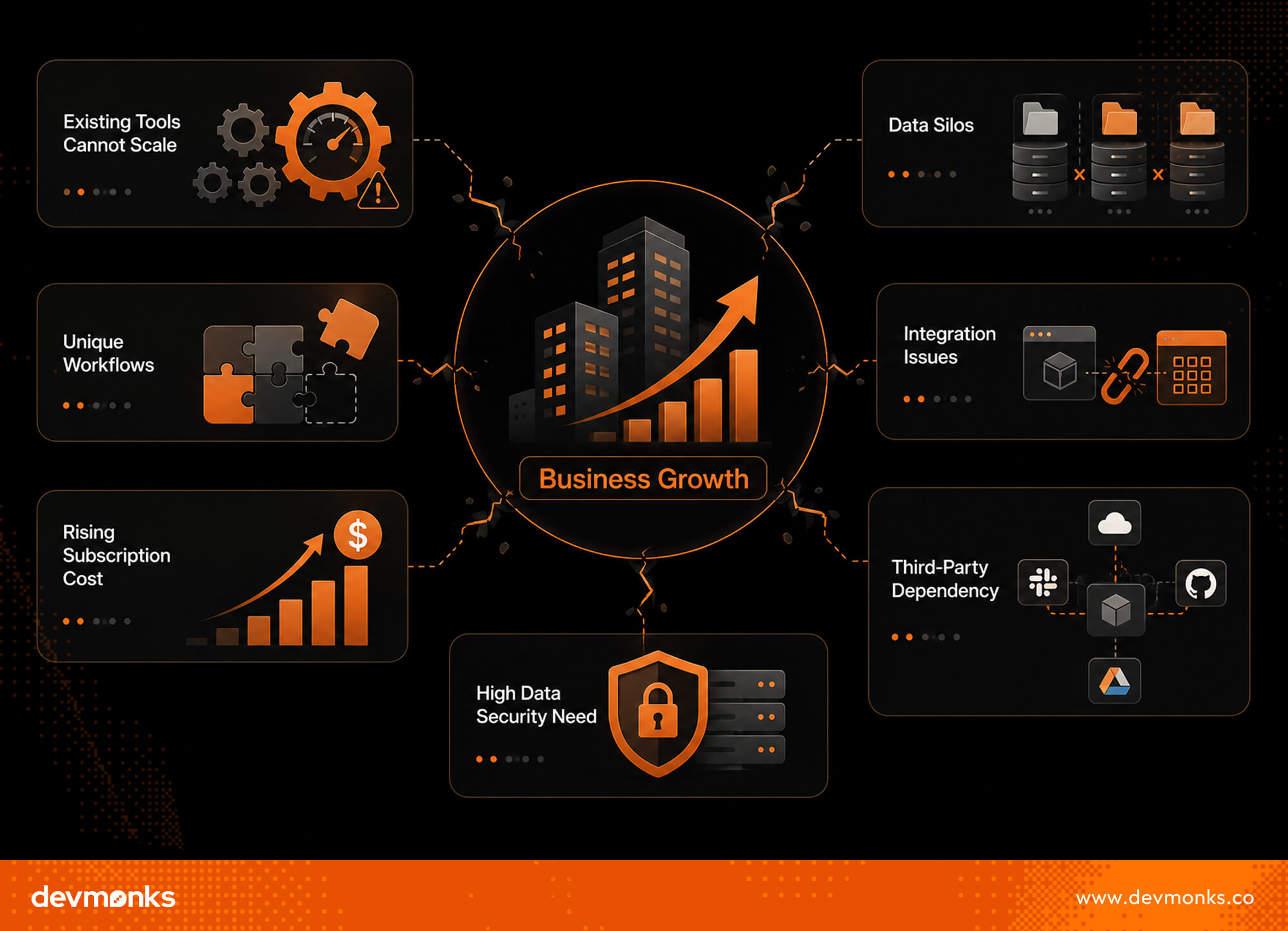
7 Signs Your Business Is Ready for Custom Software
As operations become more complex, small inefficiencies start turning into real problems. Tasks take longer, systems stop syncing smoothly, and teams rely more on manual fixes.
These are not random issues. They are clear signs your current tools are reaching their limits, and your business may need a more customized solution. Let’s discuss those signs in detail.
Your Existing Tools Cannot Scale With Growth
At the start, simple tools work fine. But as operations expand, you may notice delays, manual workarounds, or system slowdowns.
These bottlenecks waste time and limit growth. If your team keeps adjusting processes just to fit the software, the problem is clear.
Multiple Tools Are Creating Data Silos
Using many disconnected tools often leads to scattered data. Information sits in different systems and does not sync properly. This creates confusion and errors. Teams spend extra time switching between platforms instead of focusing on meaningful work.
Your Processes Require Unique Workflows
Every business evolves differently. When your processes become more specific, generic tools may not support them.
You may need features that simply do not exist in standard software. At this point, customization is no longer optional. It becomes necessary.
Integration Between Systems Is Difficult
Many SaaS tools promise easy integration. In reality, connections can be limited or unstable. You may face issues with APIs, data syncing, or missing features. Over time, these small problems turn into major operational risks.
The Subscription Cost Is Rising
At first, subscription-based tools seem affordable. But as your team grows, costs increase. Paying for multiple tools, add-ons, and extra users adds up quickly. In some cases, you end up paying more for less control.
You Require High Data Security
If your business handles sensitive data, relying only on third-party systems can be risky. You may need stricter control over how data is stored, accessed, and protected. Custom software allows you to build security around your exact requirements.
Dependency on Excess Third-Party Tools
Using too many external tools creates dependency. If one tool fails or changes its pricing, your operations get affected. This lack of control can disrupt your entire workflow.
When several of these signs appear together, it is a strong indication that your business is ready to invest in a more customized, scalable solution.
Benefits of Developing Custom Software for Growing Businesses
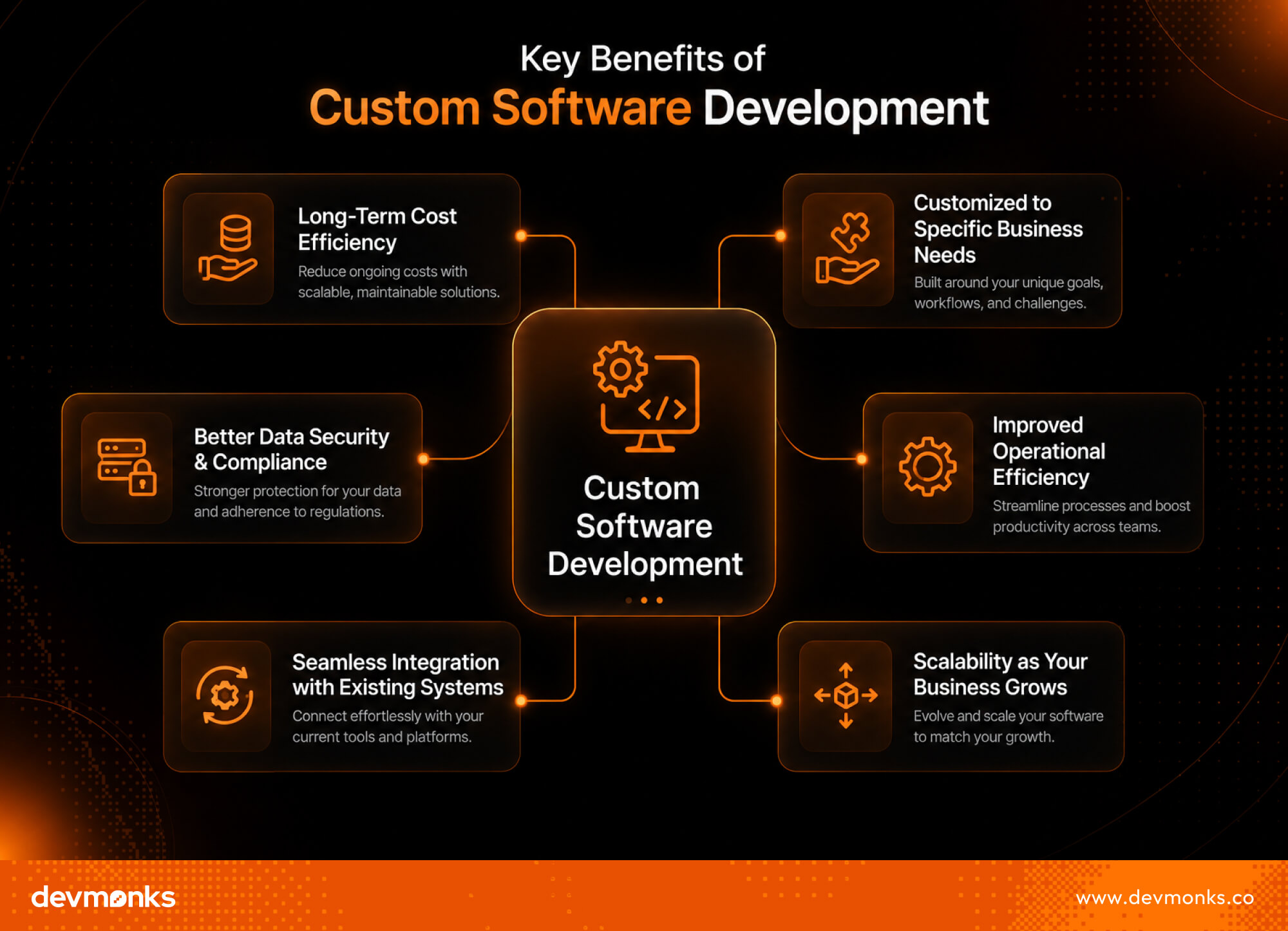
Custom software is not just a technical upgrade. It is a strategic move that supports long-term growth. It helps businesses build a strong Competitive Advantage while supporting ongoing Digital Transformation.
Here are the major benefits you will receive if you develop custom software for your business.
Customized Features That Match Business Processes
Custom software is built around how your business actually works. You do not need to adjust your processes to fit the tool. This leads to smoother operations and fewer workarounds.
Long-Term Scalability
As your business grows, your software grows with it. You can add new features, users, and capabilities without starting from scratch.
Improved Efficiency Through Automation
Automation reduces repetitive tasks. Teams spend less time on manual work and more time on meaningful activities that drive results.
Competitive Advantage Through Proprietary Tools
With custom systems, you create tools that competitors cannot easily copy. This helps you stand out in the market.
Smooth Integration with Existing Systems
Custom software connects easily with your current tools. It reduces friction and keeps your operations aligned.
Improves Security and Compliance
You get better control over data security. Systems can be designed to meet specific compliance requirements.
Better Long-Term ROI
While initial costs may be higher, custom software reduces ongoing expenses and delivers more value over time.
Employee Satisfaction and Productivity
When tools are easy to use and fit daily tasks, employees work faster and with less frustration.
Challenges Businesses Should Consider Before Building Custom Software
Building custom software brings strong benefits, but it also requires careful planning. Businesses need to understand the risks, time, and resources involved before starting.
A clear view of the Software Development Lifecycle (SDLC) and expected Development Cost helps avoid surprises.
Initial Development Costs
Custom software requires upfront investment. Costs include design, development, and testing. For many businesses, this can feel high compared to ready-made tools.
Development Time and Project Scope
Custom solutions take time to build. The timeline depends on features and complexity. Without a clear scope, projects can face delays or exceed budgets.
Legacy System Integration
If your business uses older systems, connecting them with new software can be difficult. This may require extra time and technical effort.
Resistance to Change
Teams may hesitate to adopt new systems. Training and proper guidance are needed to ensure smooth adoption across the organization.
Maintenance and Continuous Updates
Custom software is not a one-time project. It needs regular updates, bug fixes, and improvements. Businesses must be ready to manage these ongoing responsibilities.
Questions to Ask Before Starting Custom Software Development
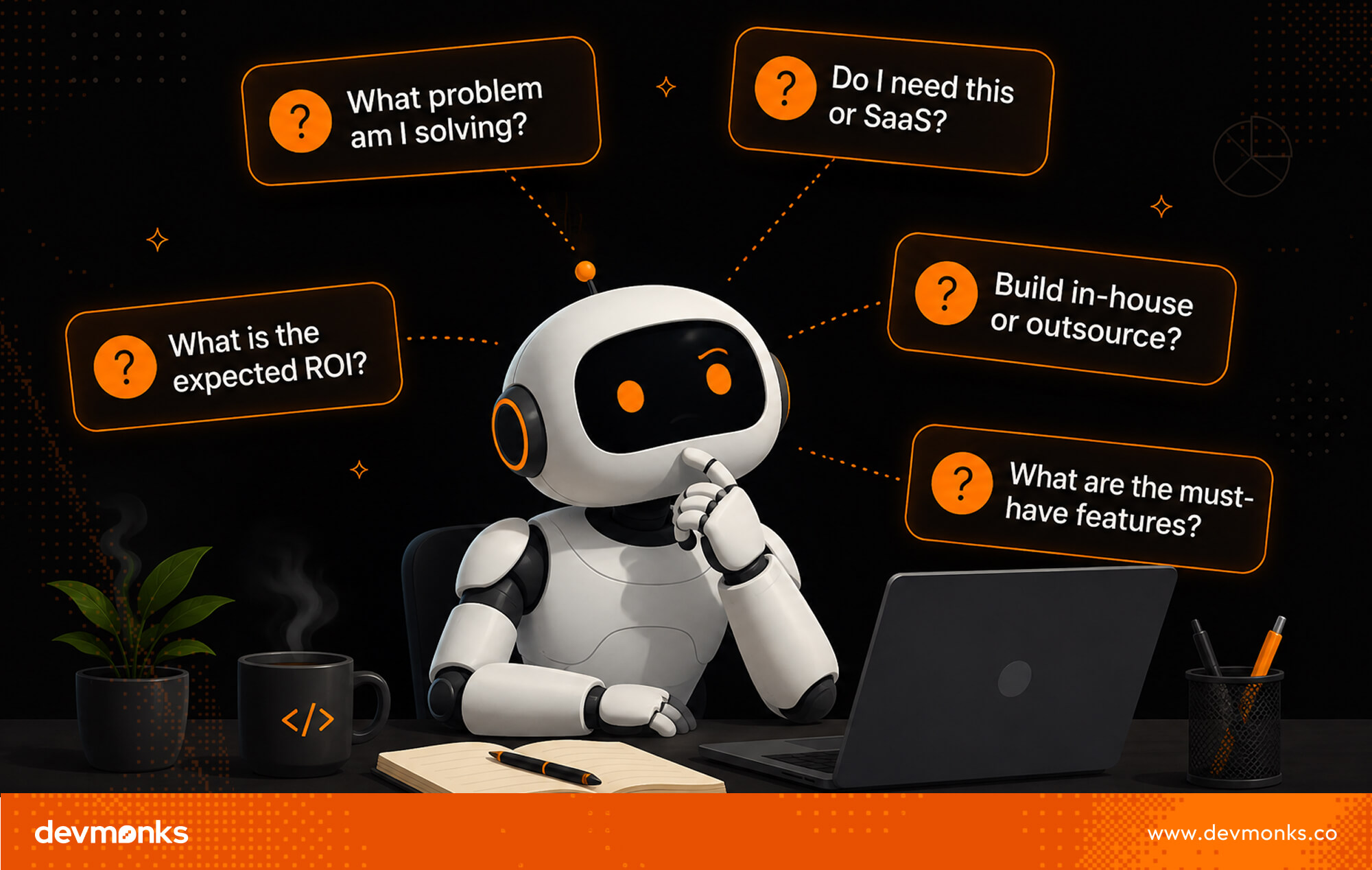
Before starting, take a step back and evaluate your readiness. Custom software is a long-term investment, so asking the right questions helps you avoid costly mistakes.
A clear Product Strategy, expected ROI, and strong Software Architecture are key to success.
What Business Problem Will the Software Solve?
Start with the core problem. Do not build software just because others are doing it. Identify what is slowing your business down or limiting growth. The clearer the problem, the more effective the solution will be.
Do We Have Clear Requirements?
Many projects fail due to unclear requirements. Before development, define what features you need and how users will interact with the system. This is where discovery sessions become important.
They help align business goals with technical solutions and reduce confusion later.
What Is the Expected ROI?
Custom software should deliver value over time. Think about how it will improve productivity, reduce costs, or increase revenue. If the outcome is not clear, the investment may not be justified.
Do We Have Internal or External Development Resources?
Decide whether you will build in-house or outsource. Internal teams offer more control but require skilled resources. External agencies bring expertise and faster delivery. Choose based on your budget, timeline, and technical capacity.
The Process of Developing Custom Software for Your Business
Building custom software follows a structured path. Each step ensures the final product meets business needs and works reliably. Most teams follow SDLC with flexible methods like Agile Development to stay adaptable.
Step 1: Discovery and Requirement Analysis
This is where everything begins. Teams research your business, understand goals, and identify key problems. Stakeholder interviews help define what the software should achieve and how it will be used.
Step 2: UI/UX Design and Prototyping
Once requirements are clear, designers create layouts and user flows. Prototypes show how the system will look and function. This step ensures the software is easy to use before development starts.
Step 3: Development and Testing
Next, developers start building the software based on approved designs. At the same time, testing teams check for bugs and performance issues. This ensures the system works smoothly and meets quality standards.
Step 4: Deployment and Continuous Improvement
After testing, the software is launched. But the process does not end here. Regular updates, improvements, and support keep the system relevant as business needs evolve.
How to Decide Between Custom Software and SaaS Solutions
Choosing between custom software and ready-made tools depends on your business needs, budget, and growth plans. Solutions like SaaS, ERP, and CRM are widely used, but the right choice depends on how your business operates.
Here are things you should compare and consider.
- Cost Comparison: SaaS has a lower upfront cost but ongoing subscriptions. Custom software needs a higher initial investment but can reduce long-term costs.
- Process Uniqueness: SaaS works best for standard processes. Custom software is better when your workflows are unique.
- Flexibility: Custom solutions allow full control over features. SaaS platforms often limit customization options.
- Time to Deploy: SaaS can be used immediately. Custom software takes time to design, build, and test.
- Scalability: Custom software grows with your business needs. SaaS may require expensive upgrades as you scale.
- Control and Security: Custom systems offer full control over data and security. SaaS depends on third-party providers and their policies.
Real Examples of Businesses That Needed Custom Software
Many industries move to custom solutions when ready-made tools cannot support their operations. Sectors like Healthcare Software, FinTech Platforms, and E-commerce Systems often require customized systems to handle complex workflows.
- Logistics Company Automation: A logistics business may need real-time tracking, route optimization, and delivery coordination. Off-the-shelf tools often fail to manage such dynamic operations efficiently. Custom software helps unify all processes in one system.
- Healthcare Scheduling Platform: Hospitals and clinics often need patient scheduling, doctor availability tracking, and record management in one place. Custom systems ensure accuracy and compliance with healthcare requirements.
- Internal Analytics Dashboards: Growing companies require real-time insights from multiple data sources. Custom dashboards bring all metrics together, which helps leaders make faster and better decisions.
Conclusion: Is Custom Software the Right Next Step for Your Business?
Custom software becomes the right choice when your business outgrows basic tools and needs better control over processes, data, and growth.
If you see challenges in scalability, workflow efficiency, or system integration, it may be time to rethink your approach.
Evaluate your current workflows, long-term goals, and expansion plans carefully. A clear understanding of your needs will help you decide whether custom software is the next strategic step.
.png)
.svg)
Frequently Asked Questions
How can I discuss an AI MVP with Dev Monks?

Book a strategy call with your use case, existing systems, and project priorities. The team can help define an initial scope and the dependencies that need to be addressed.
Does using AI replace engineering review?
Dev Monks uses AI-assisted workflows with human-guided decisions. Product requirements, engineering choices, and testing remain part of the development process.
What AI development services does Dev Monks offer?
Dev Monks offers agentic AI solutions, custom language-model solutions, workflow automation, and RAG development. Its broader services include SaaS engineering, MVP development, backend integrations, and web and mobile applications.
Is Dev Monks an official OpenAI Select Partner?
Yes. Dev Monks is now an official OpenAI Select Partner within the OpenAI Partner Network.
How long does it usually take to complete a project?
We combine AI-driven workflows with product-first engineering to provide MVP development services for startups and enterprises. Our approach balances speed, reliability, and usability while keeping teams involved. We deliver production-ready, scalable solutions, not just prototypes or demos.
What makes Dev Monks different from other development companies?
We combine AI-driven workflows with product-first engineering to provide MVP development services for startups and enterprises. Our approach balances speed, reliability, and usability while keeping teams involved. We deliver production-ready, scalable solutions, not just prototypes or demos.
How Involved Will My Team be During Development?
We combine AI-driven workflows with product-first engineering to provide MVP development services for startups and enterprises. Our approach balances speed, reliability, and usability while keeping teams involved. We deliver production-ready, scalable solutions, not just prototypes or demos.
How involved will my team be during development?
We combine AI-driven workflows with product-first engineering to provide MVP development services for startups and enterprises. Our approach balances speed, reliability, and usability while keeping teams involved. We deliver production-ready, scalable solutions, not just prototypes or demos.
Do you develop both web and mobile applications?
We combine AI-driven workflows with product-first engineering to provide MVP development services for startups and enterprises. Our approach balances speed, reliability, and usability while keeping teams involved. We deliver production-ready, scalable solutions, not just prototypes or demos.
How can Dev Monks help my startup launch faster
We combine AI-driven workflows with product-first engineering to provide MVP development services for startups and enterprises. Our approach balances speed, reliability, and usability while keeping teams involved. We deliver production-ready, scalable solutions, not just prototypes or demos.
%20vs%20new%20Date().jpg)