Best Mobile App Development Tools for Building Apps in 2026
.png)

.svg)
[ key takeways ]
- Flutter, React Native, and Swift define speed, performance, and cross-platform capability choices.
- Android Studio, Xcode, and VS Code improve coding efficiency and productivity greatly.
- Firebase, AWS, and Supabase power scalable backend systems and mobile infrastructure.
- Figma, Adobe XD, and Sketch streamline UI/UX design and prototyping workflows.
- Mixpanel and Amplitude help optimize apps through user behavior analytics insights.
.svg)
Building a successful app is not just about coding skills in mobile app development. It depends on choosing the right SDKs, IDEs, and overall app development software that fit your goals.
The tools you use can completely change how fast you build, how well your app performs, and how easily it scales.
But there is no single “best” setup. Mobile app tools vary based on app type, budget, platform, and even team size. What works for a solo developer may not work for an enterprise team.
Once you understand this, choosing the right mobile app development tools becomes much easier and more strategic.
In this article, we’ll break down the best tools across every stage of development, so you can build smarter, not harder.
What Are Mobile App Development Tools?
Mobile app development tools are software solutions that help developers create, test, launch, and manage mobile applications. They are part of the full app development software stack and make development faster, easier, and more organized.
Different tools handle different tasks. Coding tools, including IDEs (Integrated Development Environments) and SDKs (Software Development Kits), help developers build Android and iOS apps efficiently.
UI design tools create app layouts, buttons, and user flows to improve user experience. Backend tools manage databases, authentication, cloud storage, and APIs for apps that store user data or need real-time updates.
Testing tools identify bugs, performance issues, and security problems before launch. Deployment tools help publish apps to the App Store and Google Play, while analytics tools track downloads, engagement, user behavior, and app performance.
Together, these tools form a complete app development platform supporting every stage of mobile app development.
If you want to learn mobile app development tools, that’s great for building your skills. But if you just need a mobile app and feel confused about doing it yourself, you can always take professional help from agencies like Dev Monks.
Best Mobile App Development Frameworks
Choosing the right app development framework depends on your project goals, budget, performance needs, and target platforms.
Some frameworks focus on speed and cross-platform mobile development, while others offer better native performance and deeper platform integration.
Flutter
Flutter is one of the most popular choices for cross-platform mobile development. It helps developers to build Android and iOS apps from a single codebase. Flutter is known for fast performance, smooth animations, and strong UI customization.
Its widget-based system helps developers create modern and responsive app interfaces. Flutter also has a large community and a growing ecosystem, which makes development faster and easier.
Along with the mobile app. Due to its high efficiency, Flutter is also suitable for larger enterprise app developments.
React Native
React Native is a strong app development framework for teams that already use JavaScript. It helps developers create mobile apps using shared code across multiple platforms.
This framework is often used for faster MVP development because it reduces development time and cost.
React Native also has a huge plugin ecosystem and strong community support. It is a practical option for startups and businesses that want quick market entry.
SwiftUI
SwiftUI is designed for native iOS app development. It is built by Apple and works best for apps made specifically for iPhone, iPad, and other Apple devices.
SwiftUI offers clean code structure, smooth performance, and direct access to Apple’s latest features. It is ideal for businesses that want high-performance native iOS applications.
Jetpack Compose
Jetpack Compose is Google’s modern UI toolkit for Android development. It simplifies Android app design with less code and faster UI building.
This framework improves development speed while maintaining native Android performance. It works well for businesses focused only on the Android platform.
No-Code / Low-Code Tools
No-code and low-code platforms are becoming popular for simple app projects and rapid prototyping. Tools like FlutterFlow and Adalo help users create apps with drag-and-drop features instead of heavy coding.

Best IDEs and Code Editors for Mobile App Development
Choosing the right IDE or code editor can greatly improve development speed, code quality, and team productivity. Good coding tools help developers write cleaner code, fix bugs faster, and manage projects more efficiently.
Many modern IDE platforms also include built-in SDK support, testing tools, debugging features, and automation options.
Android Studio
Android Studio is the official IDE for Android app development. It is built by Google and includes everything needed to create Android applications.
The platform comes with a built-in Android SDK, smart code suggestions, app testing tools, and performance monitoring features. Android Studio is one of the best coding tools for app development if your main focus is Android devices.
Xcode
Xcode is Apple’s official development environment for iOS applications. It is used to build apps for iPhone, iPad, Apple Watch, and Mac devices.
Xcode includes the iOS SDK, interface builder, simulator tools, and advanced debugging features. It works especially well with Swift and SwiftUI, which makes native iOS development faster and smoother.
Visual Studio Code
Visual Studio Code is a lightweight and highly flexible code editor. It supports many programming languages, frameworks, and extensions.
Developers often use it for Flutter, React Native, and backend development. Its speed, customization options, and strong plugin ecosystem make it popular among cross-platform development teams.
IntelliJ IDEA
IntelliJ IDEA is a powerful IDE for Java and Kotlin development. It is widely used by professional Android developers and enterprise teams.
The platform offers advanced code analysis, automation tools, and strong integration with Android development workflows. It is especially useful for teams building large-scale mobile applications.
Dev Monks uses the right IDEs and code editors based on the project’s technology stack to ensure smoother development, better code quality, and faster delivery.
Best UI/UX Design Tools for Mobile Apps
UI/UX design tools help teams plan the look, feel, and user experience of a mobile app before development begins. Most teams follow a simple workflow, that is, create designs, build prototypes, test user flows, and then hand everything over to developers.
Figma
Figma is one of the most popular app prototyping tools in the industry. It helps teams to design app screens, create interactive prototypes, and collaborate in real time.
Designers and developers can work together on the same project from any device. Figma also makes developer handoff easier with design specs, assets, and reusable components.
Adobe XD
Adobe XD is known for fast wireframing and simple interface design. It helps teams quickly build layouts, test ideas, and create clickable app prototypes.
Its clean interface makes it beginner-friendly while still offering advanced features for professional designers. Adobe XD works well for both small and large app projects.
Sketch
Sketch is a popular mobile app design tool among Apple-focused teams. It is mainly used for designing iOS app interfaces and creating reusable design systems.
Many designers prefer Sketch because of its lightweight performance and strong plugin ecosystem. It remains a reliable option for Mac users and UI-focused projects.
Prototyping and Motion Tools
Tools like ProtoPie and Framer focus on advanced app interactions and animations. They help teams create realistic prototypes with gestures, transitions, and motion effects.
These app prototyping tools are useful for testing user experience before the app moves into development.

Best Backend Tools for Mobile App Development
Backend tools handle the server-side functions of a mobile app, including databases, authentication, APIs, cloud storage, and notifications.
These tools improve app performance, security, and scalability while making mobile backend development faster and easier.
Firebase
Firebase is one of the most widely used backend tools for mobile apps. It offers authentication, real-time databases, cloud storage, push notifications, analytics, and hosting in one platform.
Developers often choose Firebase because it is easy to set up and works well for startups, MVPs, and real-time applications.
Amazon Web Services
Amazon Web Services (AWS) is a powerful cloud platform built for large-scale applications. It provides advanced cloud infrastructure, databases, security systems, server management, and AI services.
AWS is ideal for enterprise-level apps that need high performance, global scalability, and strong reliability.
Supabase
Supabase is a modern open-source alternative to Firebase. It offers real-time databases, authentication, storage, and API generation with PostgreSQL support.
Many developers prefer Supabase because of its flexibility and developer-friendly approach.
APIs and Integrations
APIs help mobile apps connect with third-party services and features. Tools like Stripe support secure online payments, while Twilio adds messaging, calling, and OTP verification features to apps.
These integrations help developers add advanced functionality without building everything from scratch.
Best Testing & QA Tools
Testing is an important part of mobile app development. Even a well-designed app can fail if it has bugs, crashes, or performance issues. Mobile app testing tools help developers improve app quality before launch and reduce problems after release.
BrowserStack
BrowserStack helps developers test apps on real mobile devices through the cloud. Teams can check app performance across different screen sizes, operating systems, and device models without buying physical devices.
It is useful for finding compatibility issues and improving user experience on both Android and iOS platforms.
Appium
Appium is a popular automated testing framework for mobile applications. It allows developers to write test scripts that automatically check app functionality.
Automated testing saves time, improves testing speed, and helps teams catch bugs earlier in development. Appium supports both native and cross-platform mobile apps.
Firebase Test Lab
Firebase Test Lab provides large-scale testing on many real and virtual devices. Developers can run automated tests to identify crashes, slow loading times, and device-specific issues.
It is especially useful for testing apps under different network conditions and hardware environments.
Besides functional testing, QA teams also focus on crash reporting, performance monitoring, and accessibility testing. These processes help improve app stability, loading speed, and usability for all users, including people with disabilities.
Best Analytics & User Behavior Tools
Successful mobile apps improve over time using real user data. Mobile analytics tools help businesses understand how users interact with their apps, where users drop off, and which features perform best.
Strong app analytics can improve retention, engagement, and conversion rates.
- Mixpanel: Mixpanel focuses on event tracking and user behavior analysis. It helps teams monitor feature usage, user journeys, and conversion funnels.
- Amplitude: Amplitude is known for advanced product analytics and retention tracking. It helps businesses understand long-term user behavior and improve app growth strategies.
- Firebase Analytics: Firebase Analytics provides free app analytics with deep integration into the Firebase ecosystem. It tracks user engagement, app performance, and in-app events.
- Heatmaps and Funnels: Heatmaps show where users tap, scroll, or spend the most time inside an app. Funnel analysis helps identify where users leave during signup, checkout, or onboarding.
- Retention Tracking: Retention metrics help businesses measure how often users return to the app after installation. This is important for long-term app success.
DevOps & Deployment Tools
Continuous integration and continuous delivery are important in modern mobile app development. Mobile CI/CD tools help teams automate testing, app builds, and deployment processes.
This reduces manual work, speeds up releases, and improves app stability.
- GitHub Actions: GitHub Actions help automate development workflows directly inside GitHub. Teams can run tests, build apps, and deploy updates automatically after code changes.
- Bitrise: Bitrise is a mobile-focused CI/CD platform designed for Android and iOS apps. It simplifies automated testing, app signing, and deployment to app stores.
- Fastlane: Fastlane automates repetitive mobile development tasks such as screenshots, beta releases, code signing, and app publishing. It helps developers release updates faster and with fewer errors.
These mobile CI/CD tools improve team productivity and make app delivery more reliable, especially for projects with frequent updates and large development teams.
How to Choose the Right Mobile App Development Tools
Choosing the right mobile app development tools becomes easier when you follow a clear decision framework. Each factor directly impacts performance, cost, and long-term success.
- App type: Define whether you are building a simple app, an enterprise solution, or a real-time platform. Complex apps need more advanced tools.
- Native vs cross-platform: Choose native tools for high performance or cross-platform tools for faster development and shared code.
- Team skillset: Match tools with your team’s expertise (e.g., JavaScript, Kotlin, Swift) to reduce learning time.
- Budget: Some tools are free or low-cost, while enterprise solutions may require higher investment.
- Speed to market: Use faster frameworks and backend-as-a-service tools if you need a quick app launch.
- Scalability: Ensure tools can handle future user growth and increased data load.
- Ecosystem support: Strong libraries, plugins, and updates make development smoother.
- Backend integration: Check how easily tools connect with APIs, databases, and cloud services.
- Community support: Large communities help solve issues faster and provide better resources.
- Testing capabilities: Good testing tools ensure stability, performance, and fewer bugs before launch.
Best Tool Stack For Mobile App by Project Type
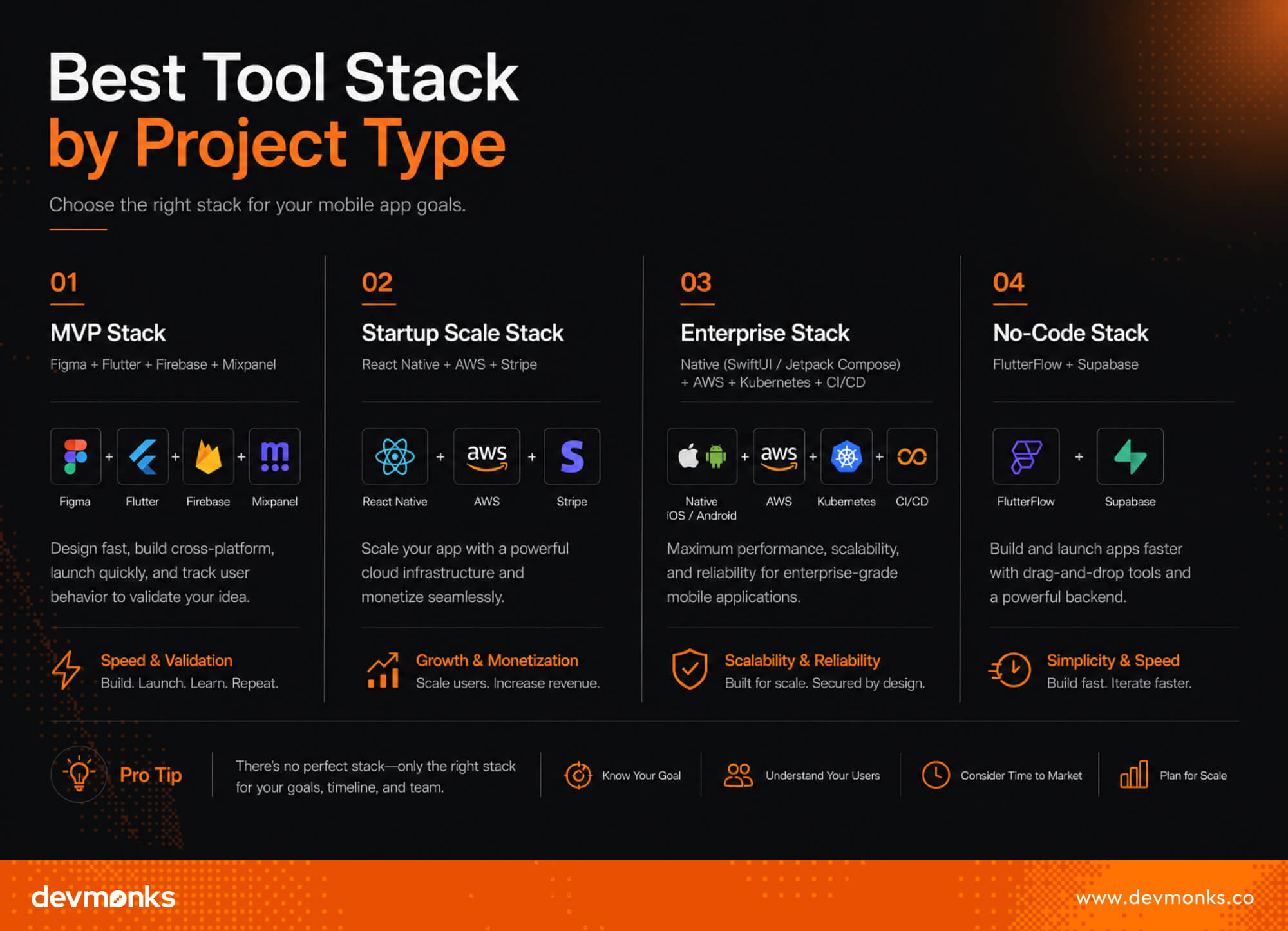
Different mobile apps need different tool stacks. The right combination depends on speed, scalability, budget, and long-term goals. Here are some practical examples:
MVP Stack
Figma + Flutter + Firebase + Mixpanel
This stack is best for fast product validation. Figma is used for quick UI/UX design, Flutter for cross-platform development, Firebase for backend services like authentication and database, and Mixpanel for user behavior tracking.
It helps startups launch quickly and improve based on real user data.
Startup Scale Stack
React Native + AWS + Stripe
This stack supports growing startups. React Native enables faster cross-platform development using JavaScript.
AWS provides scalable cloud infrastructure, while Stripe handles secure payment processing. It is ideal for apps that need flexibility and early revenue generation.
Enterprise Stack
Native (SwiftUI / Jetpack Compose) + AWS + Kubernetes + CI/CD tools
This setup is built for large-scale applications. Native development ensures top performance, AWS and Kubernetes handle heavy infrastructure and scaling, and CI/CD tools automate testing and deployment for continuous delivery.
No-Code Stack
FlutterFlow + Supabase
This stack is best for non-technical users or rapid prototyping. FlutterFlow simplifies UI building, while Supabase provides backend services with authentication and databases.
Common Mobile App Tool Selection Mistakes
Choosing mobile app development tools without a clear strategy can lead to performance issues, higher costs, and scaling problems later. Here are some common mistakes developers and businesses make:
- Choosing tools by hype: Many teams pick popular tools without checking if they actually fit the project's needs.
- Ignoring scalability: Some tools work well for small apps but fail when user traffic grows.
- Overengineering the stack: Using too many tools or overly complex architectures slows development rather than improving it.
- Weak testing setup: Skipping proper testing tools leads to bugs, crashes, and poor user experience after launch.
- Poor analytics setup: Without analytics tools, teams cannot understand user behavior or improve the app effectively.
- Lock-in risk: Relying too heavily on one platform or backend tool can make future migration difficult and expensive.
FAQs
Which is better, Swift or Flutter?
Swift is better for high-performance native iOS apps, while Flutter is better for cross-platform development with a single codebase. If you want iOS-only quality, choose Swift. If you want faster multi-platform apps, choose Flutter.
What are the best mobile app development tools for beginners?
Beginners should start with simple tools like Flutter, React Native, and Visual Studio Code. For the backend, Firebase is easy to learn. For design, Figma helps create UI without coding. These tools are beginner-friendly and widely used.
Should I learn Flutter or Native?
Learn Flutter if you want to build apps for both Android and iOS quickly. Choose native development (Swift or Kotlin) if you want deep platform knowledge and maximum performance. Flutter is faster to start, in contrast, native is deeper to master.
.png)
.svg)
Frequently Asked Questions
How can I discuss an AI MVP with Dev Monks?

Book a strategy call with your use case, existing systems, and project priorities. The team can help define an initial scope and the dependencies that need to be addressed.
Does using AI replace engineering review?
Dev Monks uses AI-assisted workflows with human-guided decisions. Product requirements, engineering choices, and testing remain part of the development process.
What AI development services does Dev Monks offer?
Dev Monks offers agentic AI solutions, custom language-model solutions, workflow automation, and RAG development. Its broader services include SaaS engineering, MVP development, backend integrations, and web and mobile applications.
Is Dev Monks an official OpenAI Select Partner?
Yes. Dev Monks is now an official OpenAI Select Partner within the OpenAI Partner Network.
How long does it usually take to complete a project?
We combine AI-driven workflows with product-first engineering to provide MVP development services for startups and enterprises. Our approach balances speed, reliability, and usability while keeping teams involved. We deliver production-ready, scalable solutions, not just prototypes or demos.
What makes Dev Monks different from other development companies?
We combine AI-driven workflows with product-first engineering to provide MVP development services for startups and enterprises. Our approach balances speed, reliability, and usability while keeping teams involved. We deliver production-ready, scalable solutions, not just prototypes or demos.
How Involved Will My Team be During Development?
We combine AI-driven workflows with product-first engineering to provide MVP development services for startups and enterprises. Our approach balances speed, reliability, and usability while keeping teams involved. We deliver production-ready, scalable solutions, not just prototypes or demos.
How involved will my team be during development?
We combine AI-driven workflows with product-first engineering to provide MVP development services for startups and enterprises. Our approach balances speed, reliability, and usability while keeping teams involved. We deliver production-ready, scalable solutions, not just prototypes or demos.
Do you develop both web and mobile applications?
We combine AI-driven workflows with product-first engineering to provide MVP development services for startups and enterprises. Our approach balances speed, reliability, and usability while keeping teams involved. We deliver production-ready, scalable solutions, not just prototypes or demos.
How can Dev Monks help my startup launch faster
We combine AI-driven workflows with product-first engineering to provide MVP development services for startups and enterprises. Our approach balances speed, reliability, and usability while keeping teams involved. We deliver production-ready, scalable solutions, not just prototypes or demos.

%20vs%20new%20Date().jpg)