Best AI for Coding Python Free: 8 Top Tools Ranked
.png)

.svg)
[ key takeways ]
- The best free AI for Python coding depends on your goals, workflow, and coding experience.
- ChatGPT Free offers the best overall balance for Python coding tasks today, efficiently.
- Claude Free excels at debugging Python errors through strong reasoning and detailed explanations.
- Windsurf and GitHub Copilot provide excellent VS Code integration with smart autocomplete features.
- Google Gemini Free handles larger codebases effectively thanks to its generous context window.
.svg)
The best free AI for Python coding depends on your goals. ChatGPT excels at code generation and learning, Claude is outstanding for debugging, Gemini handles large codebases well, while GitHub Copilot and Windsurf shine inside VS Code with powerful autocomplete features.
No single AI is perfect for every task. An AI that works well for Django development may not be the best for competitive programming or data science.
Knowing which tool is best for writing code, fixing bugs, or learning Python can save time and improve productivity. Read on to compare the top free Python AI tools and find the right one for your workflow.
What Is the Best Free AI for Python Coding?
The best free AI for Python coding depends on your needs, but ChatGPT Free offers the best overall balance for most users. It combines code generation, explanations, debugging help, and learning support in a simple interface.
Whether you are writing your first Python script or building a larger project, it works as a reliable AI coding assistant. Learning web development takes a lot of time, especially if you're starting with Python. But if you have ChatGPT, it's way easier.
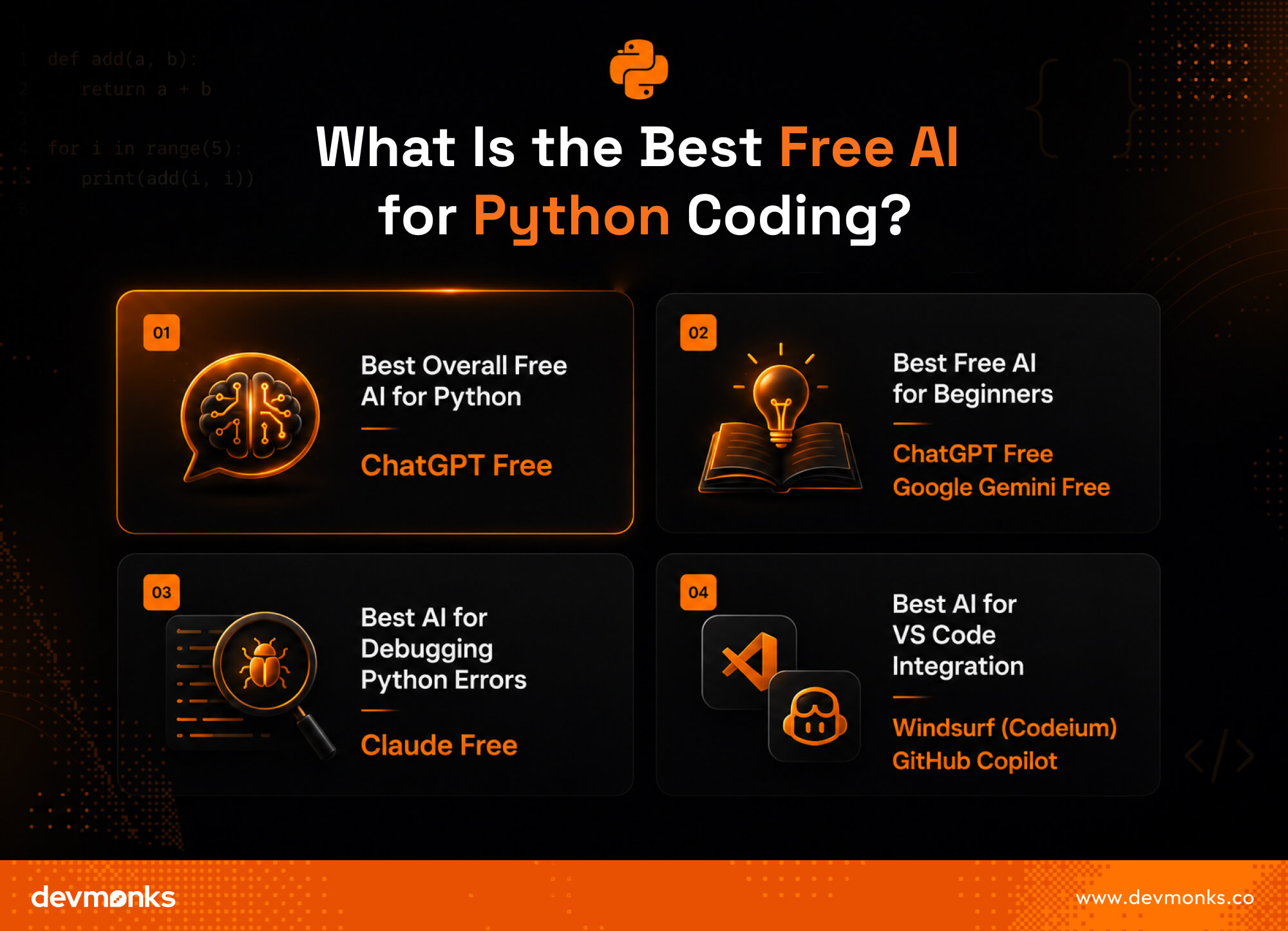
Best Overall Free AI for Python
ChatGPT Free is the top choice for most developers. It supports code generation, explains concepts clearly, and helps fix errors. Its ease of use makes it suitable for both beginners and experienced programmers.
Best Free AI for Beginners
For beginners, ChatGPT Free and Google Gemini Free are excellent Python AI tools. They explain code in simple language, answer follow-up questions, and help users learn Python step by step. Their conversational style makes coding less intimidating.
Best AI for Debugging Python Errors
When it comes to debugging, Claude Free stands out. Its strong reasoning abilities allow it to analyze complex code and identify the root cause of errors. Instead of only suggesting fixes, it often explains why the problem occurred.
Best AI for VS Code Integration
If you work in VS Code, Windsurf (Codeium), and GitHub Copilot are excellent options. They provide autocomplete, smart code completion, and in-editor AI assistance, which helps developers write Python code faster without leaving their IDE.
While AI tools can help developers write code faster, businesses often require expert implementation and custom solutions.
Agencies like Dev Monks use AI-assisted development practices to build high-quality websites and applications tailored to specific business needs.
Top Free AI Tools for Python Coding Compared
If you are searching for the best free AI for coding Python, you have plenty of great options today. Some tools work as chat assistants, while others integrate directly into your code editor.
The right choice depends on whether you need code completion, debugging, or full project support. Here is a detailed look at the top free AI coding tools for Python developers.
ChatGPT Free
ChatGPT Free is one of the most popular AI tools for Python coding. It helps users write scripts, explain concepts, generate functions, and debug errors.
Beginners especially enjoy its conversational style because they can ask follow-up questions and receive detailed explanations.
The tool is excellent for learning Python syntax, understanding algorithms, and fixing common bugs. It can also generate code snippets quickly and explain why a certain approach works.
However, the free version has usage limits and may not always provide editor-based autocomplete or code completion features. You usually need to copy and paste code into the chat interface.
Claude Free
Claude Free stands out for its strong reasoning abilities. It performs especially well when analyzing complex Python code and identifying logical errors.
Many developers use it for debugging because it explains problems clearly and suggests practical fixes.
This AI coding tool is useful for reviewing large code blocks and improving code quality. It often provides thoughtful responses that help developers understand the root cause of bugs rather than simply offering quick fixes.
The free version may have message limits depending on usage.
Google Gemini Free
Google Gemini Free is another powerful option for Python developers. It offers generous free usage and supports long conversations, which makes it useful for larger coding projects.
One of its biggest strengths is handling long context windows. This helps developers to work with larger files and maintain continuity across multiple coding tasks.
Gemini can assist with code generation, debugging, and explanations while integrating with Google's ecosystem.
Windsurf (Codeium)
Windsurf, powered by Codeium, is a strong free AI coding tool designed for developers who prefer working directly inside their editor. It provides fast autocomplete and code completion features that speed up Python development.
The tool supports popular editors such as VS Code, which makes it convenient for daily coding. Developers can generate functions, receive suggestions, and improve productivity without constantly switching tabs.
GitHub Copilot Free
GitHub Copilot Free gives developers access to AI-powered coding assistance within the GitHub ecosystem. It offers a free quota that allows users to experience AI-driven code completion and autocomplete features.
For Python developers already using GitHub repositories, Copilot integrates smoothly into their workflow. It can generate repetitive code, suggest functions, and help reduce development time. However, advanced usage may require a paid subscription.
Cursor Free
Cursor is an AI-powered code editor built specifically for developers. Unlike chat-based tools, Cursor brings AI directly into the coding environment.
This editor-based workflow helps users write, edit, and debug Python code without leaving the workspace.
Cursor supports intelligent code completion, project understanding, and quick debugging. Developers who prefer an integrated coding experience often find Cursor highly efficient.
Replit AI
Replit AI is ideal for users who want browser-based coding without installing software. It combines an online IDE with AI assistance, which makes Python development accessible from almost any device.
The AI features help with code generation, debugging, and explanations directly inside the browser. This makes Replit especially useful for students, beginners, and developers who need a portable coding environment.
Feature Comparison Table of Free Python AI Tools
Choosing the best AI for coding Python for free can be difficult because each tool shines in different areas. Some focus on debugging, while others excel at code completion or editor integration.
The table below compares the most important features to help you pick the right AI coding assistant for your needs.
Which Free AI Is Best for Different Python Tasks?
Not all Python AI tools are built for the same job. Some are better at code generation, while others excel at Python debugging or code explanation. Choosing the right AI can save time and improve your coding experience.
Best AI for Writing Python Scripts
For writing Python scripts, ChatGPT Free and Google Gemini Free are excellent choices. They can generate code quickly, explain syntax, and suggest better ways to solve problems.
Whether you need a simple calculator or a web scraper, these tools can help.
Best AI for Debugging Errors
If your code keeps throwing errors, Claude Free is one of the best options. Its strong reasoning skills make it excellent for Python debugging and code refactoring. It often identifies not only the bug but also why it happened.
Best AI for Django Development
Developers working with Django can benefit from ChatGPT and GitHub Copilot. These tools understand common Django patterns, such as models, views, and templates. They can generate boilerplate code and speed up development.
Best AI for Data Science and Pandas
For data science tasks, ChatGPT and Gemini perform very well. They can help with libraries like NumPy, Pandas, and Matplotlib. From cleaning datasets to creating charts, these AI assistants simplify complex tasks.
Best AI for Learning Python
Beginners often prefer ChatGPT Free because of its teaching style. It provides step-by-step explanations, answers questions, and breaks down difficult concepts into easy language.
Best AI for Competitive Programming
For logic-heavy problems and algorithms, Claude Free and Gemini Free are strong choices. They can explain time complexity, suggest efficient solutions, and help developers improve their problem-solving skills.
Can AI Generate Entire Python Projects?
Yes, AI can generate entire Python projects, but it is not fully autonomous. Modern AI tools can create project structures, write code, and even generate documentation.
They are especially useful for building small to medium-sized applications quickly. For enterprise web development, it's better to take human assistance.
What AI Can Build Automatically
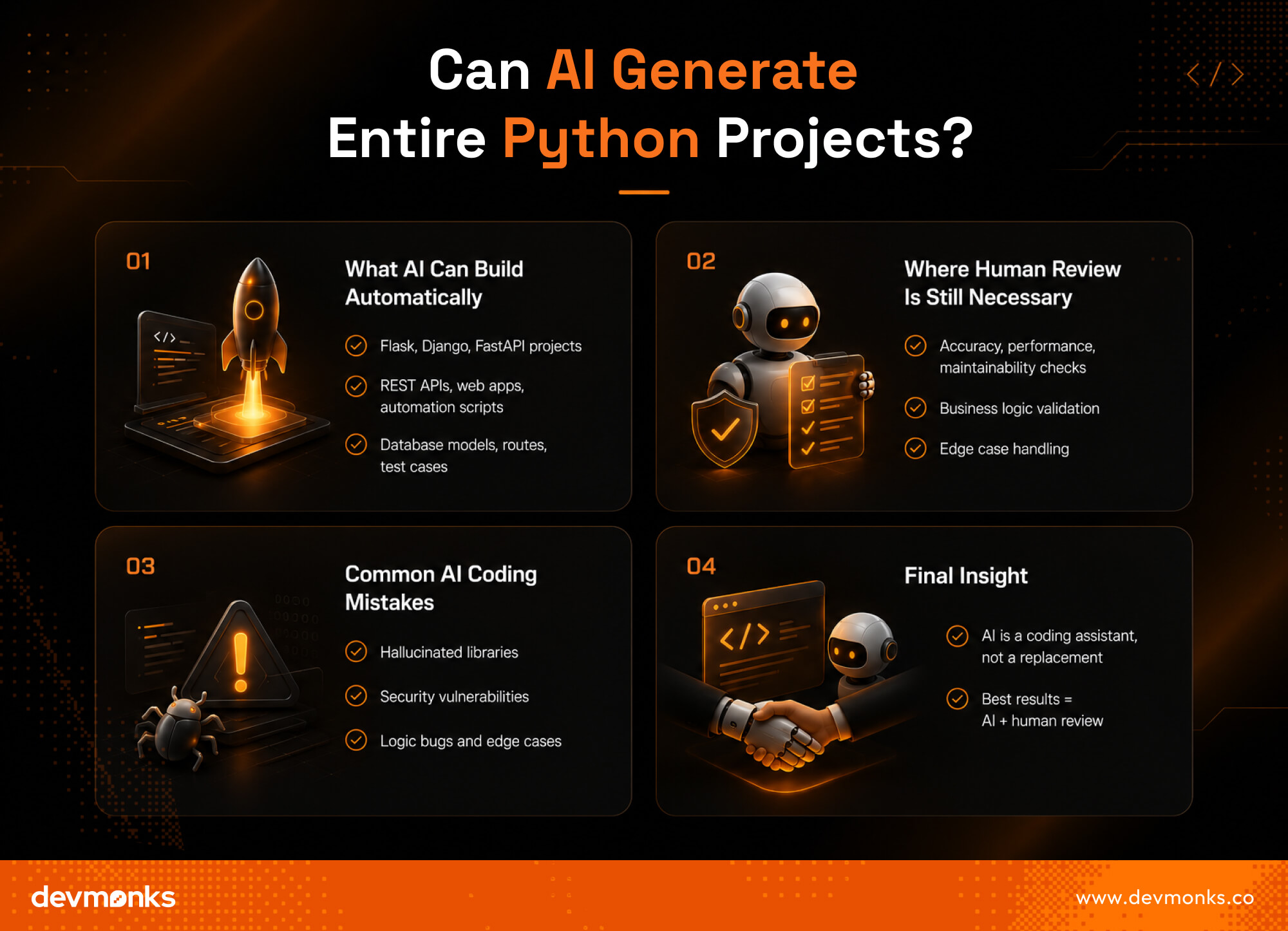
AI can create Python applications using frameworks like Flask, Django, and FastAPI. For example, it can generate REST APIs, web applications, data analysis scripts, and automation tools.
AI can also write database models, create routes, and suggest test cases. This greatly speeds up development and reduces repetitive work.
Where Human Review Is Still Necessary
Even though AI is powerful, human review remains essential. Developers should always check the generated code for accuracy, performance, and maintainability.
AI may not fully understand business requirements or edge cases. Human oversight ensures that the application works as intended and follows best practices.
This is where experienced developers and reliable agencies come in. Agencies like Dev Monks combine AI-assisted development with expert review to ensure applications are secure, scalable, and aligned with business goals.
Human oversight ensures that the final product works as intended and follows industry best practices.
Common AI Coding Mistakes
AI-generated code is not perfect. Common mistakes include:
- Hallucinated libraries: The AI may reference packages, APIs, or functions that do not actually exist.
- Security issues: Generated code can contain vulnerabilities such as insecure authentication, poor input validation, or unsafe database queries.
- Logic bugs: The code may work incorrectly in certain scenarios due to flawed reasoning or missed edge cases.
AI is an excellent coding assistant, but it should be treated as a helper rather than a replacement for developers. The best results come from combining AI-generated code with careful human review.
How to Use AI Effectively for Python Coding
AI can save hours of work, but the quality of its output depends on how you use it. With the right approach, AI can become a powerful Python coding assistant rather than just a code generator.
Writing Better Prompts
Good prompts lead to better results. This is known as prompt engineering. Instead of saying, "Write Python code," be specific. For example, ask: "Write a Python script that reads a CSV file and calculates average sales."
Clear instructions help AI generate more accurate code.
Providing Error Messages and Context
When asking AI to fix bugs, include the error message and relevant code. Context matters. For example:
"I'm getting KeyError: 'name' in this Pandas code. How can I fix it?"
Sharing details helps the AI identify the issue faster and provide better debugging suggestions.
Asking AI to Explain Code
AI is not only for writing code. You can ask it to explain functions, algorithms, or syntax in simple terms. This makes learning Python easier and helps developers understand why the code works.
Using AI With VS Code
Many AI tools work directly inside VS Code through extensions. Tools like GitHub Copilot and Windsurf provide autocomplete, code completion, and debugging support within the editor.
This creates a smoother workflow and lets developers code faster without switching between apps.
ChatGPT vs Claude vs Gemini vs Copilot for Python
Choosing the best AI for Python depends on what you value most. Some tools excel at coding accuracy, while others are better for debugging or editor integration. Here's how they compare.
Accuracy
ChatGPT and Claude are known for producing accurate Python code and clear explanations. Gemini performs well on larger codebases due to its long context window.
GitHub Copilot is highly effective for generating code inside an IDE, but may occasionally suggest outdated patterns.
Debugging Ability
When it comes to debugging, Claude often stands out because of its strong reasoning skills. It explains why an error occurs instead of simply providing a fix.
ChatGPT also performs very well for debugging and code explanations. Gemini is useful when working with long scripts or multiple files.
Free Usage Limits
All four tools offer free access, but with limitations. ChatGPT Free and Claude Free have message limits.
Gemini Free generally provides generous usage and larger context windows. GitHub Copilot Free includes a monthly quota for code suggestions.
IDE Integration
For IDE support, GitHub Copilot is the clear winner. It integrates seamlessly with editors like VS Code and works directly in your coding environment. ChatGPT, Claude, and Gemini are primarily chat-based, though extensions are available.
Which One Should You Choose?
Choose ChatGPT if you want the best all-around AI assistant. Pick Claude for debugging Python errors. Use Gemini for large projects and long conversations. Select GitHub Copilot if you prefer AI built directly into your editor.
Limitations of Free AI Coding Assistants
Free AI coding assistants can boost productivity, but understanding their limitations helps you use them more effectively.
- Usage caps: Most free plans limit the number of messages, code generations, or requests you can make each day or month.
- Context limitations: AI tools may struggle with large codebases, multiple files, or long conversations due to context window restrictions.
- Privacy concerns: Avoid sharing sensitive information such as passwords, API keys, or confidential business data with AI tools.
- Hallucinations: AI can sometimes generate incorrect code, suggest nonexistent libraries, or provide inaccurate explanations.
- Dependency on prompts: The quality of AI output depends heavily on the prompt. Clear and detailed instructions usually produce better results.
FAQs
Which AI is completely free for Python coding?
Several AI tools offer free plans for Python coding, including ChatGPT Free, Claude Free, Gemini Free, and Windsurf (Codeium). While many have usage limits, Windsurf provides generous free code completion features, which makes it one of the best free AI coding tools.
What AI works inside VS Code?
Many AI coding assistants integrate directly with VS Code. Popular options include GitHub Copilot, Windsurf (Codeium), and Cursor. These tools provide autocomplete, code completion, debugging assistance, and AI-powered suggestions without requiring developers to leave the editor.
Can AI write Django applications?
Yes, AI can generate Django applications by creating models, views, templates, and API endpoints. Tools like ChatGPT and GitHub Copilot can build project structures and write boilerplate code, though developers should always review the output for accuracy and security.
End Notes
Chat-based tools like ChatGPT, Claude, and Gemini are ideal for learning and debugging. Meanwhile, editor-based tools such as Cursor, Windsurf, and GitHub Copilot provide seamless AI assistance directly inside coding environments.
Your best choice depends on whether you prioritize debugging, autocomplete, or an integrated development workflow.
.png)
.svg)
Frequently Asked Questions
How can I discuss an AI MVP with Dev Monks?

Book a strategy call with your use case, existing systems, and project priorities. The team can help define an initial scope and the dependencies that need to be addressed.
Does using AI replace engineering review?
Dev Monks uses AI-assisted workflows with human-guided decisions. Product requirements, engineering choices, and testing remain part of the development process.
What AI development services does Dev Monks offer?
Dev Monks offers agentic AI solutions, custom language-model solutions, workflow automation, and RAG development. Its broader services include SaaS engineering, MVP development, backend integrations, and web and mobile applications.
Is Dev Monks an official OpenAI Select Partner?
Yes. Dev Monks is now an official OpenAI Select Partner within the OpenAI Partner Network.
How long does it usually take to complete a project?
We combine AI-driven workflows with product-first engineering to provide MVP development services for startups and enterprises. Our approach balances speed, reliability, and usability while keeping teams involved. We deliver production-ready, scalable solutions, not just prototypes or demos.
What makes Dev Monks different from other development companies?
We combine AI-driven workflows with product-first engineering to provide MVP development services for startups and enterprises. Our approach balances speed, reliability, and usability while keeping teams involved. We deliver production-ready, scalable solutions, not just prototypes or demos.
How Involved Will My Team be During Development?
We combine AI-driven workflows with product-first engineering to provide MVP development services for startups and enterprises. Our approach balances speed, reliability, and usability while keeping teams involved. We deliver production-ready, scalable solutions, not just prototypes or demos.
How involved will my team be during development?
We combine AI-driven workflows with product-first engineering to provide MVP development services for startups and enterprises. Our approach balances speed, reliability, and usability while keeping teams involved. We deliver production-ready, scalable solutions, not just prototypes or demos.
Do you develop both web and mobile applications?
We combine AI-driven workflows with product-first engineering to provide MVP development services for startups and enterprises. Our approach balances speed, reliability, and usability while keeping teams involved. We deliver production-ready, scalable solutions, not just prototypes or demos.
How can Dev Monks help my startup launch faster
We combine AI-driven workflows with product-first engineering to provide MVP development services for startups and enterprises. Our approach balances speed, reliability, and usability while keeping teams involved. We deliver production-ready, scalable solutions, not just prototypes or demos.
%20vs%20new%20Date().jpg)