[ key takeways ]
Frontend vs backend development is one of the most common comparisons in web development, yet many people still confuse the roles of each.
Frontend Development focuses on the parts of a website or application that users see and interact with, while Backend Development powers everything behind the scenes through server-side development, databases, and application logic.
Both are essential for creating modern web applications, and neither can function effectively without the other. Understanding the difference is important whether you are planning a career in tech, hiring developers, or building a digital product.
It helps you choose the right skills, technologies, and development approach for your goals.
In this article, we will break down the key differences between frontend and backend development, how they work together, and which path may be right for you.
To make the differences easier to understand, the table below summarizes frontend and backend development side by side.
Building a successful application requires both a strong frontend and a reliable backend working together seamlessly.
At Dev Monks, our development team specializes in both areas, which creates digital products that deliver exceptional user experiences while maintaining powerful performance behind the scenes.
Frontend and backend development are two sides of the same coin, but they focus on very different parts of a digital product.
Frontend deals with what users see and interact with, while backend works behind the scenes to make everything function properly.
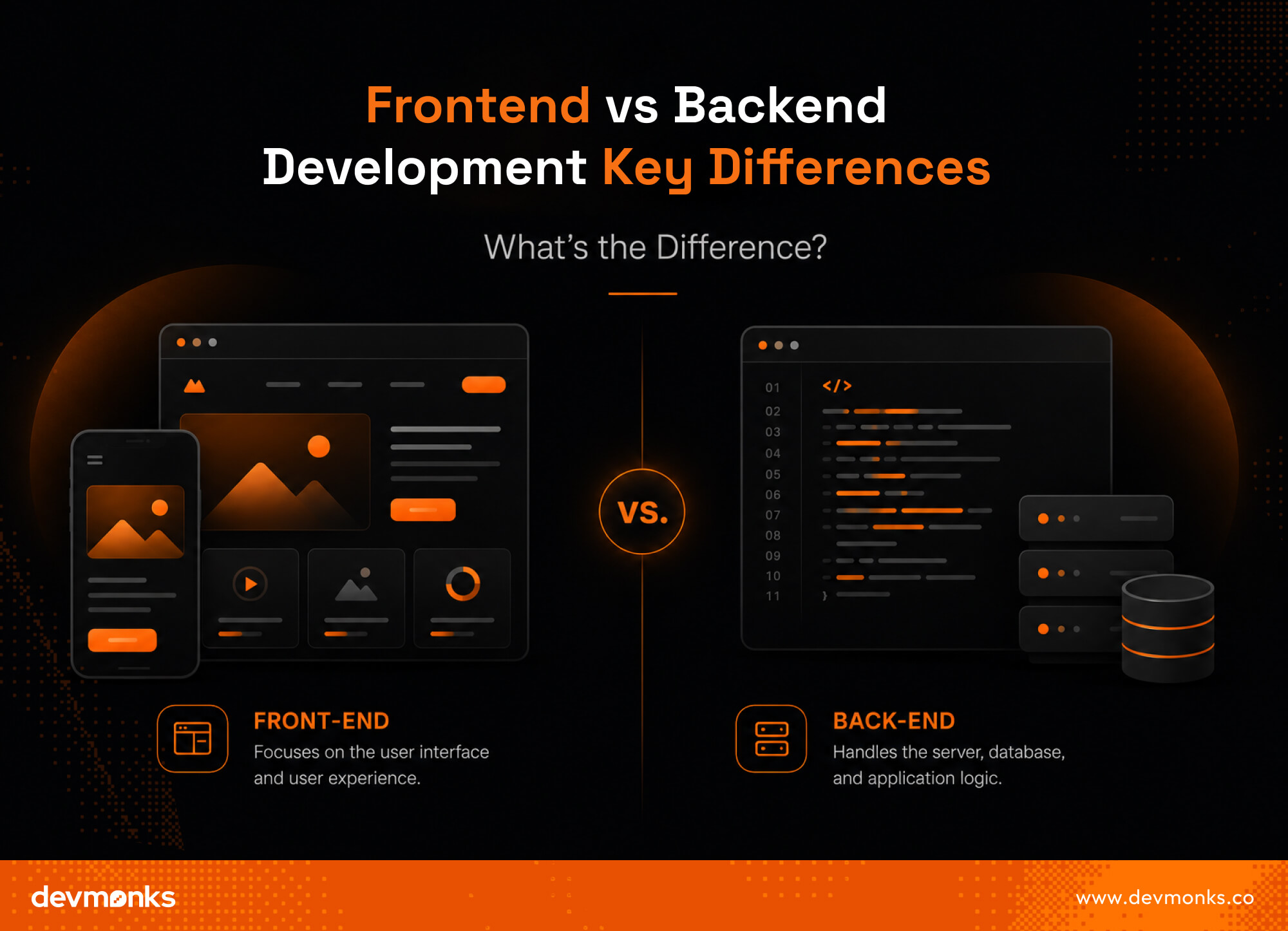
Frontend development focuses on the visual and interactive part of a website or application, whereas backend development focuses on the server-side logic, data handling, and system performance.
Frontend is what users directly see on their screens, such as buttons, layouts, colors, images, forms, and navigation. It is all about user experience and making the product easy and enjoyable to use.
Developers use technologies like HTML, CSS, and JavaScript to build this layer.
On the other hand, backend development powers the application behind the scenes. It handles databases, user authentication, server requests, and application logic using languages like Python, Java, or Node.js.
The frontend user interface is what users interact with directly, on the other hand, the backend does not have a visible interface for users because it works in the background.
The frontend UI includes everything a user clicks, types, and views, making it responsible for design, responsiveness, and user experience. It ensures the application looks good and feels smooth.
In contrast, backend development focuses on business logic, which means how data is processed, stored, and managed.
It decides what happens after a user submits a form or clicks a button. The backend ensures that the right data is delivered to the frontend securely and efficiently.
Frontend development works with client-side architecture, whereas backend development works with server-side architecture that powers the application logic and data flow.
On the frontend, applications are structured as component-based systems using frameworks like React, Vue.js, and Angular.
Many frontend applications are also built with frameworks like Next.js, which helps improve performance, routing, and server-side rendering.
These components run in the browser and are responsible for rendering the user interface and handling user interactions. Everything is delivered to users through the client-side.
On the backend, the architecture is built around servers, APIs, and databases. Technologies like REST API, GraphQL, and PostgreSQL manage how data is stored, retrieved, and shared.
Backend systems handle business logic, authentication, hosting, scalability, and performance to ensure smooth application functioning.
Frontend processing happens on the client-side inside the user’s browser, on the contrary, backend processing happens on the server-side, where data is processed before being sent to the user.
In client-side processing, the browser handles tasks like rendering pages, updating UI elements, and managing user interactions in real time.
This makes applications faster and more interactive for users. Technologies like JavaScript frameworks are mainly used here.
In server-side processing, the backend handles requests, processes data, communicates with databases, and sends responses back to the frontend.
It ensures security, data accuracy, and proper business logic execution before anything reaches the user interface.
Frontend development focuses on client-side tools and frameworks, whereas backend development focuses on server-side frameworks, databases, and infrastructure tools.
On the frontend, developers commonly use frameworks like React, Vue.js, Angular, and Svelte along with TypeScript to build interactive, scalable, and responsive user interfaces. These tools help create smooth user experiences in the browser.
On the backend, developers use frameworks such as Express.js, Django, Spring Boot, Laravel, and ASP.NET to build secure and scalable applications.
Backend systems also rely heavily on databases like PostgreSQL, MySQL, MongoDB, and Redis to store and manage data efficiently. Together, these frontend and backend frameworks form complete web development systems.
Frontend performance responsibilities emphasize ensuring the application loads quickly and provides a smooth user experience, whereas backend performance responsibilities deal with handling data processing, server efficiency, and system reliability.
The frontend is responsible for optimizing images, reducing load times, managing rendering speed, and ensuring a responsive design across devices. It directly affects how fast and smooth the app feels to users.
The backend ensures performance by optimizing database queries, managing server load, handling multiple requests, and maintaining API efficiency.
It also focuses on scalability so the system can handle more users without slowing down or crashing under heavy traffic.
Frontend security focuses on protecting the user interface and preventing client-side vulnerabilities, whereas backend security focuses on protecting data, APIs, and server-side systems from threats.
On the frontend, security work includes handling safe input forms, preventing cross-site scripting (XSS), and ensuring that sensitive data is not exposed in the browser. However, most frontend security is limited because code is visible to users.
On the backend, security responsibilities are much deeper and more critical. It includes securing APIs, protecting databases, managing encryption, controlling access, and validating every request.
Backend systems also handle authentication and authorization to ensure only the right users can access specific data and functions.
Frontend development challenges are based on creating smooth user experiences across different devices and browsers, whereas backend development challenges focus on managing system complexity, data handling, and server reliability.
On the frontend side, developers often face issues like browser compatibility, responsive design, performance optimization, and maintaining a consistent UI across platforms.
Conversely, on the backend side, challenges include designing scalable APIs, managing databases, handling high traffic loads, and ensuring fast and secure data processing.
Backend developers must also deal with system integration and error handling between multiple services.
Overall, frontend challenges are more user-facing, while backend challenges are more focused on system stability, data flow, and application architecture.
Frontend developer skills focus on building user interfaces and creating smooth user experiences, whereas backend developer skills focus on managing servers, databases, and application logic.
Frontend developers need technical skills in HTML, CSS, JavaScript, and frameworks like React or Vue.js to build responsive and interactive designs.
Backend developers require knowledge of programming languages like Python, Java, or Node.js, along with databases and APIs. Both roles need strong problem-solving skills to debug issues and improve performance.
Communication and collaboration skills are also important because frontend and backend developers must work closely together to build fully functional applications that meet user and business needs.
For most beginners, frontend development is easier and is usually the best place to start before learning backend development.
Frontend and backend development offer strong career opportunities in software engineering, but their paths and demand can differ slightly.
Frontend developer careers focus on building user interfaces, while backend developer careers focus on building server-side systems and data management.
In the industry, both roles are highly in demand, especially as companies expand their digital products.
Backend roles often require deeper system knowledge, which can sometimes lead to slightly higher salaries, while frontend roles are highly valued for user experience design.
So, in general, backend developers tend to earn slightly more on average, though salaries vary based on experience, location, industry, and technical expertise.
Remote work opportunities are available in both fields, and many professionals eventually grow into full-stack developer or software engineer roles with broader responsibilities.
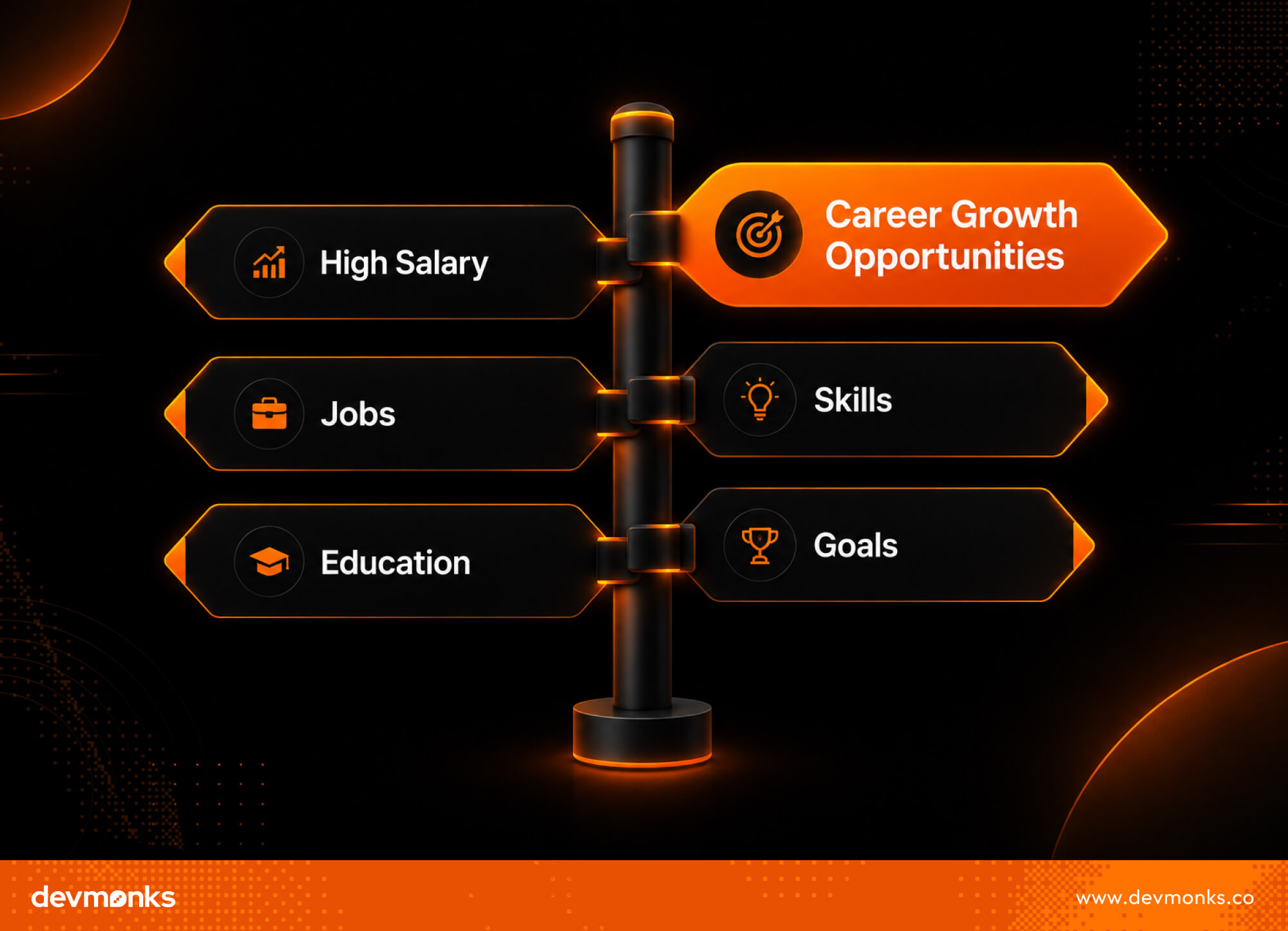
Frontend development is often seen as easier to start with, on the other hand, backend development is considered more complex due to its focus on logic, servers, and databases.
Learning frontend development involves understanding HTML, CSS, and JavaScript first, then gradually moving to frameworks like React or Vue.js. It feels more visual, so beginners can quickly see results on the screen.
Learning backend development requires understanding programming languages, APIs, database systems, and server architecture. Beginners often struggle with debugging, data flow, and system logic.
A good learning path is to start with frontend basics, then move to backend concepts, and finally combine both into full-stack development projects.
Frontend and backend developers work closely as a team to build complete and functional software. Their collaboration ensures that users get a smooth experience while the system runs efficiently in the background.
Both sides depend on each other, and communication is a key part of the software development lifecycle.
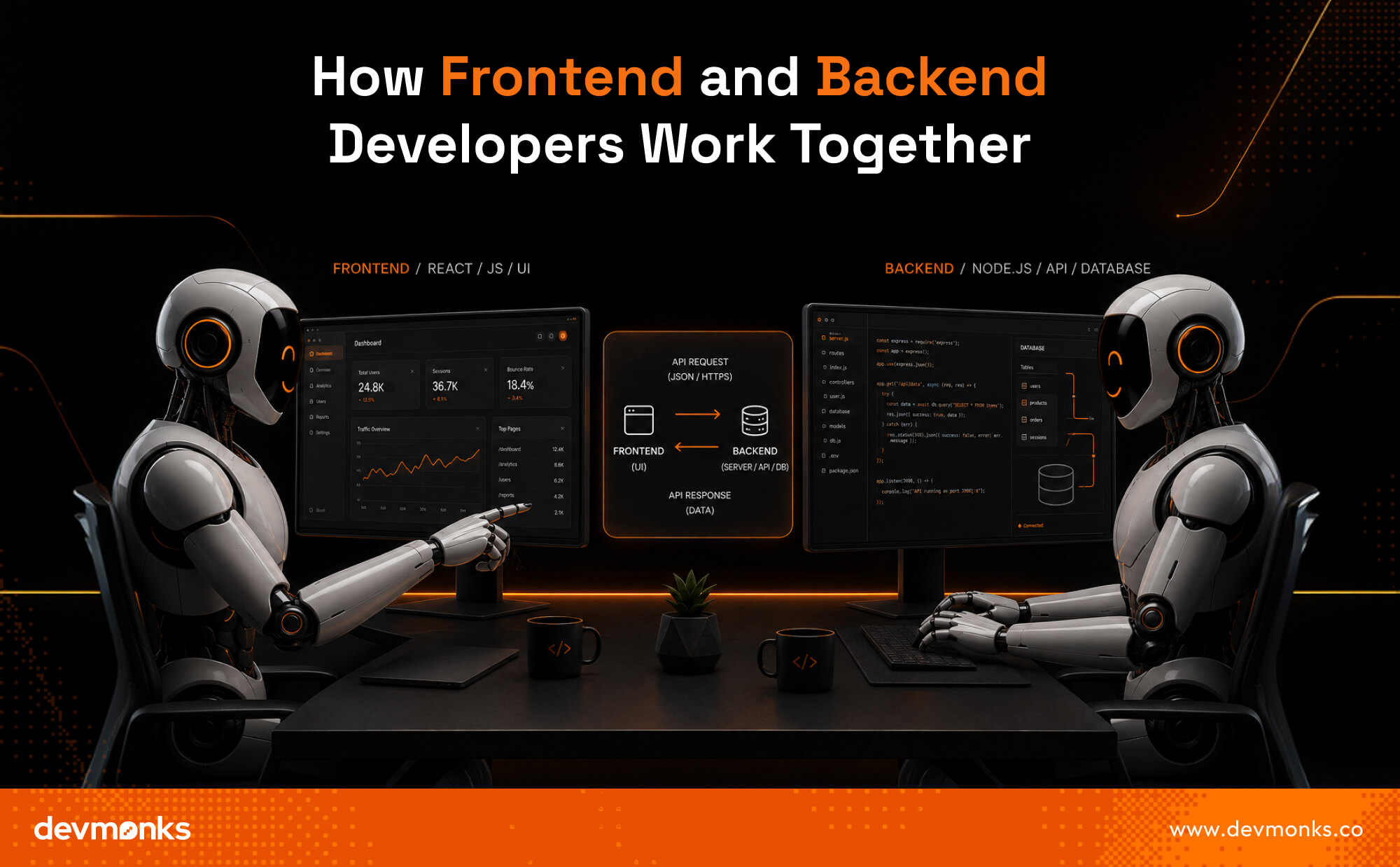
API communication is the main bridge between frontend and backend systems. The frontend sends requests, and the backend responds with data using APIs, often in JSON format.
This allows both sides to stay separate but still work together smoothly in real time. This API-driven approach is also what makes headless web development possible.
In this stage, UI/UX designs are shared with frontend developers. They convert design files into interactive interfaces while ensuring backend requirements are considered for functionality and data integration.
Data flows from the frontend to the backend through user actions like form submissions. The backend processes it, interacts with the database, and sends the required response back to the frontend.
In agile teams, frontend and backend developers work in short development cycles. They attend regular meetings, review progress, and quickly fix issues together to improve product quality.
This kind of close collaboration is a key part of custom software development, where frontend and backend teams work together to build tailored digital solutions for specific business needs.
Teams also use GitHub to manage code, review changes, and collaborate efficiently throughout the development process.
For larger custom software projects, reliable DevOps consultants also play an important role in streamlining development, testing, and deployment.
Full-stack development means working on both the frontend and backend parts of a web application. A full-stack developer handles everything from designing user interfaces to managing servers, APIs, and databases.
This makes them flexible professionals who can build complete applications on their own or support both sides of a development team.
Full-stack development is important in modern software engineering because it helps companies build products faster and manage systems more efficiently.
A full-stack developer is responsible for building the user interface, writing backend logic, managing databases, and connecting everything using APIs. They ensure that both frontend and backend work smoothly together.
Some popular stacks include the MERN Stack and MEAN Stack, which combine frontend frameworks with backend technologies and databases to create complete applications.
Businesses hire full-stack developers when they need faster development, smaller teams, or flexible engineers who can handle both frontend and backend tasks in software projects.
For businesses looking for complete development support, working with a team that understands both frontend and backend development can simplify the entire process.
At Dev Monks, our developers combine full-stack expertise with modern technologies to build scalable, high-performing web and mobile applications from end to end.
No, AI is unlikely to replace frontend developers completely. While AI can automate repetitive coding tasks and generate UI components, developers are still needed to create user experiences, solve complex problems, and ensure applications meet business and user requirements.
Yes, you can learn backend development in 6 months with consistent practice. Focus on a programming language, databases, APIs, and server concepts. While mastering backend development takes longer, six months is enough to build basic projects and gain practical skills.
C++ is primarily used for backend development rather than frontend development. It is commonly used for system programming, game engines, high-performance applications, and server-side software. Frontend development typically relies on technologies such as HTML, CSS, and JavaScript.
Frontend and backend development serve different but equally important roles in modern software development. Frontend creates the experiences users see and interact with, while backend powers the functionality behind the scenes.
There is no clear winner between the two. The right choice depends on your interests, skills, and career goals. Together, they form the foundation of every successful digital product.
We combine AI-driven workflows with product-first engineering to provide MVP development services for startups and enterprises. Our approach balances speed, reliability, and usability while keeping teams involved. We deliver production-ready, scalable solutions, not just prototypes or demos.

Cloud-based solutions for remote patient consultations in pharmacies enable patients to connect with pharmacists and healthcare providers through secure online platforms.
They also enable pharmacies to manage patient records, prescriptions, and consultations in real time. These solutions improve access to care, reduce waiting times, and support more efficient pharmacy operations.
As telehealth adoption continues to grow, understanding how cloud telepharmacy works is becoming increasingly important for pharmacies looking to stay competitive and meet evolving patient expectations.
Read this article to know its key features, benefits, challenges, security requirements, and future potential in modern healthcare.
Cloud-based remote patient consultation systems help pharmacies to provide healthcare services online.
These solutions combine telemedicine, cloud computing, and pharmacy systems to connect patients with pharmacists or healthcare providers through video calls, phone calls, or secure messaging.
The cloud acts as a central platform where consultation records, patient information, and pharmacy data are stored securely. Because the information is available online, authorized users can access it from different locations and devices when needed.
In pharmacies, these systems support digital pharmacy consultations, medication counseling, prescription guidance, and follow-up care.
Patients can receive professional advice without visiting the pharmacy, which makes healthcare more convenient and accessible.
Organizations looking to implement these solutions often work with healthcare software development agencies such as Dev Monks to build secure, scalable, and user-friendly telepharmacy platforms.
By using cloud telehealth and virtual care platforms, pharmacies can improve communication, save time, and provide better support for patients while maintaining secure access to important healthcare information.

Cloud technology makes remote consultations possible by connecting patients, pharmacists, and healthcare providers through a secure online platform.
A patient can schedule a consultation, share health information, and join a real-time video consultation from any internet-connected device.
The system then stores and manages the data in the cloud, which allows authorized users to access it when needed.
In a telepharmacy system, patient information moves through cloud infrastructure hosted on platforms such as AWS, Microsoft Azure, or Google Cloud.
Consultation requests, medical records, and communication data are securely transferred between users and cloud servers.
This secure health data exchange allows pharmacists and healthcare providers to review information, update records, and deliver care through a healthcare SaaS platform without delays.
Cloud solutions can also connect with pharmacy management software, prescription processing tools, and point-of-sale systems.
Platforms from providers such as McKesson, Cerner, and Epic Systems support EHR integration and pharmacy workflow automation.
As a result, consultation records, prescriptions, and patient data remain synchronized, which helps pharmacies deliver faster, more accurate, and more efficient services.
Dev Monks can help pharmacies adopt modern cloud technologies to deliver convenient and secure remote healthcare services.
By developing customized telehealth platforms, the company can support pharmacies in improving patient access, communication, and overall care delivery.
Dev Monks can build cloud-based telepharmacy systems customized to a pharmacy's specific needs.
These solutions may include video consultations, appointment scheduling, patient portals, and secure messaging tools that make remote consultations simple and efficient.
A key advantage of cloud technology is its ability to connect with existing healthcare software.
Dev Monks can integrate remote consultation platforms with pharmacy management systems, EHRs, and prescription processing tools, which helps pharmacies maintain a smooth and connected workflow.
Patient data security is a top priority in healthcare. Dev Monks can implement secure cloud infrastructure, data encryption, and access controls to protect sensitive information.
The solutions can also scale easily as patient demand grows, which ensures long-term reliability and performance.
By creating user-friendly platforms, Dev Monks can help pharmacies offer faster access to healthcare services, reduce wait times, and provide a more convenient consultation experience for patients.
Cloud-based telepharmacy solutions include several features that make remote patient consultations more efficient, secure, and convenient.
These tools help pharmacies deliver quality care while improving communication between patients and healthcare providers.
Video consultation is one of the most important telehealth features. Patients can connect with pharmacists or healthcare professionals from any location using a smartphone, tablet, or computer.
Many platforms use HIPAA-compliant video conferencing tools to protect sensitive health information. Solutions built on technologies such as Twilio, Zoom for Healthcare, and Teladoc Health support secure and reliable virtual consultations.
Telepharmacy platforms simplify prescription processing by allowing healthcare providers to create, review, and manage prescriptions digitally. This reduces paperwork, minimizes errors, and speeds up medication delivery.
Cloud-based systems provide secure access to patient data and medical records. Pharmacists can quickly review medication histories, consultation notes, and treatment information, which helps them make informed decisions during consultations.
Secure messaging tools allow patients and pharmacists to communicate instantly. Patients can ask questions, receive medication reminders, and follow up after consultations, which creates a smoother and more connected healthcare experience.
Cloud-based remote consultation systems offer significant benefits for patients, pharmacists, and healthcare organizations. They improve access to care, streamline daily operations, and support better health outcomes.
Remote healthcare access makes it easier for patients to receive professional advice without visiting a pharmacy in person.
This is especially helpful for people living in rural areas, patients with mobility challenges, or those with busy schedules.
Virtual consultation platforms reduce travel time and waiting periods, which helps patients to connect with healthcare professionals more quickly and conveniently.
Cloud-based systems automate many routine tasks, including appointment scheduling, patient record management, prescription processing, and follow-up communication.
This pharmacy efficiency reduces manual paperwork and administrative workload. As a result, pharmacists can spend more time focusing on patient care and medication counseling.
Regular virtual consultations encourage continuous care and stronger patient engagement. Pharmacists can monitor medication use, answer questions, and provide timely reminders.
Medication Therapy Management (MTM) services become easier to deliver through digital platforms, helping patients follow treatment plans more effectively and achieve better health outcomes.
Many patients feel more comfortable discussing health concerns from their homes. Remote consultations provide a private and convenient environment while reducing unnecessary visits.
Platforms similar to those offered by Amwell and Teladoc Health demonstrate how secure digital consultations can improve the overall patient experience while maintaining confidentiality and trust.

Security and data privacy are critical in cloud telepharmacy because pharmacies handle sensitive patient information every day. Strong security measures help protect health records, support healthcare compliance, and maintain patient trust.
Cloud telepharmacy platforms use secure medical cloud technologies to protect patient data. Information is encrypted both when it is stored and when it is transferred between systems.
Features such as multi-factor authentication, role-based access controls, and activity monitoring help prevent unauthorized access.
Solutions built on platforms like Microsoft Azure Security and AWS HealthLake provide advanced security tools for healthcare organizations.
Cloud-based pharmacy systems must comply with healthcare regulations such as HIPAA in the United States and GDPR in Europe.
These frameworks require organizations to protect patient information, control access to records, and report data breaches when necessary. Compliance also helps pharmacies avoid legal risks and maintain industry standards.
Protecting privacy goes beyond cybersecurity. Telepharmacy providers must ensure that only authorized users can view patient information.
Clear consent processes, secure cloud storage, and responsible data handling practices help patients feel confident when using remote consultation services.
Strong privacy measures create a safer and more trustworthy healthcare experience for everyone involved.
While cloud-based consultation systems offer many benefits, pharmacies may face several challenges during implementation. Addressing these issues is important for ensuring a smooth and successful transition to digital healthcare services.
Implementing a cloud-based telepharmacy platform requires reliable internet connectivity, compatible devices, and secure cloud services.
Smaller pharmacies may find the initial investment challenging, especially when upgrading existing systems or purchasing new technology.
Introducing new digital tools often requires changes to existing pharmacy workflows. Pharmacists and staff need proper training to use consultation platforms, manage digital records, and support remote patients.
Resistance to change and limited technical knowledge can slow adoption and reduce efficiency during the transition period.
Protecting patient information is a major concern in healthcare IT adoption. Pharmacies must implement strong security measures and comply with regulations such as HIPAA and GDPR.
Managing secure access, data storage, and privacy requirements can be complex and requires ongoing monitoring.
Cloud consultation platforms must work seamlessly with pharmacy management software, electronic health records, and prescription systems.
Integrating solutions from providers such as Oracle Health (Cerner) and Epic Systems can sometimes present interoperability issues.
Poor integration may lead to data inconsistencies, workflow disruptions, and additional implementation challenges, which makes careful planning essential for long-term success.
The future of telepharmacy is closely connected to advances in artificial intelligence, cloud computing, and healthcare automation. As technology continues to evolve, pharmacies will be able to provide faster, smarter, and more personalized patient care.
AI healthcare systems can help pharmacists analyze patient information, identify potential medication risks, and provide decision support during consultations.
AI-assisted diagnosis tools may also help healthcare professionals detect health concerns earlier and improve treatment planning.
Predictive health analytics can use patient data to identify trends and forecast potential health issues before they become serious. This allows pharmacies to offer proactive care, medication reminders, and personalized health recommendations.
Cloud healthcare innovation will continue to automate routine tasks such as appointment scheduling, prescription processing, and patient follow-ups.
Platforms like Google Cloud Healthcare API can also improve data sharing between healthcare providers, which supports a more connected and efficient digital healthcare ecosystem.
As a result, telepharmacy will become more accessible, efficient, and patient-focused in the years ahead.
Before adopting a cloud-based telepharmacy solution, pharmacies should evaluate several key factors:
Working with an experienced healthcare software development agency such as Dev Monks can help pharmacies address these considerations more effectively and implement a secure, scalable, and compliant telepharmacy solution.
Cloud-based telepharmacy is transforming how pharmacies deliver care, which makes healthcare more accessible, efficient, and patient-focused.
As digital healthcare continues to grow, pharmacies that embrace cloud technology will be better positioned to meet evolving patient expectations and industry demands.
Start with a secure, scalable solution that fits your needs, invest in proper training, and focus on patient experience. The sooner pharmacies adapt, the greater the opportunity to improve care quality and long-term operational success.

Front-end developers focus on the user interface and experience, while full-stack developers work on both the front end and back end of applications. Neither is better, rather, the right choice depends on your interests and career goals.
Understanding the difference is important if you're planning a career in web development or deciding which skills to learn. Each path offers unique opportunities, salaries, and learning curves.
Whether you enjoy visual design or building complete applications, choosing the right direction can shape your future in tech. Read on to know the key differences and find the path that best fits you.

Front-end development focuses on the user interface users interact with, whereas Full-stack development covers both the front-end and the back-end systems behind an application.
In simple terms, front-end developers build what users see, while full-stack developers create and manage the entire application.
Both are important web developer roles in modern software development careers. Many professionals use JavaScript, but full-stack developers work with a broader technology stack.
Agencies like Dev Monks often work across both areas, which handles complete product development from UI to backend systems.
Front-end development focuses on the browser experience and visual design of websites. It involves creating layouts, buttons, menus, and interactive features that users see and use every day.
Developers mainly use HTML to structure content, CSS to style pages, and JavaScript to add interactivity. They also ensure websites work smoothly across different devices and screen sizes.
Full-stack development combines front-end and back-end development. Full-stack developers build user interfaces while also managing servers, application logic, and data.
They often use Node.js for server-side development, work with databases to store information, and connect services through APIs. Their broad skill set allows them to perform complete web application development from start to finish.
Both front-end and full-stack developers play vital roles in web development, but their skills, responsibilities, and career paths differ in several ways.
Front-end developers need a mix of technical and design skills to create engaging and user-friendly websites.
The foundation of front-end development lies in HTML, CSS, and JavaScript. HTML structures web content, CSS handles styling and layouts, and JavaScript adds interactivity to create dynamic user experiences.
Modern developers often use frameworks and libraries to build applications faster. React is one of the most popular choices, while Vue and Angular are also widely used for creating scalable and interactive interfaces.
Front-end developers should understand user interface (UI) design principles and web accessibility to ensure websites are easy for everyone to use. They also need to create mobile-responsive designs that work smoothly across devices.
Knowledge of CSS frameworks like Bootstrap or Tailwind CSS can further speed up development and improve consistency.

Full-stack developers need a broad skill set because they work on both the front end and back end of applications.
Full-stack developers should understand front-end technologies like HTML, CSS, and React. These tools help them create responsive and user-friendly interfaces.
On the server side, developers often use technologies such as Node.js and Express to build application logic and manage requests. Other popular back-end languages include Python, Java, and PHP.
Managing data is a key part of full-stack development. Developers work with SQL databases like PostgreSQL and NoSQL databases like MongoDB to store and retrieve information.
They also use REST APIs to connect different applications and services.
Full-stack developers should know version control tools like Git for collaboration and code management. Basic knowledge of Docker and cloud hosting platforms helps them deploy and maintain applications efficiently.

Salary is often a major factor when choosing between front-end and full-stack development careers. While pay varies by location and experience, full-stack developers generally earn more due to their broader skill set.
According to salary data from Indeed, front-end developers in the United States earn an average salary of around $125,000 per year.
Glassdoor and LinkedIn also report similar ranges, though compensation varies by company and experience level.
Full-stack developers in the U.S. earn an average of about $137,000 per year, according to Indeed. Data from Glassdoor places median compensation near $119,000–$120,000 annually.
Full-stack developers usually earn higher salaries because they handle both front-end and back-end tasks.
They work with user interfaces, servers, databases, and APIs, making them valuable across the entire development process.
For those exploring coding for beginners, front-end development is generally easier to learn than full-stack development because it requires mastering fewer technologies.
Front-end development has a lower entry barrier. Beginners can start with HTML, CSS, and JavaScript and quickly build websites they can see and interact with.
This makes learning more engaging and helps developers progress faster along their developer roadmap.
Full-stack development has a steeper learning curve because it includes both front-end and back-end skills. In addition to user interfaces, learners must understand servers, databases, APIs, and deployment tools.
The timeline depends on learning pace and practice. Many learners become job-ready in 3–6 months for entry-level front-end roles with consistent study.
Full-stack development usually takes 6–12 months or more because of its broader skill requirements and technologies.
Both front-end and full-stack developers are in high demand as businesses continue to invest in digital products and online services. The right choice depends on your interests and career goals.
Front-end developers remain highly sought after because every website and application needs an engaging user interface. Job platforms like LinkedIn regularly list thousands of front-end roles across industries.
Developers who showcase projects on GitHub and stay updated with modern frameworks often have better job prospects.
Full-stack developers are especially valuable because they can handle multiple parts of an application.
Many companies, especially startups and small teams, prefer hiring developers who can work across both front-end and back-end technologies. This versatility creates strong demand in the job market.
Both roles have a promising future, even as AI tools become more advanced. AI can automate repetitive coding tasks, but businesses still need developers to solve problems, design systems, and improve user experiences.
Full-stack developers may have an advantage due to their broader skills, but front-end specialists with expertise in modern technologies will continue to be in demand.
Choosing between front-end and full-stack development depends on your interests, career goals, and preferred way of working. Both paths offer strong job opportunities and rewarding careers.
Front-end development may be the right choice if you enjoy creating user interfaces and visual experiences. It is ideal for those who like design, interactivity, and improving how users interact with websites.
It is also a great option if you want a faster entry into web development, as the learning curve is generally easier.
Full-stack development is a better fit if you want to build complete applications from start to finish. It suits people who enjoy working on both the user-facing side and the server-side logic behind an application.
If solving a wide range of technical problems excites you, full-stack development can provide a more versatile career path.
Yes, many full-stack developers begin their careers in front-end development. Since they already understand user interfaces and browser technologies, transitioning to full-stack development becomes much easier.
A common path is to start with front-end skills and gradually expand into other areas: Front-end → APIs → Backend → Databases → Deployment. This step-by-step approach helps developers build a strong foundation without feeling overwhelmed.
After mastering HTML, CSS, and JavaScript, developers can learn Node.js and Express for server-side development. Understanding SQL helps with managing databases, while Docker simplifies application deployment.
By adding these skills over time, front-end developers can successfully transition into full-stack roles and work on complete web applications.
Understanding the daily responsibilities of each role can help you decide which career path aligns with your interests and strengths.
Front-end developers spend much of their day building user interfaces and improving website experiences. They create layouts, add interactive features, fix UI bugs, and ensure websites work across devices.
They also collaborate closely with designers to turn design concepts into functional web pages.
Full-stack developers work across the entire application. Their tasks may include developing APIs, managing databases, handling deployment, and improving both front-end and back-end functionality.
Because of their broad responsibilities, they often collaborate with multiple teams throughout a project.
Both front-end and full-stack development offer exciting career opportunities, but each path comes with its own advantages and challenges.
Ultimately, the better choice depends on your interests. If you enjoy design and user experiences, front-end development may suit you.
If you prefer working across the entire application, full-stack development can offer broader opportunities.
Technically, yes, but it is not recommended. Full-stack development includes both front-end and back-end skills. Learning front-end technologies like HTML, CSS, and JavaScript first provides a strong foundation for building complete applications.
AI can automate repetitive coding tasks, but it cannot replace human creativity, problem-solving, and system design. Full-stack developers who learn AI tools and adapt to new technologies are likely to remain in demand.
Yes, front-end development remains highly sought after. Businesses need skilled developers to create fast, accessible, and engaging user experiences. As websites and apps continue to evolve, demand for front-end developers remains strong.
In the debate of Full Stack vs Front End, there is no one-size-fits-all answer.
Front-end development is ideal for those who enjoy design and user experiences, while full-stack development suits those who want to build complete applications.
Choose the path that matches your interests, because the best career is one you enjoy learning and growing in.

The best free AI for Python coding depends on your goals. ChatGPT excels at code generation and learning, Claude is outstanding for debugging, Gemini handles large codebases well, while GitHub Copilot and Windsurf shine inside VS Code with powerful autocomplete features.
No single AI is perfect for every task. An AI that works well for Django development may not be the best for competitive programming or data science.
Knowing which tool is best for writing code, fixing bugs, or learning Python can save time and improve productivity. Read on to compare the top free Python AI tools and find the right one for your workflow.
The best free AI for Python coding depends on your needs, but ChatGPT Free offers the best overall balance for most users. It combines code generation, explanations, debugging help, and learning support in a simple interface.
Whether you are writing your first Python script or building a larger project, it works as a reliable AI coding assistant. Learning web development takes a lot of time, especially if you're starting with Python. But if you have ChatGPT, it's way easier.

ChatGPT Free is the top choice for most developers. It supports code generation, explains concepts clearly, and helps fix errors. Its ease of use makes it suitable for both beginners and experienced programmers.
For beginners, ChatGPT Free and Google Gemini Free are excellent Python AI tools. They explain code in simple language, answer follow-up questions, and help users learn Python step by step. Their conversational style makes coding less intimidating.
When it comes to debugging, Claude Free stands out. Its strong reasoning abilities allow it to analyze complex code and identify the root cause of errors. Instead of only suggesting fixes, it often explains why the problem occurred.
If you work in VS Code, Windsurf (Codeium), and GitHub Copilot are excellent options. They provide autocomplete, smart code completion, and in-editor AI assistance, which helps developers write Python code faster without leaving their IDE.
While AI tools can help developers write code faster, businesses often require expert implementation and custom solutions.
Agencies like Dev Monks use AI-assisted development practices to build high-quality websites and applications tailored to specific business needs.
If you are searching for the best free AI for coding Python, you have plenty of great options today. Some tools work as chat assistants, while others integrate directly into your code editor.
The right choice depends on whether you need code completion, debugging, or full project support. Here is a detailed look at the top free AI coding tools for Python developers.
ChatGPT Free is one of the most popular AI tools for Python coding. It helps users write scripts, explain concepts, generate functions, and debug errors.
Beginners especially enjoy its conversational style because they can ask follow-up questions and receive detailed explanations.
The tool is excellent for learning Python syntax, understanding algorithms, and fixing common bugs. It can also generate code snippets quickly and explain why a certain approach works.
However, the free version has usage limits and may not always provide editor-based autocomplete or code completion features. You usually need to copy and paste code into the chat interface.
Claude Free stands out for its strong reasoning abilities. It performs especially well when analyzing complex Python code and identifying logical errors.
Many developers use it for debugging because it explains problems clearly and suggests practical fixes.
This AI coding tool is useful for reviewing large code blocks and improving code quality. It often provides thoughtful responses that help developers understand the root cause of bugs rather than simply offering quick fixes.
The free version may have message limits depending on usage.
Google Gemini Free is another powerful option for Python developers. It offers generous free usage and supports long conversations, which makes it useful for larger coding projects.
One of its biggest strengths is handling long context windows. This helps developers to work with larger files and maintain continuity across multiple coding tasks.
Gemini can assist with code generation, debugging, and explanations while integrating with Google's ecosystem.
Windsurf, powered by Codeium, is a strong free AI coding tool designed for developers who prefer working directly inside their editor. It provides fast autocomplete and code completion features that speed up Python development.
The tool supports popular editors such as VS Code, which makes it convenient for daily coding. Developers can generate functions, receive suggestions, and improve productivity without constantly switching tabs.
GitHub Copilot Free gives developers access to AI-powered coding assistance within the GitHub ecosystem. It offers a free quota that allows users to experience AI-driven code completion and autocomplete features.
For Python developers already using GitHub repositories, Copilot integrates smoothly into their workflow. It can generate repetitive code, suggest functions, and help reduce development time. However, advanced usage may require a paid subscription.
Cursor is an AI-powered code editor built specifically for developers. Unlike chat-based tools, Cursor brings AI directly into the coding environment.
This editor-based workflow helps users write, edit, and debug Python code without leaving the workspace.
Cursor supports intelligent code completion, project understanding, and quick debugging. Developers who prefer an integrated coding experience often find Cursor highly efficient.
Replit AI is ideal for users who want browser-based coding without installing software. It combines an online IDE with AI assistance, which makes Python development accessible from almost any device.
The AI features help with code generation, debugging, and explanations directly inside the browser. This makes Replit especially useful for students, beginners, and developers who need a portable coding environment.
Choosing the best AI for coding Python for free can be difficult because each tool shines in different areas. Some focus on debugging, while others excel at code completion or editor integration.
The table below compares the most important features to help you pick the right AI coding assistant for your needs.
Not all Python AI tools are built for the same job. Some are better at code generation, while others excel at Python debugging or code explanation. Choosing the right AI can save time and improve your coding experience.
For writing Python scripts, ChatGPT Free and Google Gemini Free are excellent choices. They can generate code quickly, explain syntax, and suggest better ways to solve problems.
Whether you need a simple calculator or a web scraper, these tools can help.
If your code keeps throwing errors, Claude Free is one of the best options. Its strong reasoning skills make it excellent for Python debugging and code refactoring. It often identifies not only the bug but also why it happened.
Developers working with Django can benefit from ChatGPT and GitHub Copilot. These tools understand common Django patterns, such as models, views, and templates. They can generate boilerplate code and speed up development.
For data science tasks, ChatGPT and Gemini perform very well. They can help with libraries like NumPy, Pandas, and Matplotlib. From cleaning datasets to creating charts, these AI assistants simplify complex tasks.
Beginners often prefer ChatGPT Free because of its teaching style. It provides step-by-step explanations, answers questions, and breaks down difficult concepts into easy language.
For logic-heavy problems and algorithms, Claude Free and Gemini Free are strong choices. They can explain time complexity, suggest efficient solutions, and help developers improve their problem-solving skills.
Yes, AI can generate entire Python projects, but it is not fully autonomous. Modern AI tools can create project structures, write code, and even generate documentation.
They are especially useful for building small to medium-sized applications quickly. For enterprise web development, it's better to take human assistance.
AI can create Python applications using frameworks like Flask, Django, and FastAPI. For example, it can generate REST APIs, web applications, data analysis scripts, and automation tools.
AI can also write database models, create routes, and suggest test cases. This greatly speeds up development and reduces repetitive work.
Even though AI is powerful, human review remains essential. Developers should always check the generated code for accuracy, performance, and maintainability.
AI may not fully understand business requirements or edge cases. Human oversight ensures that the application works as intended and follows best practices.
This is where experienced developers and reliable agencies come in. Agencies like Dev Monks combine AI-assisted development with expert review to ensure applications are secure, scalable, and aligned with business goals.
Human oversight ensures that the final product works as intended and follows industry best practices.
AI-generated code is not perfect. Common mistakes include:
AI is an excellent coding assistant, but it should be treated as a helper rather than a replacement for developers. The best results come from combining AI-generated code with careful human review.

AI can save hours of work, but the quality of its output depends on how you use it. With the right approach, AI can become a powerful Python coding assistant rather than just a code generator.
Good prompts lead to better results. This is known as prompt engineering. Instead of saying, "Write Python code," be specific. For example, ask: "Write a Python script that reads a CSV file and calculates average sales."
Clear instructions help AI generate more accurate code.
When asking AI to fix bugs, include the error message and relevant code. Context matters. For example:
"I'm getting KeyError: 'name' in this Pandas code. How can I fix it?"
Sharing details helps the AI identify the issue faster and provide better debugging suggestions.
AI is not only for writing code. You can ask it to explain functions, algorithms, or syntax in simple terms. This makes learning Python easier and helps developers understand why the code works.
Many AI tools work directly inside VS Code through extensions. Tools like GitHub Copilot and Windsurf provide autocomplete, code completion, and debugging support within the editor.
This creates a smoother workflow and lets developers code faster without switching between apps.
Choosing the best AI for Python depends on what you value most. Some tools excel at coding accuracy, while others are better for debugging or editor integration. Here's how they compare.
ChatGPT and Claude are known for producing accurate Python code and clear explanations. Gemini performs well on larger codebases due to its long context window.
GitHub Copilot is highly effective for generating code inside an IDE, but may occasionally suggest outdated patterns.
When it comes to debugging, Claude often stands out because of its strong reasoning skills. It explains why an error occurs instead of simply providing a fix.
ChatGPT also performs very well for debugging and code explanations. Gemini is useful when working with long scripts or multiple files.
All four tools offer free access, but with limitations. ChatGPT Free and Claude Free have message limits.
Gemini Free generally provides generous usage and larger context windows. GitHub Copilot Free includes a monthly quota for code suggestions.
For IDE support, GitHub Copilot is the clear winner. It integrates seamlessly with editors like VS Code and works directly in your coding environment. ChatGPT, Claude, and Gemini are primarily chat-based, though extensions are available.
Choose ChatGPT if you want the best all-around AI assistant. Pick Claude for debugging Python errors. Use Gemini for large projects and long conversations. Select GitHub Copilot if you prefer AI built directly into your editor.
Free AI coding assistants can boost productivity, but understanding their limitations helps you use them more effectively.
Several AI tools offer free plans for Python coding, including ChatGPT Free, Claude Free, Gemini Free, and Windsurf (Codeium). While many have usage limits, Windsurf provides generous free code completion features, which makes it one of the best free AI coding tools.
Many AI coding assistants integrate directly with VS Code. Popular options include GitHub Copilot, Windsurf (Codeium), and Cursor. These tools provide autocomplete, code completion, debugging assistance, and AI-powered suggestions without requiring developers to leave the editor.
Yes, AI can generate Django applications by creating models, views, templates, and API endpoints. Tools like ChatGPT and GitHub Copilot can build project structures and write boilerplate code, though developers should always review the output for accuracy and security.
Chat-based tools like ChatGPT, Claude, and Gemini are ideal for learning and debugging. Meanwhile, editor-based tools such as Cursor, Windsurf, and GitHub Copilot provide seamless AI assistance directly inside coding environments.
Your best choice depends on whether you prioritize debugging, autocomplete, or an integrated development workflow.