
[ capabilities ]
What Your Team Learns And Keeps
Licences alone don't make a team faster. These are the skills, rules and setup we leave behind in your repos and your people.

Hands-on workshops
Your developers use Cursor, Claude Code or GitHub Copilot on your own codebase, not toy examples, with a senior engineer beside them.

Repo setup for AI tools
We add rules files, prompts and project context to your repos, so AI coding tools follow your patterns instead of inventing new ones.

Review & testing rules
We set clear rules for reviewing AI-written code and add tests and CI checks that catch what a quick review misses.

Security & secrets
We show your team what never goes into a prompt, lock down secrets, and scan for the risky code AI tools tend to write.

Coding agent workflows
We teach when to hand a task to a coding agent, how to brief it, and how to check its work before it reaches main.

Team playbook & 90-day plan
You keep a written playbook and a 30/60/90-day adoption plan, so new habits stick after the workshops end.




[ process ]
How We Train Your Team
We train on your own tickets and codebase, so new habits start in real work from week one, not in a slide deck.

[step 01]
Team & codebase review
We look at your stack, your review process and how your developers use AI today, and agree the goals.

[step 01]
Setup & rules
We configure the tools, add rules files to your repos, and write the review and security guidelines.

[step 01]
Workshops on real tasks
Your developers ship real tickets with AI tools in guided sessions, so the skills transfer straight to their daily work.

[step 01]
Follow-up & adoption
We check in at 30, 60 and 90 days, answer questions and adjust the playbook as your team finds what works.
[ stacks ]
The Tools We Train On
We train on the AI models and the developer tools your team already uses, and add tests and CI checks around them.


[ case studies ]
Case studies


AI & ML
[
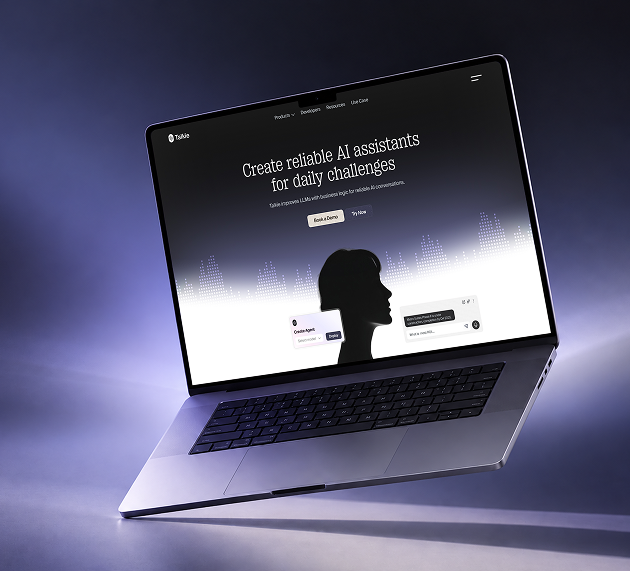
Talkie
]
AI assistant marketing site
AI and automation build · 4-week engagement period · Demo-led launch plan
[ The challenge ]
Talkie sold a technical product that buyers struggled to picture, so the team needed a site that showed voice and chat assistants at work and earned trust before any sales call.
Next.js
Typescript
Tailwind CSS
Node.js
PostGreSQL
[ What we built ]
Interactive voice and chat demos sit beside integration maps and live impact figures, all linked to a short form for free trials and demo bookings.
2.6×
Demo bookings
38%
Trial sign-up lift
1.4s
Page load time
SaaS website · Brand, UI/UX & development
[ projects ]
AI Work We've Delivered


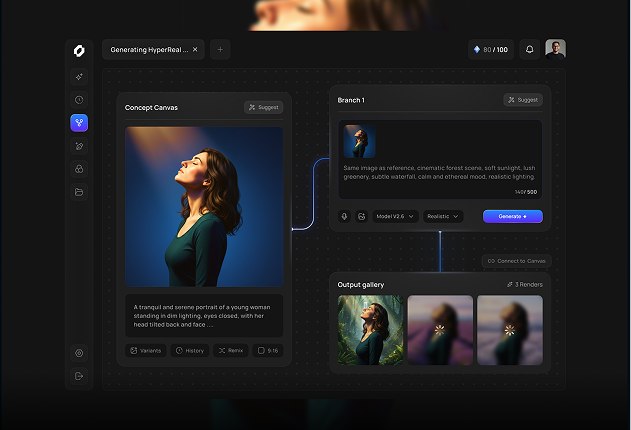
DEEPVISION
WebApp
AI Creative
A node canvas that branches ideas into renders
We built the AI engine behind DeepVision, from prompt branching to model selection and style controls. Renders land in the gallery fast, and remix and history tools make every experiment easy to trace back.

NEXORA
Website
AI Productivity
Writing, images, and automation in one AI suite
Building four AI tools under one roof is hard. We connected the models, custom personas, file uploads, and saved prompts so Nexora runs smoothly from the very first free trial.

INKORA
Website
AI Writing
AI writing tools tuned for blogs and SEO
Inkora needed content that comes out fast and reads well in many languages. In this case, we wired the AI models into chat-style tools for blogs, SEO, and articles, and tracked usage so growth stays visible.

ASSIST ME
Mobile App
Productivity
One mobile app for email, files, tasks
We built the Assistant app for mobile, from the welcome screen to the home dashboard. It holds the AI copilot, a document scanner, and quick actions that bring email, files, and tasks together.
[ transformation ]
The Rebuild, Not The Pitch
Projects often begin with damage control: the audit, the fix, and the aftermath.
A dedicated 4-person pod
Designer, engineers and QA, all on your product.
One team, two platforms
iOS + Android, one team, one codebase.
Crash-free at scale
99.2% stability across 1.8M live users.
What clients actually say
Feedback from founders we've shipped with.
Direct speak with the engineer
Saiful replies directly, no manager in the loop.
Built in Dhaka, shipped globally
Live in 9+ countries across four continents.
[ testimonial ]
What It's Like Working With Us

Sofia Gouveia @ Esdiac
Design Director
We relied on them to build our online store with AI-enhanced features that improve customer experience.
Working with Dev Monks on our ESDIAC app and group websites was an excellent experience. They were patient, attentive to feedback, and delivered clean, consistent, high-quality work. We're proud of the results and happy to continue our long-term partnership with them.


Anika @ Coin Pulse
Founder
Their team truly understood our vision and brought it to life through a stunning digital identity.
Dev Monks is a professional, reliable partner for end-to-end product builds. From clean, modern designs to seamless development, they exceeded my expectations. I couldn't be happier with the collaboration!

Austin @ Clarity LLC
CEO
Working with Dev Monks completely changed how we approached building our app website scratch.
I've worked with Design Monks on three websites, and they've been nothing but exceptional. Their design is top-notch, development is reliable, and communication is always smooth. They quickly act on feedback and deliver exactly what I need. For me, they're a 10/10 partner for all things design and development.

Ted Nash @ Yenex
Founder & CEO
I never expected building a complex platform to feel this easy and smooth.
I've had the pleasure of collaborating with Dev Monks for a while now on my new project. They're lightning-quick in addressing any questions or feedback I have, and they consistently go the extra mile to make sure I'm thrilled with the final outcome. I wholeheartedly endorse them


[ faq ]
Questions You'd Ask Before Signing Off

Which AI coding tools do you train on?

Cursor, Claude Code and GitHub Copilot, plus the coding agents built into them. If your team already uses a tool, we train on that one.
Will AI coding tools lower our code quality?
Not with the right rules. We set up review guidelines, tests and CI checks so AI-written code meets the same bar as the rest of your codebase.
What team size is this for?
It works best for engineering teams of 5 to 50 developers. Sessions run online or on site, in groups of up to 10.
How long does the training take?
A single workshop day covers the basics. Most teams choose a 4-week programme with setup, workshops on real tickets and follow-up check-ins.
How is this different from AI Workflow Setup & Training?
This service is for developers writing code. AI Workflow Setup & Team Training is for non-technical teams using tools like n8n and Zapier. If AI-written code is already in production, start with an AI Code Security Audit.



[ start project ]
Is Your Team Using AI Tools Without A Plan?
Tell us your stack and how your developers use AI today. We'll suggest where training would save the most time and what to set up first.
Typical range
$15,000 – $80,000
~/devmonks/stack.ts

Dual-store launch included

Fixed, transparent scope
Your ideas deserve more than prototypes. Partner with Dev Monks and bring scalable, reliable, and AI-enhanced products to life today.



