[ key takeways ]
To develop an educational app, identify your target audience, validate your idea, and define the right features. Next, choose the right technology, build an MVP, and test it thoroughly.
Finally, launch the app and improve it continuously using user feedback and analytics. Following this process helps you reduce development risks, control costs, and create a learning app that users enjoy.
Whether you're building an app for schools, online courses, or corporate training, this guide walks you through every stage, from planning and development to costs, best practices, and real-world examples.
An educational app is a digital learning application designed to help people learn new knowledge or develop skills through smartphones, tablets, or computers.
These apps support online learning by offering lessons, quizzes, videos, assignments, and progress tracking in one place.
They come in different forms, including Learning Management System (LMS) platforms, language learning apps, children's education apps, test preparation tools, and professional training solutions.
The rapid growth of EdTech, Mobile Learning, and Online Education has increased the demand for flexible and accessible learning experiences.
Today, schools, universities, businesses, training centers, and independent educators all use educational apps to deliver courses and improve learning outcomes.
As more people prefer learning anytime and anywhere, investing in an eLearning app or education platform has become a smart choice for organizations looking to reach more learners and provide engaging educational experiences.
Educational apps are one type of software application, so understanding the basics of application development can help you better plan the overall development process before choosing technologies and features.
If you're planning to build an educational app but aren't sure where to begin, working with an experienced development agency like Dev Monks can help you choose the right features, technology, and development approach.
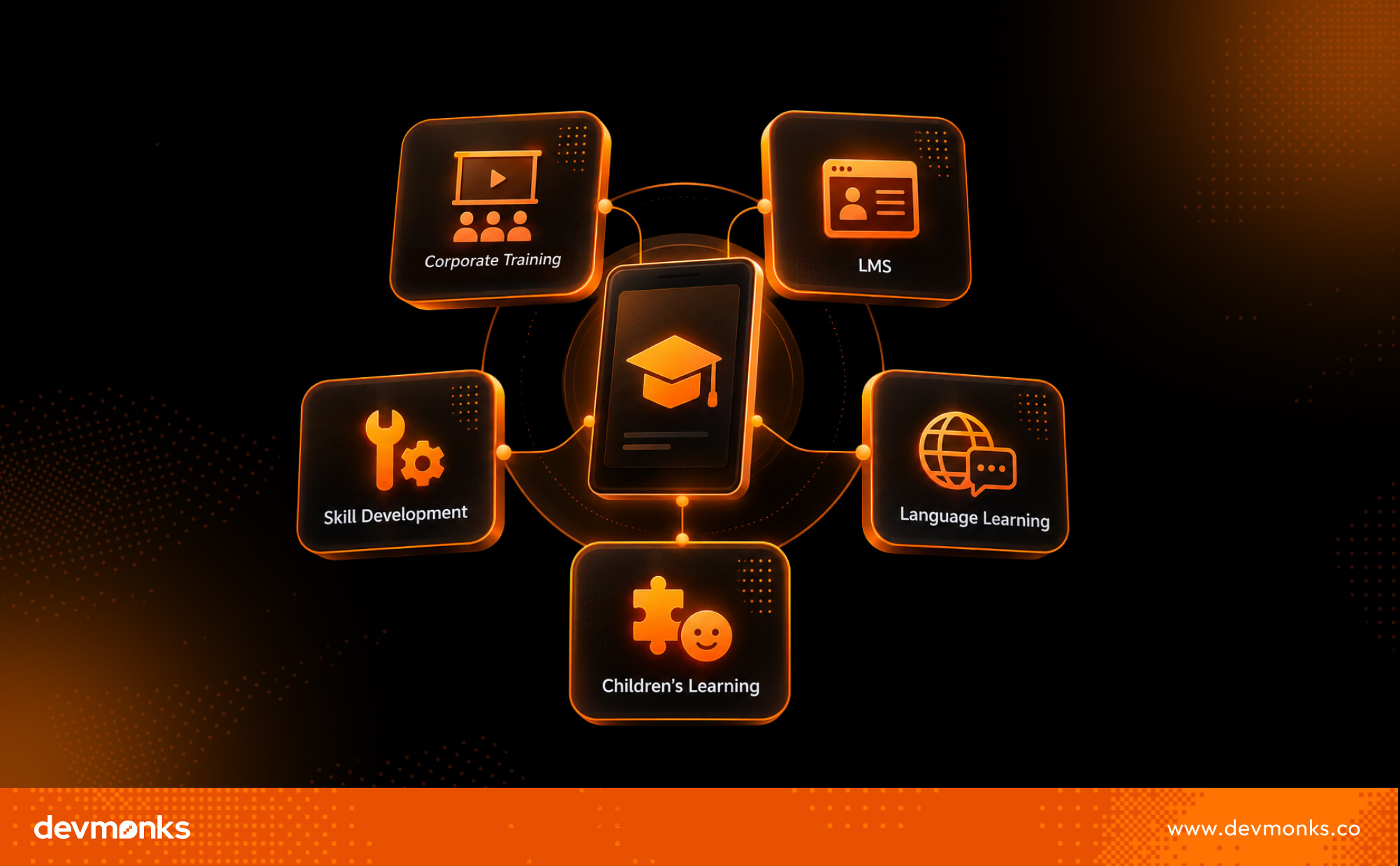
Educational apps come in many forms, and each serves a different purpose. Before you start development, decide what kind of education platform you want to build.
Your choice will affect the features, design, and overall learning experience. Below are the most common types of educational software used today.
An LMS is a complete learning platform used by schools, universities, and businesses to manage teaching and training. It allows instructors to create courses, upload lessons, track progress, and communicate with learners.
Popular examples include Moodle, Canvas, and Blackboard. These platforms are widely used for classroom learning, employee training, and large-scale eLearning programs.
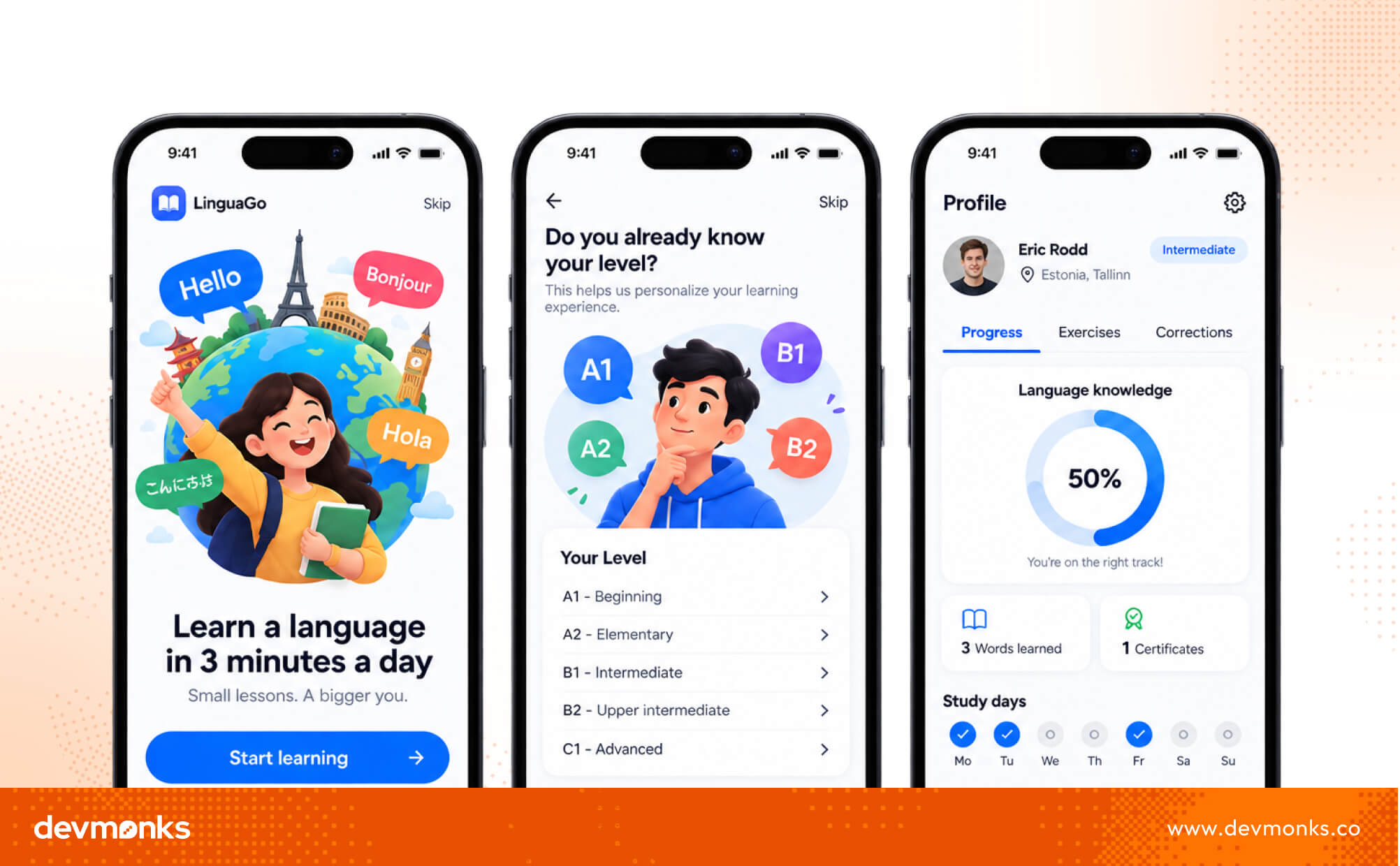
Language learning apps help users practice vocabulary, grammar, speaking, and listening at their own pace. They often use short lessons, quizzes, and rewards to keep learners motivated.
Well-known examples include Duolingo and Babbel. If you plan to build an online course platform for languages, interactive lessons and daily practice should be your main focus.
Children's learning apps are designed for preschool and K12 students. They use colorful visuals, games, animations, and simple activities to make learning fun.
These apps help children improve reading, math, science, creativity, and problem-solving skills while keeping them engaged.
Skill development apps help people learn practical skills for education and careers. They often offer structured courses, certifications, and flexible learning paths.
Platforms like Coursera and Udemy teach coding, design, business, marketing, and many other subjects. This type of course app is popular among students and working professionals.
Corporate Learning apps are built for employee training and professional development. Companies use them to deliver onboarding, compliance training, leadership programs, and skill-building courses.
These apps often include progress tracking, assessments, and certificates to measure employee performance.
Developing an educational app is more than writing code and adding lessons. It starts with understanding your users, planning the right features, and following a clear process.
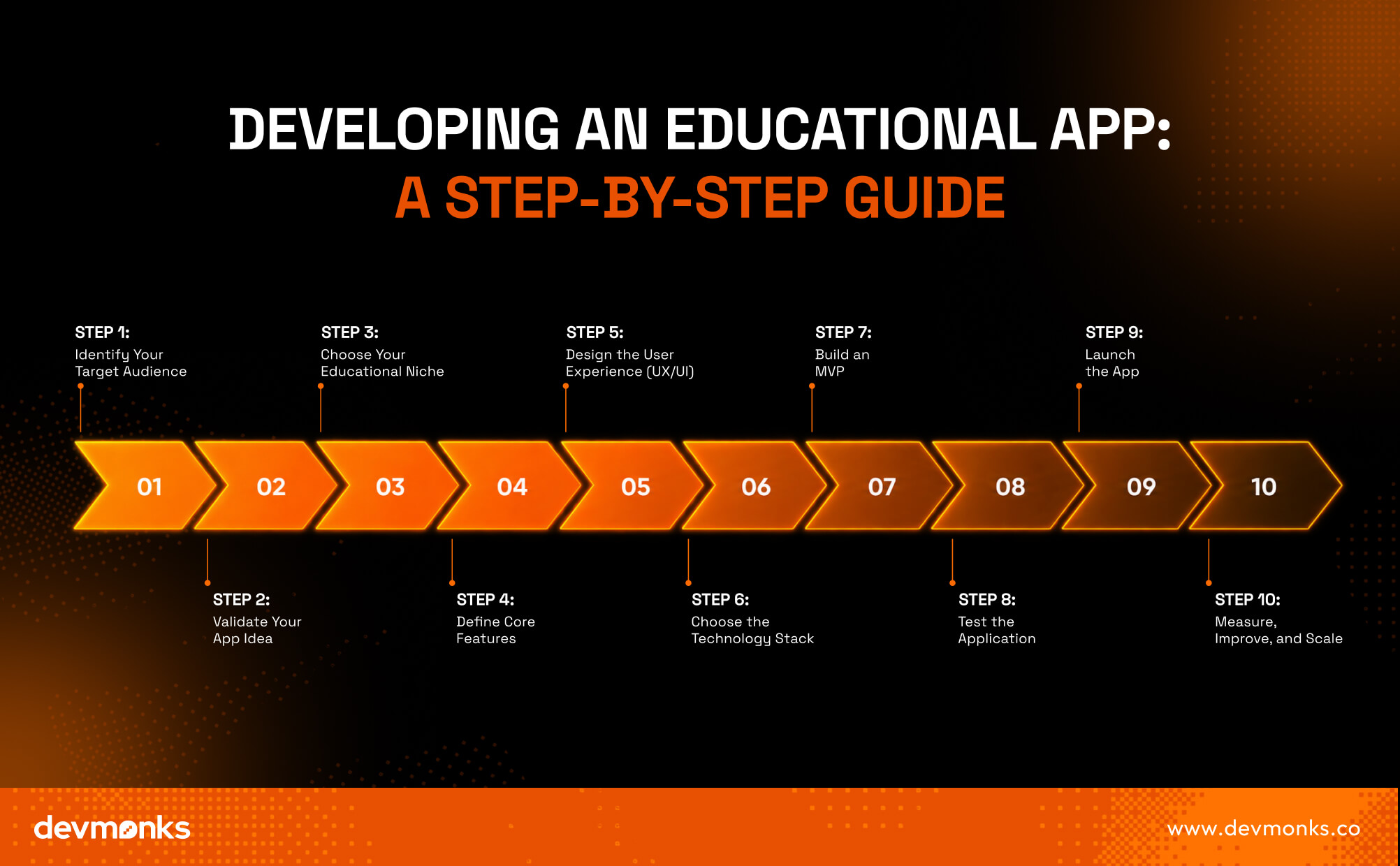
These 10 steps will help you build an app that is useful, engaging, and ready to grow.
The first step is knowing exactly who will use your app. Your audience could be students, teachers, parents, schools, or enterprises.
Create a clear User Persona by understanding their age, goals, learning habits, and challenges. When you know your users well, it becomes much easier to build features they actually need.
Before investing time and money, make sure there is real demand for your idea. Start with Product Discovery by researching competitors, reading user reviews, and identifying market gaps.
Conduct user interviews to learn what people like, what they struggle with, and what they wish existing apps offered. This helps you build a product people truly want.
Education is a broad market, so focus on one niche first. You might build an app for K12 students, higher education, test preparation, language learning, or corporate learning.
A clear niche helps you design better content, features, and marketing strategies. You can always expand into other areas as your app grows.
List the features your app needs before development begins. Most successful educational apps include user profiles, course management, video lessons, progress tracking, assessments, push notifications, search, discussion forums, and certificates.
Add Gamification elements like points, badges, and streaks to increase motivation. Use Learning Analytics to monitor learner progress and improve the overall learning experience.
Features such as quizzes, personalized learning paths, and effective course management make the app more engaging and valuable.
A great learning app should feel simple from the first screen. Focus on UX Design by creating a smooth student journey with clear navigation and easy-to-find content.
Use UI Design to keep the interface clean, attractive, and distraction-free. Follow Accessibility (WCAG) guidelines so learners with different abilities can use the app comfortably.
A user-centered design creates a better learning experience and encourages people to keep coming back.
Select technologies based on your app's goals and budget. For the frontend, many developers choose React Native or Flutter to build apps for both Android and iOS. On the backend, Node.js is a popular option for handling users and course data.
Databases and services like Firebase simplify authentication and real-time updates, while cloud providers such as AWS support storage, video streaming, and scaling.
You can also integrate AI features like personalized recommendations and smart tutoring to improve learning.
Start with a Minimum Viable Product (MVP) instead of building every feature at once. Include only the essentials needed to solve your users' main problem.
An MVP helps reduce development costs, lowers risk, and allows you to collect valuable feedback before investing in advanced features.
Testing is essential before launch. Check every feature with functional testing, measure performance under different conditions, strengthen security, and verify accessibility. Fixing issues early creates a smoother experience and improves user satisfaction.
Once testing is complete, publish your app on Google Play and the Apple App Store. Prepare a marketing plan that includes social media, content marketing, app store optimization, and email campaigns.
A strong launch helps you attract your first users quickly.
Your work doesn't stop after launch. Use tools like Google Analytics and Firebase Analytics to understand user behavior, monitor retention, and identify popular features.
Use this data to improve the app, release meaningful updates, and scale your education platform as your audience grows. Continuous improvement is the key to long-term success.
The right features make an educational app useful, engaging, and easy to use. While the exact functionality depends on your goals, these are the essential features that most successful learning apps include:
Choosing the right technology stack helps your educational app perform well, scale easily, and deliver a smooth learning experience. Here are the key technologies to consider:
The app development cost depends on your app's complexity, features, development team, location, and timeline. Building an MVP first is a smart way to validate your idea before investing in a full-scale product.
If you want a broader understanding of pricing across different industries, it's also helpful to explore the usual mobile application development costs before estimating your education app budget.
Building an educational app comes with several challenges that developers should plan for from the beginning.
A successful educational app is not just feature-rich, it also delivers an engaging and effective learning experience. Follow these best practices to improve user satisfaction and long-term retention.
Several educational apps have become global success stories by solving different learning needs. Duolingo keeps users engaged through gamification and bite-sized lessons.
Khan Academy offers free, high-quality educational content for students worldwide. Coursera partners with universities to provide professional certificates and degree programs.
Udemy allows experts to create and sell courses across countless subjects. BYJU'S combines interactive videos with personalized learning. Quizlet helps students study efficiently using flashcards, quizzes, and AI-powered learning tools.
If you're looking for an experienced development partner, Dev Monks can help you plan, design, develop, and launch a custom educational app customized to your business goals and learners' needs.
Development time depends on the app's complexity. A basic MVP usually takes 3-4 months, while a feature-rich educational app may require 6-2 months. Proper planning, testing, and feedback can also affect the overall timeline.
It depends on your target audience and budget. If most users are on Android, launch there first. If your audience is mixed, use a cross-platform framework like Flutter or React Native to build for both Android and iOS simultaneously.
An MVP (Minimum Viable Product) is the first working version of your educational app. It includes only essential features like user login, courses, video lessons, quizzes, and progress tracking, which helps you to test the idea and gather user feedback before adding advanced functionality.
Developing an educational app requires careful planning, the right technology, and a deep understanding of your learners' needs. Start with a clear MVP, gather user feedback, and improve the app over time.
If you're planning a scalable education platform and need expert guidance, partnering with an experienced educational app development company can help turn your idea into a successful product.
We combine AI-driven workflows with product-first engineering to provide MVP development services for startups and enterprises. Our approach balances speed, reliability, and usability while keeping teams involved. We deliver production-ready, scalable solutions, not just prototypes or demos.


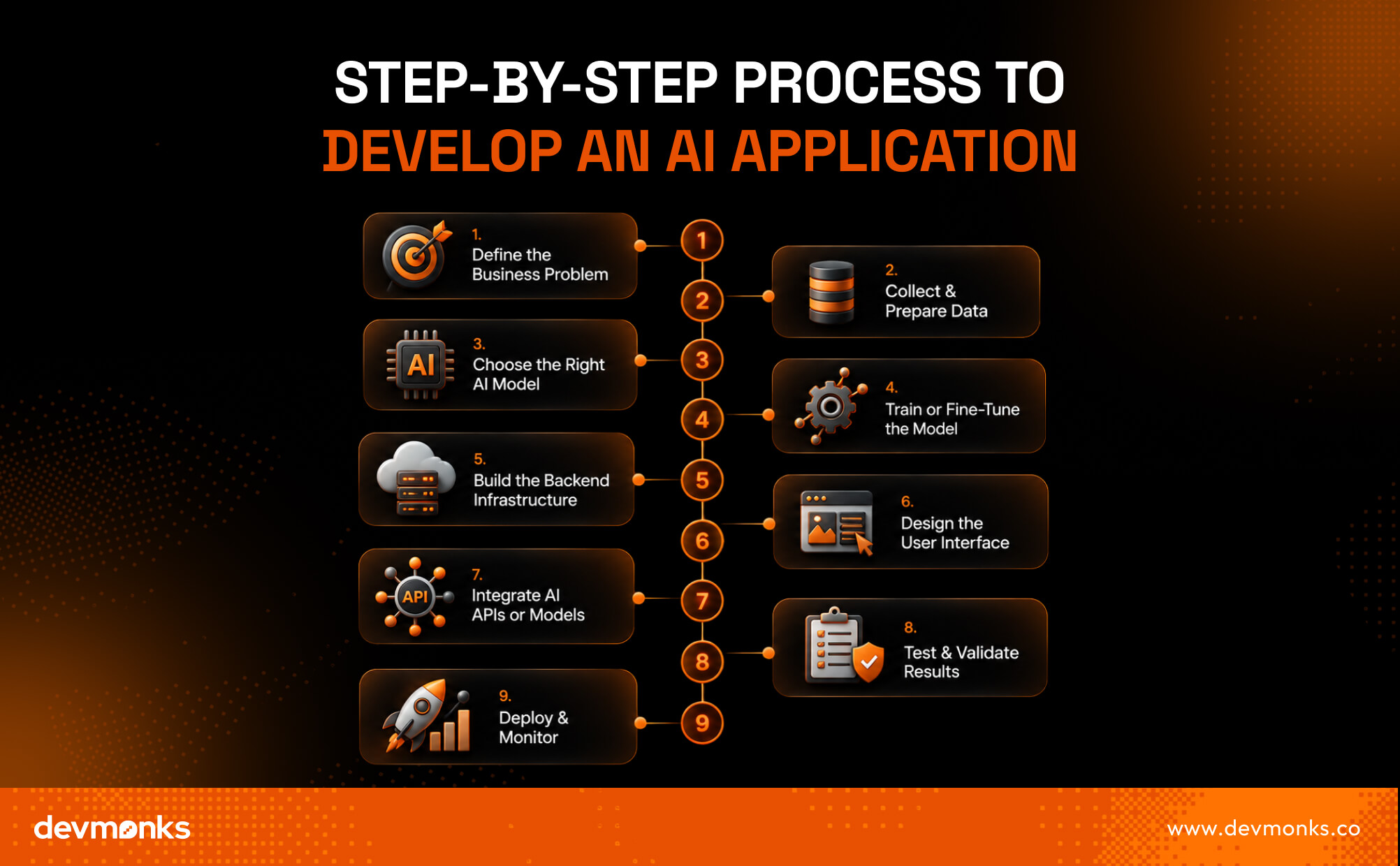
To develop an AI application, define the problem you want to solve, collect and prepare quality data, choose the right AI model, build and test the application, deploy it, and continuously improve it using real-world feedback.
Each step plays a key role in creating an AI solution that is accurate, scalable, and reliable.
Understanding this process helps you avoid costly mistakes, choose the right technologies, and build AI software that delivers real business value.
In this article, you'll learn every stage of AI application development, from planning and model selection to deployment, best practices, costs, and future trends.
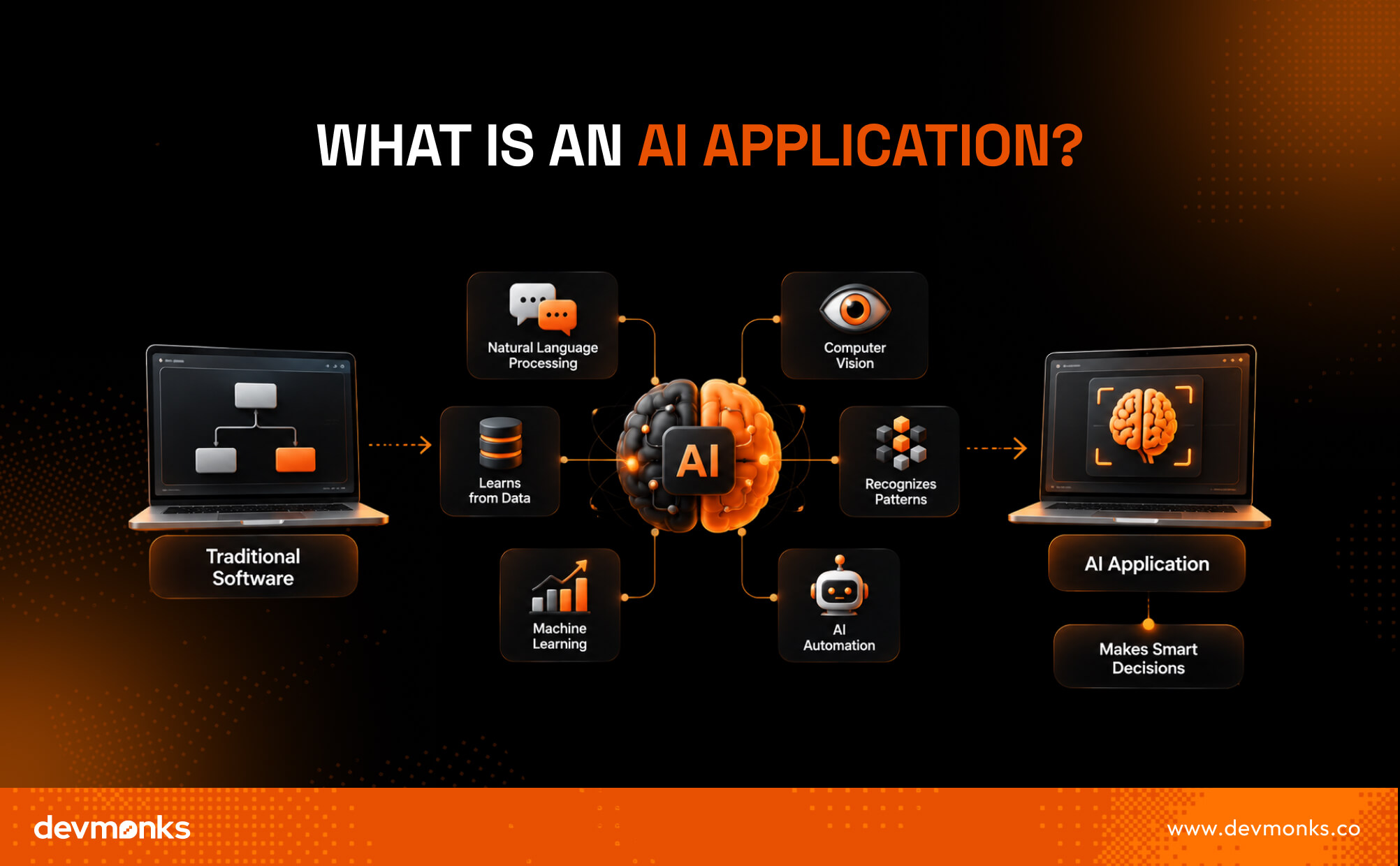
An AI application is software that uses Artificial Intelligence to perform tasks that normally require human thinking.
Unlike traditional software, which follows fixed rules, AI-powered software can learn from data, recognize patterns, and improve its performance over time. This makes AI-driven apps more flexible and capable of handling complex tasks.
AI application development is a specialized branch of application development that combines traditional software engineering with artificial intelligence to build smarter, data-driven solutions.
Many AI systems use Machine Learning, Deep Learning, and NLP (Natural Language Processing) to understand text, images, speech, and user behavior.
Technologies such as OpenAI and Google DeepMind have made modern intelligent applications more accurate and useful.
Today, businesses use AI software for chatbots, recommendations, fraud detection, content generation, and intelligent automation, helping users complete tasks faster and more efficiently.
If you're planning to develop an AI application, working with an experienced development agency like Dev Monks can help you build a secure, scalable, and high-performing solution.

AI can solve different business problems. The right application depends on your goals, industry, and users. Modern AI models make it possible to build everything from smart assistants to advanced analytics platforms.
Generative AI applications create text, images, code, and other content using large language models.
Businesses use them to automate content creation, customer support, coding assistance, document generation, and other creative or productivity tasks.
Predictive AI uses predictive analytics to forecast trends and user behavior. Businesses use a recommendation engine to suggest products, movies, or content based on customer preferences.
Computer Vision helps software understand images and videos. Common uses include AI image recognition, OCR, object detection, and quality inspection.
Frameworks like TensorFlow and hardware from NVIDIA power many of these solutions.
Conversational AI includes every AI chatbot, AI assistant, and AI agent that understands natural language.
AI is transforming healthcare, finance, retail, manufacturing, education, and SaaS with smarter automation, faster decisions, and personalized user experiences.
Building an AI application involves more than choosing a model and writing code. You need a clear plan, quality data, the right technology, and continuous improvements after launch.
The first step is identifying the problem you want AI to solve. Ask what users need, what tasks can be automated, and how success will be measured.
Clear goals help you choose the right AI solution instead of adding AI where it is not needed. This step also defines your overall AI workflow and project scope.
After defining the problem, collect data from trusted sources, remove duplicates, fix errors, and label it correctly. Clean and organized datasets help improve accuracy and reduce bias during model training.
Different problems require different models. Generative AI often uses models available through the OpenAI API or Hugging Face. For image recognition, frameworks like TensorFlow and PyTorch are popular choices.
You can either train a model from scratch or use fine-tuning to adapt an existing model to your business data.
Fine-tuning is often faster, more affordable, and delivers better results for specific use cases. During model training, monitor accuracy, precision, and other performance metrics to ensure the model learns correctly.
Your backend handles data processing, user requests, and AI operations. It should be secure, scalable, and able to process requests efficiently.
Many businesses use AWS, Azure, or Google Cloud to host AI applications because these platforms provide reliable infrastructure and built-in AI services.
Next, design a clean and intuitive interface that makes AI features easy to access. Focus on simple navigation, fast responses, and clear feedback so users can interact with the application naturally.
Connect your application to the selected AI model through APIs or by hosting the model on your own infrastructure.
During this stage, configure prompts, manage requests, handle responses, and optimize inference speed so users receive fast and accurate results.
Before launch, test the application with real-world scenarios. Check the AI's accuracy, speed, security, and reliability. Validate outputs with different datasets and user groups to identify errors, reduce bias, and improve overall performance before production.
The final step is deployment. After release, continuously monitor performance, collect user feedback, and track AI accuracy. Update datasets, retrain or fine-tune models when needed, and improve the application over time.
AI is never truly finished, rather, it becomes more effective through ongoing monitoring and continuous optimization.
If your business lacks in-house AI expertise, partnering with an experienced AI development agency like Dev Monk can simplify the entire development process, from strategy and model selection to deployment and ongoing support.

The right AI tech stack depends on your application's features, performance needs, and budget. Choosing the right tools from the beginning makes development faster and future updates easier.
Python is the most popular choice for AI because of its rich ecosystem. JavaScript is commonly used for web-based AI applications, while Java is preferred for many enterprise systems.
Frameworks like TensorFlow and PyTorch simplify AI model development. LangChain and LlamaIndex are popular LLM frameworks for building AI assistants that connect to external data.
A vector database such as Pinecone or Weaviate stores embeddings and enables fast vector search. SQL and NoSQL databases manage application and user data.
AWS, Google Cloud, and Azure provide scalable infrastructure for training, deployment, and monitoring AI applications.
Developers can integrate models through OpenAI, Anthropic Claude, and Gemini inference APIs.
The best AI model depends on what your application needs to do. Different models are designed for different tasks, from generating text to recognizing images and speech.
LLMs such as GPT-4, Claude, Gemini, and Llama are powerful language models built on transformer architecture. These foundation models are ideal for chatbots, content generation, coding assistants, and document analysis.
Traditional machine learning models work well for prediction, classification, fraud detection, and recommendation systems using structured data.
Deep Learning uses neural network architectures to solve complex problems involving text, images, and audio.
Computer vision models identify objects, faces, and text in images. They are widely used for image recognition and quality inspection.
Speech recognition models convert spoken language into text and understand voice commands. They power voice assistants, transcription tools, call center automation, and hands-free applications.
The success of an AI application depends on the quality of its data. Accurate, complete, and well-organized data helps AI models learn faster and produce more reliable results. A strong training dataset also reduces errors and improves overall performance.
AI applications can learn from structured data, such as spreadsheets and databases, as well as unstructured data like text, images, videos, and audio.
Gather enough training samples from reliable and relevant sources to ensure the model learns effectively.
Data preprocessing removes duplicates, fixes missing values, and corrects inconsistencies. Feature engineering also helps improve model performance.
Annotation adds meaningful labels to raw data, allowing AI models to recognize patterns and make accurate predictions.
Protect user data by following regulations like GDPR and HIPAA. Strong data quality standards and privacy practices help build secure, trustworthy AI applications.
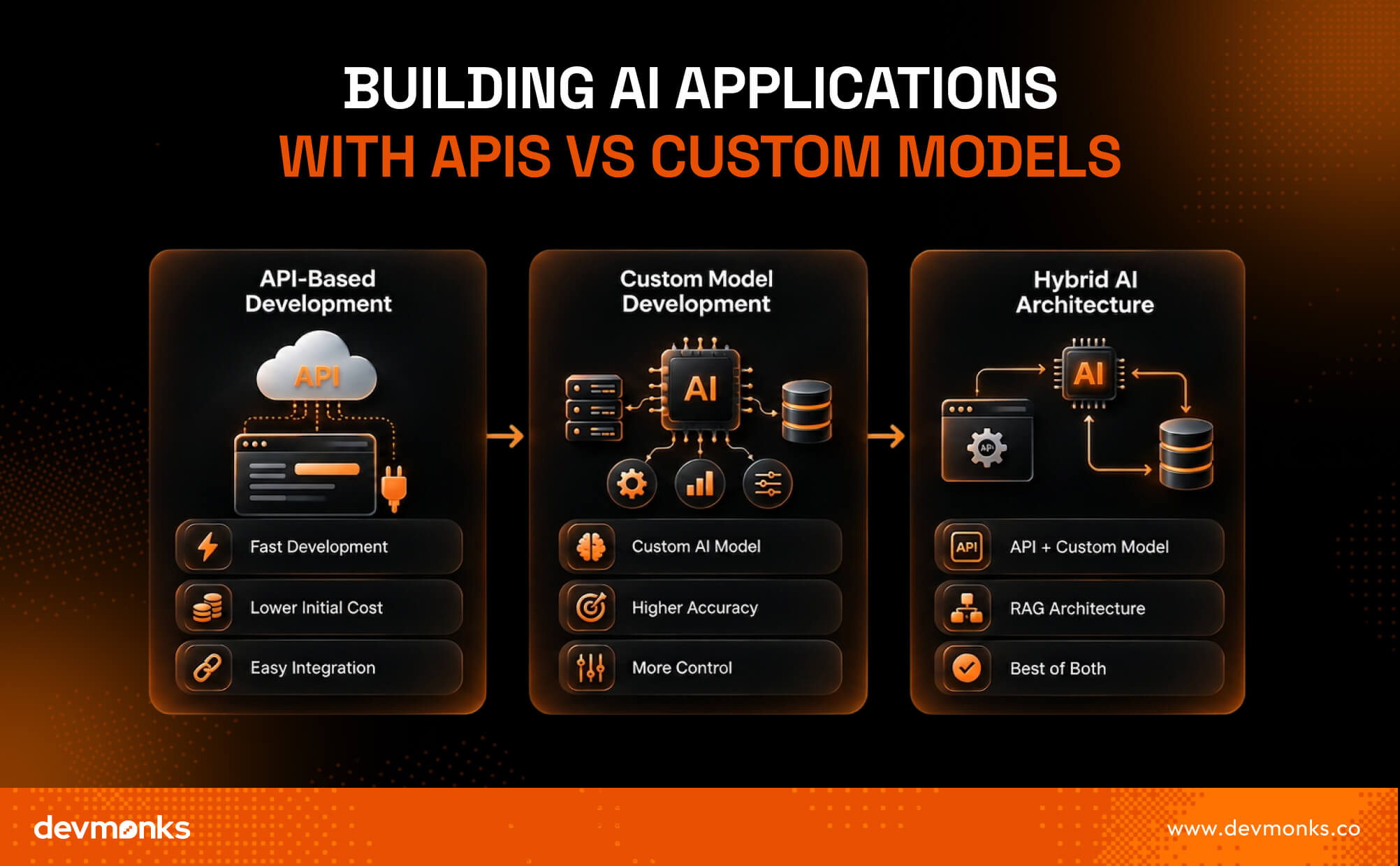
Businesses can build AI applications using ready-made APIs, custom AI models, or a combination of both. The right approach depends on your budget, performance needs, and project goals.
API-based development is the fastest way to launch an AI application. Services like the OpenAI API and Anthropic API provide access to powerful foundation models without the need to build your own infrastructure.
With proper API integration, prompt engineering, and platforms like Hugging Face, developers can quickly create AI-powered features.
Custom models are trained or fine-tuned for specific business needs. They offer greater control, improved accuracy, and better performance for specialized tasks, but require more time, expertise, and computing resources.
Businesses with unique workflows often choose custom software development to build AI applications that match their specific requirements and integrate seamlessly with existing systems.
A hybrid approach combines APIs with custom models to balance speed and flexibility.
Many businesses use RAG architecture to connect foundation models with private knowledge bases, delivering more accurate, context-aware responses while keeping information up to date.

Developing AI applications comes with technical and ethical challenges that can affect performance, reliability, and user trust. Addressing these issues early leads to better long-term results.
Poor or incomplete data reduces model accuracy and leads to unreliable predictions.
AI models can generate incorrect information. Hallucination mitigation techniques, such as better prompts and reliable data sources, help improve response quality.
Biased training data can produce unfair results. Following AI ethics and responsible AI practices helps create more balanced systems.
Over time, changing data can reduce model performance, which makes regular updates essential.
Growing user demand can increase latency, which requires scalable infrastructure.
Protect AI applications by following OWASP guidelines and complying with GDPR to keep user data secure.
Following proven best practices helps you build AI applications that are accurate, scalable, and easy to maintain.
The cost and timeline of AI application development depend on the project's complexity, features, and technology choices. Simple applications can be built in weeks, while enterprise solutions often take several months.
AI is already helping businesses improve efficiency, reduce costs, and deliver better customer experiences across many industries. Here are some common real-world examples:
AI is evolving rapidly, and new technologies are making applications smarter, faster, and more autonomous. Businesses that adopt these innovations early can gain a strong competitive advantage.
AI apps generate revenue through subscription plans, one-time purchases, in-app purchases, advertisements, API usage fees, enterprise licensing, and premium features. Some businesses also offer custom AI solutions, consultation, or usage-based pricing for commercial customers.
Yes. Many AI platforms and APIs allow developers to build AI applications without deep machine learning knowledge. However, understanding AI fundamentals, data handling, and prompt engineering helps you create more reliable, accurate, and scalable AI solutions.
Python is the most popular programming language for AI application development because of its extensive libraries and frameworks. JavaScript is excellent for AI-powered web applications, while Java is commonly used for enterprise AI systems that require high performance and scalability.
Developing an AI application requires careful planning, quality data, the right technology stack, and continuous improvement after launch.
Whether you're building a simple AI assistant or an enterprise solution, following a structured development process will increase your chances of success.
Start with a clear business goal, focus on user needs, and partner with an experienced AI development team to turn your idea into a reliable, scalable application.

CSS relative vs absolute refers to two positioning methods that control where elements appear on a web page. Relative positioning moves an element from its original location while keeping its space in the layout.
Absolute positioning removes the element from the normal document flow and places it relative to its nearest positioned parent.
Understanding this difference is essential for building clean, responsive, and predictable web layouts. It helps you position badges, tooltips, overlays, buttons, and other UI elements without breaking your design.
In this guide, you'll learn how both positioning methods work, when to use each one, their key differences, and the best practices for modern CSS development.
CSS positioning is the process of controlling where an HTML element appears on a web page. It uses the position property to decide how an element is placed within a CSS layout.
By default, elements follow the normal document flow. However, there are times when you need to move an element to a specific spot. That is where CSS positioning becomes useful.
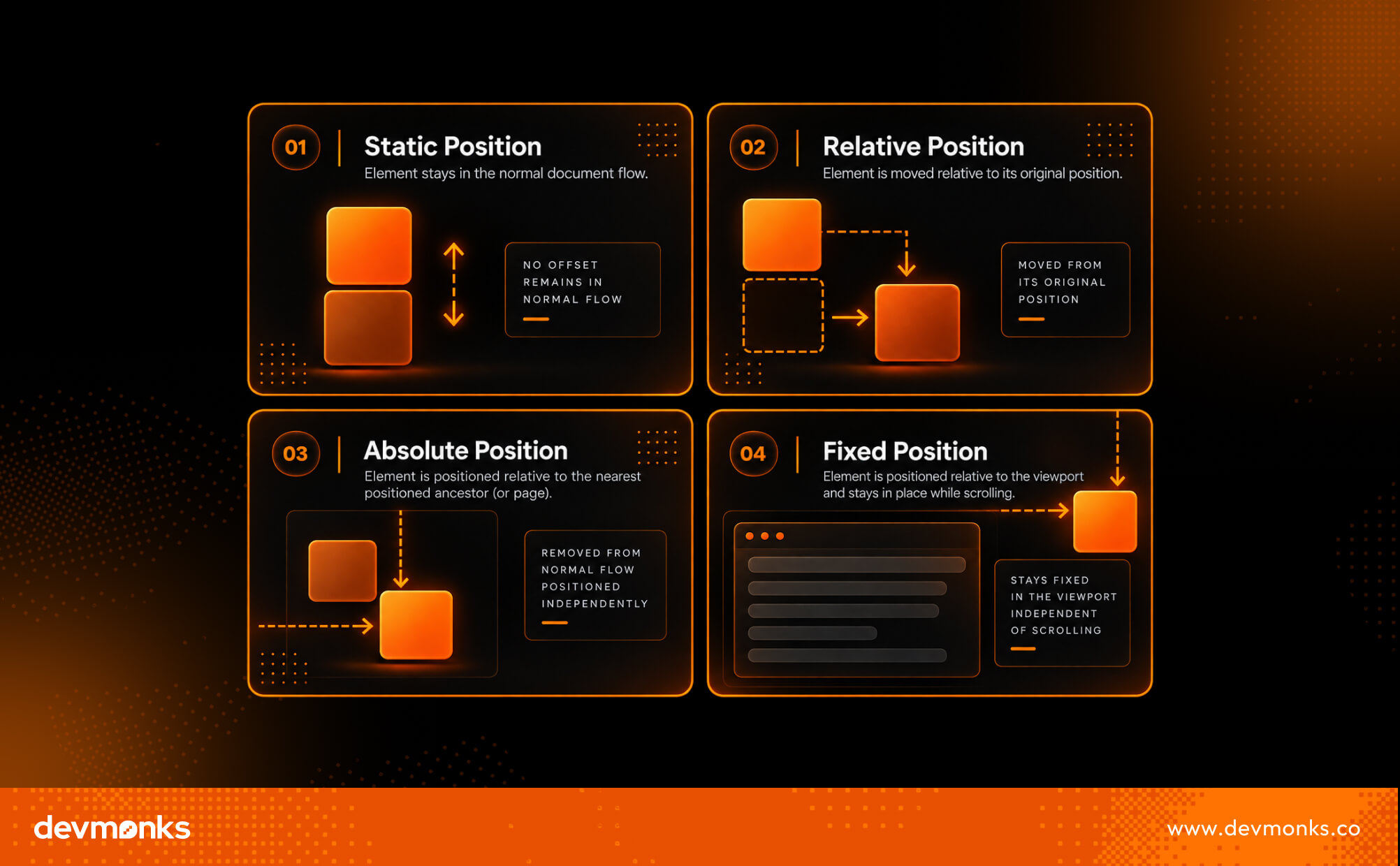
The position property offers five position values: static, relative, absolute, fixed, and sticky. Each one behaves differently and serves a different purpose.
CSS positioning gets easier once you understand how relative and absolute positioning work together.
If you're building a production-ready website and need help turning those concepts into a responsive, scalable design, Dev Monks web development agency can help.

Relative positioning lets you move an element from its normal position without removing it from the page layout. You can apply position: relative to an element and then use offset properties like top, right, bottom, or left to shift it.
The important thing to remember is that the element still keeps its original space in the document. Other elements behave as if it never moved.
This makes position: relative a great choice when you only need to make small adjustments without affecting the overall layout.
It is also commonly used to create a positioning context for child elements. If a child element uses position: absolute, it will be positioned relative to the nearest parent with position: relative.
When you set position: relative, the element stays in the normal document flow. The offset properties simply move its visible location.
The original space of the element remains reserved. This means nearby elements do not move to fill the gap, making relative positioning predictable and easy to use for small layout changes.
.box {
position: relative;
top: 20px;
left: 30px;
}
In this example, the element moves 20 pixels down and 30 pixels to the right. Even though it appears in a new location, it still occupies its original space in the layout.
Think of it as sliding a picture inside its frame. The picture moves, but the frame stays where it is.
Relative positioning is useful in many everyday CSS layouts, including:
Absolute positioning lets you place an element exactly where you want it. When you use position: absolute, the element is removed from the normal document flow.
It no longer reserves space in the layout, so nearby elements behave as if it is not there. This gives you precise control over an element's location without changing the position of other content.
An element with position: absolute is positioned using the top, right, bottom, and left properties. Its position is based on its containing block, which is usually the nearest positioned ancestor.
A positioned ancestor is any parent element with a position value other than static, such as relative.
If no positioned ancestor exists, the browser positions the element relative to the page instead. This is why developers often set position: relative on a parent container before using position: absolute on a child element.
HTML
<div class="card">
<span class="badge">New</span>
<img src="product.jpg" alt="Product">
</div>
CSS
.card {
position: relative;
}
.badge {
position: absolute;
top: 10px;
right: 10px;
}
In this example, the badge appears in the top-right corner of the card. It is positioned relative to the card, not the entire page, because the parent has position: relative.
Absolute positioning is commonly used for elements that need to float above other content or stay in a precise location.
Common examples include tooltips, modals, notification badges, icons inside input fields, floating action buttons, and decorative graphics.
Since these elements do not affect the surrounding layout, they are perfect for overlays, popups, and other floating UI components.
Relative positioning moves an element while keeping its place in the layout, whereas absolute positioning removes the element from the layout and places it at a specific location.
Both relative and absolute positioning help you control where elements appear, but they work in very different ways.
With relative positioning, the element stays in the normal document flow. You can move it using offset properties, but it still keeps its original space. This makes it ideal for small layout adjustments and for creating a positioning context for child elements.
With absolute positioning, the element is removed from the normal document flow. It no longer takes up space, so other elements ignore it.
Instead, it is positioned relative to its nearest positioned parent. This makes it perfect for overlays, badges, tooltips, and other floating UI elements.
Knowing when to use each method helps you build cleaner, more responsive layouts and avoid unexpected positioning issues.
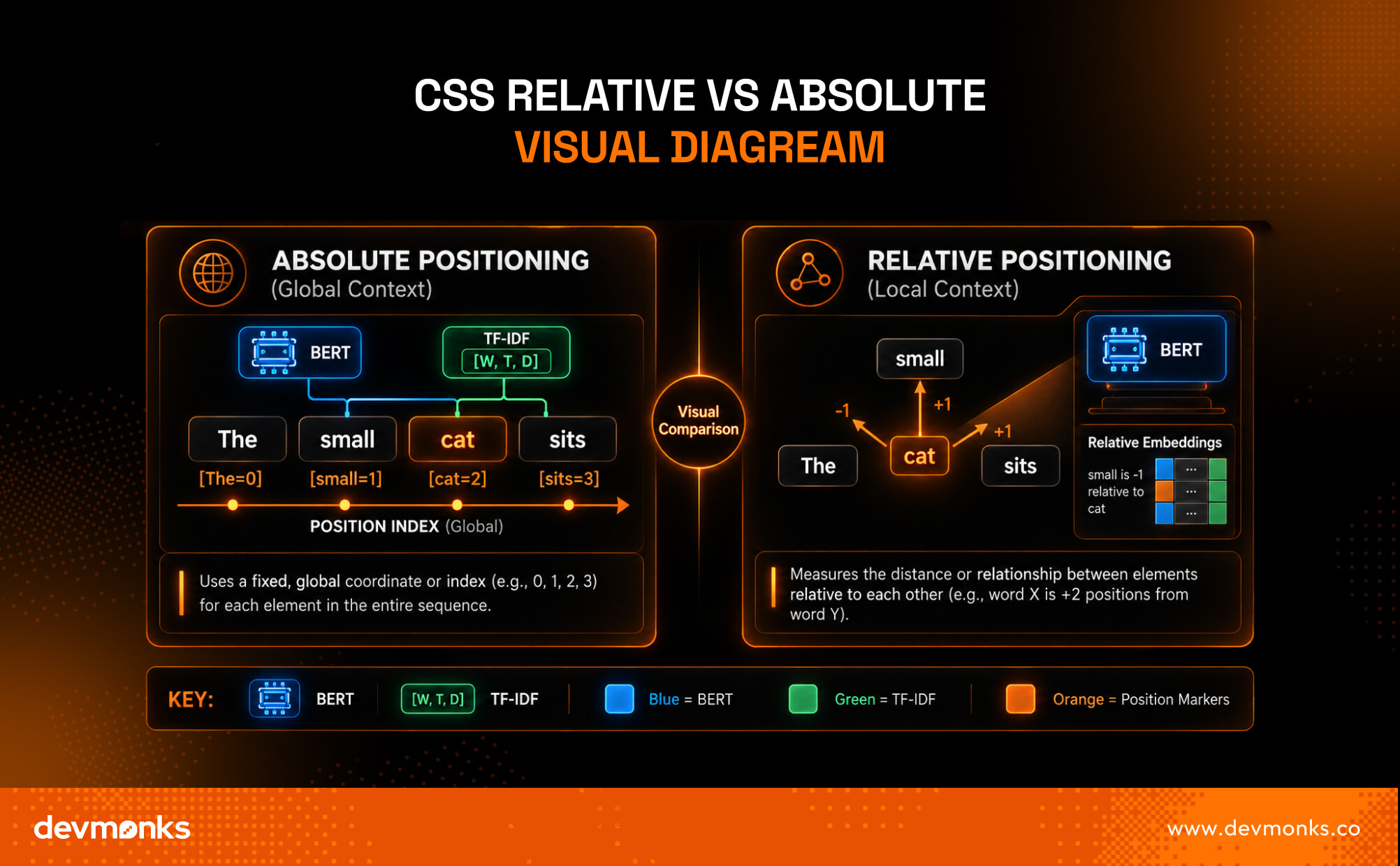
The illustration below shows the core difference. Relative positioning moves an element from its original location while keeping its space in the layout.
Absolute positioning removes the element from the normal flow and places it relative to its nearest positioned parent, allowing it to float independently.

In real-world CSS layouts, relative and absolute positioning are often used together. This combination gives you precise control over child elements while keeping them attached to a specific parent.
Instead of placing an element anywhere on the page, you can position it exactly where it belongs inside a container.
A parent element is commonly given position: relative to create a positioning context. On its own, this does not change the parent's location.
Instead, it tells the browser that any child with position: absolute should be positioned relative to this parent.
This approach makes layouts more organized and predictable. For example, you can place a notification badge on a profile picture or position a button inside a card without affecting the rest of the page.
An element with position: absolute always looks for its nearest positioned ancestor. If it finds a parent with position: relative (or another non-static position), it uses that parent as its reference point.
If no positioned ancestor exists, the element falls back to the viewport. This means it is positioned relative to the browser window instead of the intended container.
As a result, the element may appear in the wrong place, especially on responsive layouts.
That is why developers usually pair a relative parent with an absolute child. It keeps floating elements anchored to the correct container and makes the layout easier to manage across different screen sizes.
CSS positioning is straightforward once you understand the basics. However, these common mistakes can lead to confusing layouts and unexpected behavior.
To build clean, responsive layouts, use CSS positioning only when it is the right tool for the job. These best practices will help you avoid common layout problems.
Following these best practices helps create layouts that are easier to maintain and scale.
Mastering CSS positioning is an important part of building modern websites. As you continue learning front-end development, you also need to understand the concept of headless in web development, especially if you plan to work with modern CMS platforms and JavaScript frameworks.
If you need a custom website built with modern CSS techniques and responsive design, Dev Monks web development agency can help deliver clean, high-performance solutions.
CSS provides four commonly used positioning methods, and each one serves a different purpose. Choosing the right one depends on how you want an element to behave in the layout and during scrolling.
There is no single "best" positioning method.
Relative is ideal for small adjustments, absolute is best for precise placement inside a container, fixed keeps elements visible on the screen at all times, and sticky combines normal scrolling with a fixed effect when needed.
Understanding these differences helps you choose the right positioning method for every layout.
CSS positioning is one of the core concepts every front-end developer learns. If you're just starting out, understanding the time needed to learn web development can help you set realistic expectations and plan and build your skills step by step.
Does Absolute Positioning Affect Layout?
No. An element with position: absolute is removed from the normal document flow. It does not reserve space, so surrounding elements are positioned as if it does not exist. This is why absolute positioning is commonly used for overlays, badges, and floating UI elements.
Yes. Absolute elements can be responsive when they are positioned inside a responsive parent. Use relative units like %, rem, or viewport units where appropriate, and test your layout on different screen sizes instead of relying on fixed pixel values.
This usually happens because the parent does not have position: relative or another non-static position. Without a positioned parent, the absolutely positioned element uses the viewport as its reference point instead of the intended container.
Understanding CSS relative vs absolute positioning is essential for building clean and responsive layouts.
Relative positioning is ideal for small adjustments and creating a positioning context, while absolute positioning is best for overlays and precisely placed elements.
Use each where it fits, combine them when needed, and rely on Flexbox or CSS Grid for your main page layout.

Financial services web development is the creation of secure, scalable, and high-performance digital platforms for banking, fintech, insurance, and investment services.
It powers systems like online banking portals, fintech apps, and trading platforms that safely manage sensitive financial data while ensuring smooth user experiences.
Finance is rapidly going digital, and weak systems can lead to security risks, poor performance, and loss of customer trust. Strong development practices help businesses stay competitive and reliable in a fast-changing industry.
Read further to explore how these platforms work, the technologies behind them, and why they are essential for the future of digital finance.
Financial services web development is the process of building secure and scalable web platforms for the financial sector. It focuses on creating digital systems that help people manage money, access services, and make transactions online in a safe way.
This type of development is widely used in areas like Fintech, Banking Systems, and Secure Web Apps. It ensures that sensitive financial data is protected while still offering fast and smooth user experiences.
Agencies like Dev Monks also support this space by building reliable, growth-ready financial platforms with a strong focus on scalability and performance.
Financial services web development includes building fintech websites that support modern digital finance solutions. It also covers banking portals where customers can check balances, transfer money, and manage accounts.
Another key part is trading platforms, where users can buy and sell stocks, crypto, or other assets in real time.
It connects traditional financial services with modern digital tools. It makes financial services more accessible, efficient, and secure for users everywhere.
Financial web development platforms must include strong, reliable features to support secure and smooth digital financial services.
These platforms are built for banks, fintech companies, insurance providers, and investment firms. Every feature focuses on security, speed, and user trust.
Security starts with login systems. Platforms use multi-factor authentication (MFA), biometric login, and identity checks to protect user accounts. Tools like OAuth, Auth0, and Okta help manage secure user authentication.
These systems ensure only verified users can access sensitive financial data. Identity verification systems also reduce fraud and unauthorized access.
Financial platforms must handle transactions instantly and safely. Payment gateways like Stripe, PayPal, and Plaid help process payments in real time.
These systems support payment gateway integration and financial transaction APIs. This ensures users can send and receive money without delays while keeping data secure.
These platforms generate automatic financial reports and dashboards. Businesses use this data to track performance, user activity, and transaction trends. It helps in better decision-making and financial planning.
Modern platforms connect with banks, payment systems, and third-party financial tools. This integration improves service quality and creates a unified financial ecosystem.
Financial systems must handle growing users and high traffic. Scalable architecture ensures the platform performs well even during peak usage.
A strong UX keeps users engaged. Personalized user portals help customers access relevant information quickly. Responsive, mobile-first design ensures smooth performance on all devices.
Security is the backbone of financial web development. Encryption protects sensitive data during storage and transfer. Technologies like AWS Security, Cloudflare, and Azure Security provide strong cloud protection. These systems use encrypted financial data, secure cloud infrastructure, and SSL/TLS security to prevent cyber threats.
Here are the top 3 financial services web development agencies known for building secure, scalable, and high-performance digital finance platforms.
Website: Dev Monks
Locations: Remote / Global
Price: $x-y/hr
Clients: Startups, enterprises, and product teams
Ideal for: MVPs, SaaS platforms, and scalable digital products

Dev Monks is a globally focused development agency that delivers strong financial services web development solutions for startups, enterprises, and product teams.
It is well-suited for building secure and scalable digital products such as fintech platforms, banking portals, and SaaS-based financial systems.
The agency focuses on full-cycle development, from idea to deployment, which ensures every product is built with real user needs in mind.
Its approach combines smart engineering with practical decision-making, which helps financial platforms stay reliable, fast, and user-friendly.
Dev Monks is especially effective for MVP development and scalable SaaS architecture. This makes it a strong choice for companies that want to launch quickly and grow without rebuilding their systems later.
It also supports complex backend systems, APIs, and multi-tenant platforms often required in financial services.
With a balance of automation and expert oversight, the agency ensures both efficiency and accuracy in development. This helps in building secure financial applications that can handle sensitive data and high user traffic.
Dev Monks is positioned as a strong partner for financial web development, which offers scalable, performance-driven solutions for modern digital finance needs.
If you need an Android fintech app, Dev Monks is one of the top Android app development agencies as well.
Website: Lounge Lizard
Locations: New York, Los Angeles, Austin, and Remote (USA-based global service)
Price: Premium/custom project-based pricing
Clients: Startups, enterprise brands, fintech companies, and eCommerce businesses
Ideal for: Financial services websites, fintech branding, UX/UI design, SEO-driven web development, conversion-focused digital platforms

Lounge Lizard is a well-established digital agency that delivers high-performance web solutions for brands in the financial services sector. It helps banks, fintech companies, and investment firms build strong online platforms that focus on both design and results.
The agency is known for creating user-focused websites that improve engagement, trust, and conversions.
For financial businesses, this means building secure and professional platforms that support customers onboarding, service access, and digital transactions with ease.
Lounge Lizard combines branding, UX design, and marketing strategy to create complete digital experiences. This is especially useful in financial services, where clarity, trust, and usability are very important.
It also works on SEO, conversion optimization, and performance-driven design, which helps financial platforms attract more users and improve visibility online.
From fintech startups to large enterprises, the agency supports scalable solutions that grow with business needs.
Lounge Lizard stands out as a creative yet strategic partner for building modern, secure, and engaging financial web platforms.
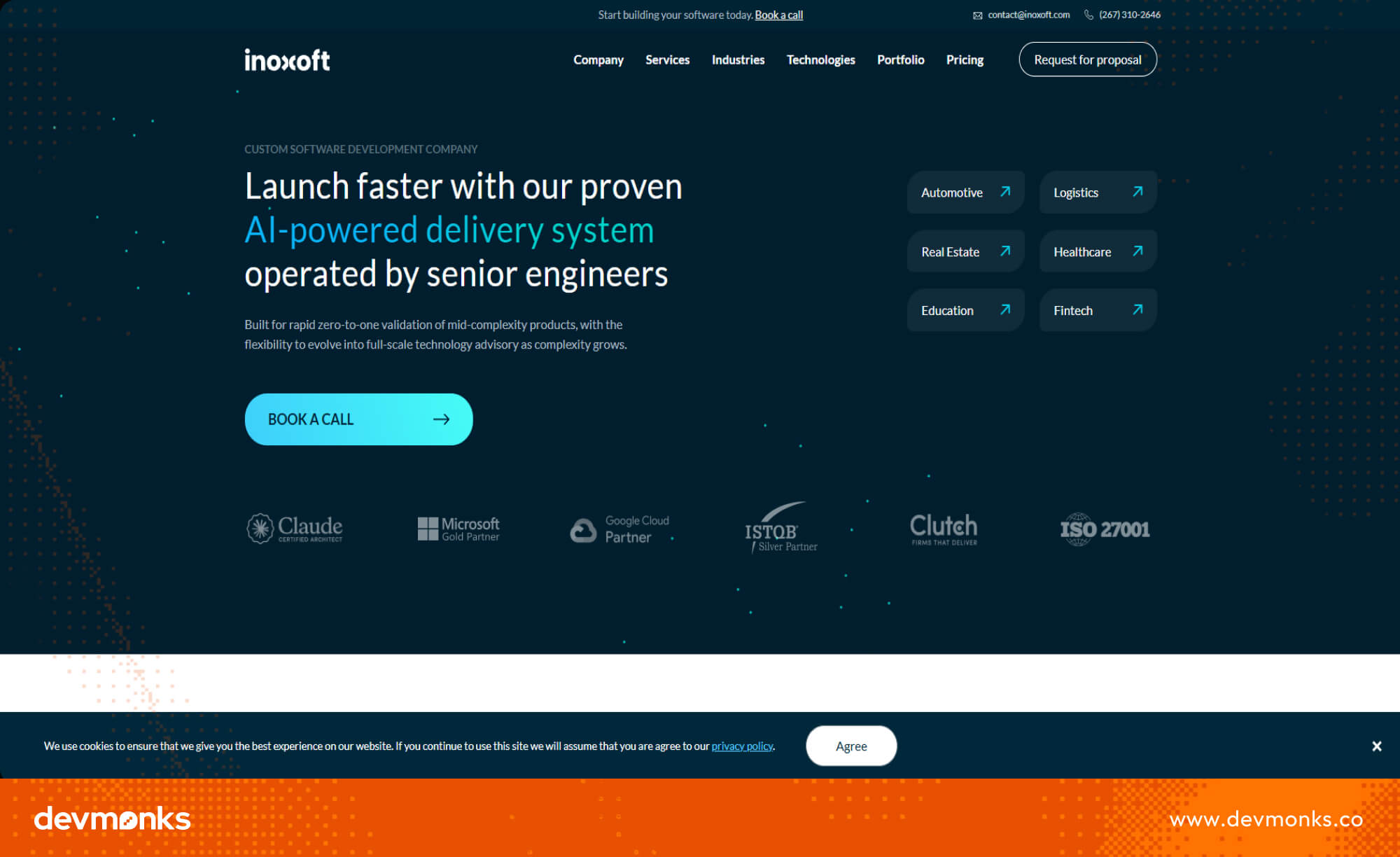
Website: InoXoft
Locations: Philadelphia, USA (with global delivery teams)
Price: Mid to premium (custom project-based pricing)
Clients: Startups, SMBs, enterprises, fintech companies
Ideal for: Secure fintech platforms, banking software, SaaS financial products, enterprise web systems

InoXoft is a custom software development company that builds secure and scalable digital solutions for modern financial businesses.
It is a strong choice for financial services web development because it focuses on reliability, data protection, and long-term system growth.
The agency develops fintech platforms, banking applications, and enterprise-grade financial systems that can handle complex operations.
It is especially useful for companies that need secure user management, fast transactions, and structured financial workflows.
InoXoft combines engineering expertise with a strong focus on business goals. This helps financial organizations improve efficiency while reducing manual processes through smart digital systems.
The team also works on UI/UX design, AI solutions, and data-driven platforms, which support better decision-making in financial services. With strong experience in building secure applications, the company ensures compliance-ready and stable systems.
Overall, InoXoft is best suited for businesses that need advanced, secure, and scalable financial web platforms designed for growth and long-term performance.
Financial web development covers many types of platforms. Each one serves a different purpose in the digital finance ecosystem. These platforms help users manage money, invest, trade, and run financial operations more efficiently.
These platforms support online banking services where users can manage accounts, transfer money, and access financial services digitally.
Traditional banks like JPMorgan Chase and Wells Fargo set the benchmark for secure online banking systems and digital account management features.
Fintech platforms focus on fast, easy, and secure financial transactions. Services like Stripe, Square, and Revolut support mobile banking apps, payment gateways, and digital wallets that make transactions simple and real-time.
These platforms help users invest and manage portfolios. Examples include Robinhood, E*TRADE, and Bloomberg Terminal. They provide stock trading dashboards and portfolio management tools for investors.
PFM platforms help users track spending, set budgets, and manage savings in a simple way. It also helps users build better financial habits by giving clear insights into daily expenses and long-term savings goals.
These systems support large organizations in handling accounting, payroll, and financial reporting with high accuracy and control.
These platforms manage digital currencies and blockchain-based financial services, which offer secure and decentralized financial transactions.
Financial services web applications are built using a layered and secure architecture. This structure helps systems stay fast, scalable, and safe while handling sensitive financial data like payments, transactions, and user records.
The frontend is the user-facing part of the application. It includes dashboards, banking interfaces, and trading screens. This layer focuses on speed, clarity, and a smooth user experience so users can easily manage their financial activities.
The backend handles business logic, data processing, and user requests. It powers features like account management, transaction handling, and financial calculations.
Many modern fintech systems use a microservices architecture to improve flexibility and performance.
APIs connect different systems together. They allow financial platforms to integrate with banks, payment gateways, and third-party services. This ensures smooth data flow between applications.
Cloud platforms like AWS and Google Cloud provide scalable and reliable hosting. These systems help fintech applications handle high traffic and large volumes of transactions without downtime.
Security is a core part of financial architecture. It includes encryption, authentication, and monitoring systems. These protections ensure that sensitive financial data stays safe from cyber threats.
Tools like Kubernetes help manage microservices efficiently. They allow financial platforms to scale automatically and maintain performance during peak usage.

Financial web development must follow strict rules to keep user data safe and ensure trust. These rules are known as compliance and regulatory requirements. They guide how financial platforms collect, store, and process sensitive information.
Standards like PCI DSS are used to protect card payment data. It ensures secure handling of credit and debit card transactions. Regulations such as GDPR focus on user privacy and control over personal data, especially in digital platforms.
The Sarbanes-Oxley Act helps ensure accurate financial reporting and prevents fraud in corporate systems.
These frameworks define financial regulatory compliance and data protection laws for digital platforms. Following them is essential for building secure and trustworthy banking and fintech applications.
Professional financial web development services help businesses build secure, fast, and reliable digital platforms.
Expert agencies understand the needs of banks, fintech companies, and investment platforms, which makes them better suited for complex financial systems.
Financial web development faces several technical and regulatory challenges that make building secure, scalable, and fully connected financial systems complex.
Financial web development uses a modern and reliable technology stack to build secure, fast, and scalable applications for banking, fintech, and investment platforms.
Financial web development is rapidly evolving with new technologies that are making financial systems smarter, more secure, and highly automated.
These trends show how AI in fintech, predictive financial analytics, blockchain financial applications, and fintech automation trends are shaping the future of digital finance into more intelligent, decentralized, and user-friendly systems.
Financial web development is shaping the future of digital banking and fintech. Businesses should focus on security, scalability, and user experience while adopting modern technologies like AI, blockchain, and cloud systems.
To stay competitive, invest in expert development teams and continuously upgrade your financial platforms to meet evolving user needs and industry standards.